
Affiliate marketing looks simple from the outside. An affiliate shares a link. A customer clicks it. A sale happens. The affiliate earns a commission.
But behind that simple process is something every WooCommerce store owner eventually runs into: tracking accuracy.
According to Adobe Analytics, affiliate marketers and influencers drove roughly 20% of Cyber Monday eCommerce revenue, highlighting how significant affiliate-driven sales have become for online businesses.
The challenge is that not all tracking methods perform equally well in today’s privacy-focused web. Browser restrictions, ad blockers, cross-device shopping behavior, and cookie limitations have changed how affiliate attribution works.
Let’s break down the affiliate tracking methods that actually work for WooCommerce stores and when you should use each one.
What Is Affiliate Tracking?

Affiliate tracking is the process of identifying which affiliate helped drive a conversion on your website. A conversion can be any action you want to reward, such as:
- Purchasing a product
- Signing up for a subscription
- Submitting a lead form
- Starting a free trial
- Registering for a membership
When a visitor clicks an affiliate link, the tracking system records information about that referral. If the visitor later completes the desired action, the system uses that information to credit the right affiliate.
This process is what makes affiliate marketing possible. Without reliable tracking, it would be difficult to know which affiliates contributed to sales, and commissions couldn’t be awarded accurately.
How Affiliate Links Track Customer Purchases
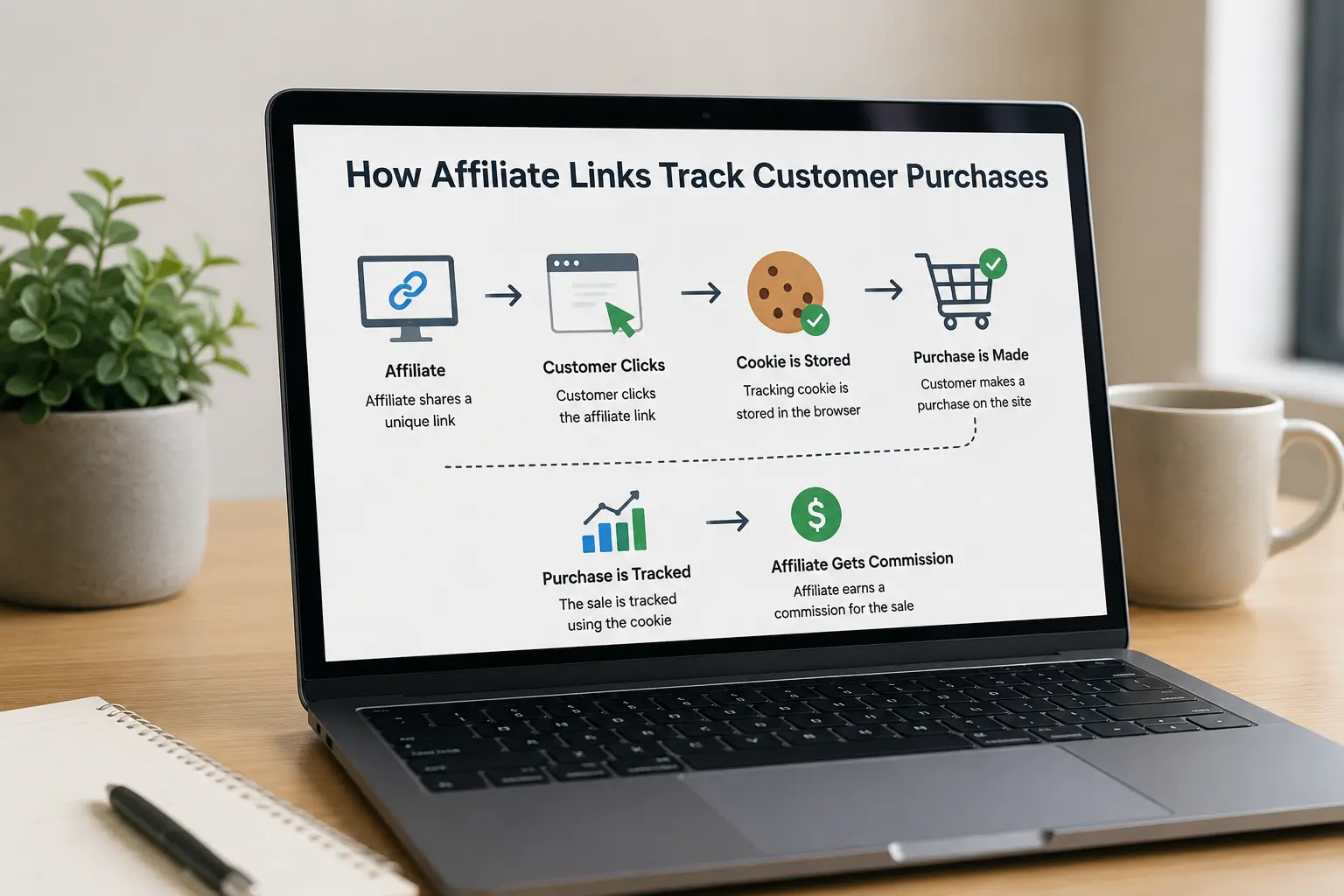
At first glance, affiliate tracking might seem complicated, but the process is actually straightforward. From the moment a visitor clicks an affiliate link to the final purchase, the tracking system works behind the scenes to ensure the right affiliate receives credit.
Here’s how it works.
Step 1: The Affiliate Shares Their Unique Referral Link
When someone joins your affiliate program, they receive a unique referral link that identifies them as the source of traffic.
For example:
https://yourstore.com/?ref=johnThis link contains a unique identifier that tells the tracking system which affiliate referred the visitor.
Step 2: A Visitor Clicks the Referral Link
As soon as a potential customer clicks the link, the affiliate software records important referral details, such as:
- Affiliate ID
- Date and time of the click
- Landing page visited
- Campaign or promotional source
- Device or browser information (depending on the tracking setup)
This information creates a record of the referral before the visitor takes any action.
Step 3: The Tracking System Stores the Referral Data
Next, the referral information is stored so it can be recognized later if the visitor converts.
Depending on the tracking method being used, the data may be stored through:
- Browser cookies
- User sessions
- Database records
- URL parameters
- Customer accounts
This stored data acts as a bridge between the original click and a future conversion.
Step 4: The Customer Returns and Continues Their Journey
Not every visitor purchases on their first visit.
Many customers take time to compare products, read reviews, or consider alternatives before making a decision. They might return:
- Later the same day
- A few days later
- Weeks after the initial click
As long as the tracking data remains valid, the affiliate can still receive credit for the referral.
Step 5: The Purchase Is Completed
When the customer finally completes the desired action-whether that’s making a purchase, starting a subscription, or signing up for a service-the affiliate tracking system checks the stored referral data.
If a valid referral is found, the conversion is automatically attributed to the correct affiliate, and the commission is calculated based on your program’s rules.
This entire process happens automatically, allowing store owners to track referrals accurately and reward affiliates fairly without any manual work.
5 WooCommerce Affiliate Tracking Methods Explained
Affiliate tracking isn’t a one-size-fits-all system. Different programs use different methods to attribute sales, and many successful affiliate programs combine multiple tracking methods to improve accuracy.
Here’s how the most common affiliate tracking methods work.
1. Cookie-Based Tracking
Cookie tracking is the most common affiliate tracking method. When someone clicks an affiliate link, a small file called a cookie is stored in their browser. This cookie contains information about the referring affiliate and helps the system remember who sent the visitor.
If the visitor purchases within the cookie’s lifespan, the affiliate receives credit for the sale.
How It Works
- An affiliate shares their unique referral link.
- A visitor clicks the link.
- The tracking system places a cookie in the visitor’s browser.
- The visitor browses your store and may leave without purchasing.
- The visitor returns later and completes a purchase.
- The system reads the cookie and attributes the sale to the affiliate.
Pros
- Simple and widely supported
- Works well for delayed purchases
- Easy to implement
- Supports most affiliate programs
Cons
- Cookies can be deleted
- Browser privacy updates may reduce accuracy
- Tracking can be lost when customers switch devices
- Ad blockers may interfere with attribution
2. Coupon Code Tracking
Coupon code tracking uses unique discount codes assigned to individual affiliates. Instead of relying entirely on clicks, sales are attributed when customers use the affiliate’s code during checkout.
This method is especially popular among influencers, YouTubers, and social media creators.
How It Works
- An affiliate receives a unique coupon code.
- The affiliate shares the code with their audience.
- A customer visits your store.
- The customer enters the coupon code during checkout.
- The system identifies the code owner.
- The sale is attributed to the affiliate automatically.
Pros
- Doesn’t rely on cookies
- Great for influencer marketing
- Easy for customers to remember
- Works across devices
Cons
- Coupon codes can be shared publicly
- Customers may forget to use the code
- Attribution can become messy when multiple affiliates promote similar offers
3. Referral Link (URL Parameter) Tracking
Referral link tracking uses unique URLs containing affiliate identifiers. Every affiliate receives a custom link that helps the tracking system recognize where visitors came from.
This is the foundation of most affiliate programs and is often combined with cookie tracking.
How It Works
- An affiliate receives a unique referral link.
- The affiliate shares the link through their website, blog, email, or social media.
- A visitor clicks the referral link.
- The system records the affiliate ID from the URL.
- The visitor browses your store.
- When a purchase occurs, the sale is linked to the affiliate.
Example:
yourstore.com/?ref=johnIn this example, “John” identifies the affiliate who referred the visitor.
Pros
- Easy to create and share
- Provides detailed click data
- Works with most marketing channels
- Simple for affiliates to understand
Cons
- Usually relies on cookies for long-term attribution
- URL parameters can sometimes be removed
4. Pixel Tracking
Pixel tracking uses a small piece of tracking code installed on your order confirmation or thank-you page. When a purchase is completed, the pixel fires, sending conversion information back to the affiliate tracking system.
Many affiliate networks and advertising platforms utilize pixel tracking to record conversions in real-time.
How It Works
- A visitor clicks an affiliate link.
- The tracking system records the referral.
- The visitor completes a purchase.
- The customer reaches the thank-you page.
- The tracking pixel loads automatically.
- The pixel sends conversion data to the affiliate platform.
- The affiliate receives credit for the sale.
Pros
- Tracks conversions automatically
- Provides real-time reporting
- Useful for campaign analysis
- Works alongside other tracking methods
Cons
- Ad blockers can block pixels
- Browser privacy features may limit tracking
- Requires technical implementation
5. Landing Page Tracking
Landing page tracking attributes referrals based on visitors arriving through a dedicated landing page designed for a specific affiliate or campaign.
Instead of sending traffic directly to a product page, affiliates send visitors to a customized page that introduces the offer, educates the audience, and captures referral data before the customer continues shopping.
This approach works particularly well for bloggers, influencers, email marketers, and affiliates who create content around your products.
How It Works
- An affiliate shares a dedicated landing page URL.
- A visitor clicks the link and arrives on the landing page.
- The tracking system records the affiliate identifier.
- The visitor reads the content and explores the offer.
- The visitor continues browsing your store.
- A purchase is completed.
- The system attributes the sale to the affiliate who drove the visitor to the landing page.
Pros
- Creates a personalized customer journey
- Often increases conversion rates
- Provides better campaign insights
- Ideal for content-driven affiliate promotions
- Can be combined with other tracking methods
Cons
- Requires creating and maintaining landing pages
- Poor landing page design can hurt conversions
- May still rely on cookies for attribution
- Managing multiple pages can become time-consuming
Why Accurate Affiliate Tracking Matters
Accurate affiliate tracking is the foundation of a successful affiliate program. It does much more than record clicks and sales-it ensures every referral is attributed correctly and every affiliate receives the commission they’ve earned.
When tracking errors occur, the impact goes beyond inaccurate reports. It can affect:
- Affiliate trust and satisfaction
- Commission accuracy
- Partner retention
- Program growth and scalability
- Revenue forecasting and performance analysis
Imagine an affiliate sends hundreds of qualified visitors to your store, but some conversions fail to track. Those missed sales mean lost commissions, frustrated partners, and reduced confidence in your program.
Over time, attribution issues can discourage top-performing affiliates from promoting your products, leading to lower engagement and missed revenue opportunities.
Reliable affiliate tracking helps build transparency between merchants and affiliates, strengthens long-term partnerships, and provides the accurate performance data needed to grow your affiliate program with confidence.
Related Reading: WooCommerce Affiliate Tracking: A Complete Guide
How to Track Affiliate Sales Using WC Affiliate
Understanding affiliate tracking methods is one thing. Setting them up correctly inside your WooCommerce store is another challenge entirely.
WC Affiliate offers three of the most secure and widely used affiliate tracking methods.
Before you start, install and activate WC Affiliate in your WooCommerce store. Make sure you have an activated license for the premium features.
Cookie-Based Tracking
Cookie tracking is enabled automatically when visitors click an affiliate’s referral link. Here’s how the process works:
Step 1: Open the Basic Settings Page
From your WordPress dashboard, navigate to: WC Affiliate → Settings → Basic Settings
This is where you can configure how affiliate referral cookies behave across your website.
Step 2: Set the Cookie Expiry Time
Next, define how long the referral cookie should remain active. For example:
30 Days. You can choose the expiration period that best matches your affiliate program.
This determines how long an affiliate remains eligible to receive credit after referring a visitor.
Step 3: Select the Cookie Expiry Unit
After entering the duration, select the time unit. For example:
- Days
- Weeks
- Months
WC Affiliate will use this value when storing referral information in the visitor’s browser.
Step 4: Enable Cross-Domain Cookie Sharing
If your store operates across multiple domains – for example, a marketing site on yourbrand.com and a checkout on store.yourbrand.com – you’ll need to enable cross-domain cookie sharing to ensure referral credit is preserved as visitors move between them.
To enable it, locate the Cross-Domain Cookie Sharing option under WC Affiliate –> Settings –> xDomain Cookie.
Once enabled, WC Affiliate will pass the referral information as a URL parameter whenever a visitor crosses to a secondary domain.
Coupon Code Tracking
Some customers never click affiliate links. Instead, they use discount codes shared by influencers, bloggers, or creators.
WC Affiliate supports coupon-based attribution to ensure those sales aren’t missed. Here’s how the process works:
Step 1: Create a Coupon in WooCommerce
First, create a WooCommerce coupon just as you normally would. For example: SUMMER20
Configure the discount amount, coupon type, usage restrictions, and expiration date based on your campaign goals.
Step 2: Assign the Coupon to an Affiliate
When the coupon creation is completed, select the affiliate who should receive credit for sales generated through that coupon.
Once assigned, the coupon becomes linked to that affiliate’s account.
Step 3: The Affiliate Promotes the Coupon
The affiliate can now share the coupon code with their audience. For example: Use code SUMMER20 and get 20% off your order.
This approach often works better than referral links because coupon codes are easier to remember and can be shared in places where clickable links aren’t practical.
Step 4: The Customer Uses the Coupon at Checkout
When a customer enters the coupon during checkout, WC Affiliate automatically recognizes the assigned affiliate.
Unlike traditional link tracking, the customer doesn’t need to click a referral URL for the sale to be attributed correctly. The coupon itself acts as the attribution method.
Step 5: Referral and Commission Are Created Automatically
As soon as the order is completed, WC Affiliate creates a referral record and calculates the commission according to your affiliate program settings.
The sale is linked to the affiliate who owns the coupon, ensuring they receive proper credit for the conversion.
This tracking method works particularly well for YouTube creators, Instagram influencers, and podcast hosts.
Referral Link (URL Parameter) Tracking
Referral link tracking is the most common affiliate tracking method used in WooCommerce affiliate programs.
It works by attaching a unique identifier to an affiliate’s URL. When a visitor clicks that link, WC Affiliate can identify the referring affiliate and track future purchases.
Here’s how the process works:
Step 1: Configure the Referral Variable
From your WordPress dashboard, navigate to: WC Affiliate → Settings → Advanced Settings
Here, you can define the referral variable used in affiliate URLs.
For example, if you set the referral variable to ref, affiliate links will look like this: https://yourstore.com/?ref
This variable is used to identify affiliates when visitors arrive on your website. If you prefer cleaner and shorter affiliate URLs, WC Affiliate includes a built-in Shortlinks feature.
Here’s how to enable shortlinks:
From your WordPress dashboard, navigate to: WC Affiliate → Settings → Shortlinks
Once configured, WC Affiliate can generate cleaner affiliate URLs automatically.
For example:
Default Referral Link: http://yoursite.com/product/ref?=3
Shortlink Version: http://yoursite.com/go/John
These shorter URLs are easier to share on social media, emails, blogs, and marketing campaigns while maintaining accurate affiliate tracking.
Step 2: Affiliate Receives a Unique Referral Link
Once an affiliate joins your program, WC Affiliate automatically generates a referral URL.
For example: http://yoursite.com/product/?ref=3Step 3: The Affiliate Shares the Link
The affiliate promotes their referral URL through various marketing channels, such as:
- Blog posts
- Social media content
- YouTube descriptions
- Email newsletters
- Online communities
Anyone who clicks the link is recognized as a referral from that affiliate.
Step 4: Referral and Commission Are Generated Automatically
After the order is completed, WC Affiliate automatically creates a referral record and calculates the commission based on your affiliate program settings.
The affiliate receives credit for the sale, and the referral appears in both the affiliate dashboard and the admin reporting area.
Store owners can also view referral activity directly from the reporting dashboard.
Landing Page Tracking
While referral links are the most common way to track affiliates, some affiliates prefer sharing clean URLs without visible tracking parameters.
That’s where Landing Page Tracking comes in. Instead of sending visitors to a URL containing a referral parameter, affiliates can promote a dedicated landing page that is assigned to their account.
Here’s how the process works:
Step 1: Create a Landing Page
First, create a page on your WooCommerce store that affiliates can promote.
For example: https://yourstore.com/summer-sale/This page will act as the affiliate’s promotional landing page.
Step 2: Notify Affiliates About the Landing Page
Once the landing page is ready, you can share it with your affiliates via email.
For example: Promote our Summer Sale using this landing page:
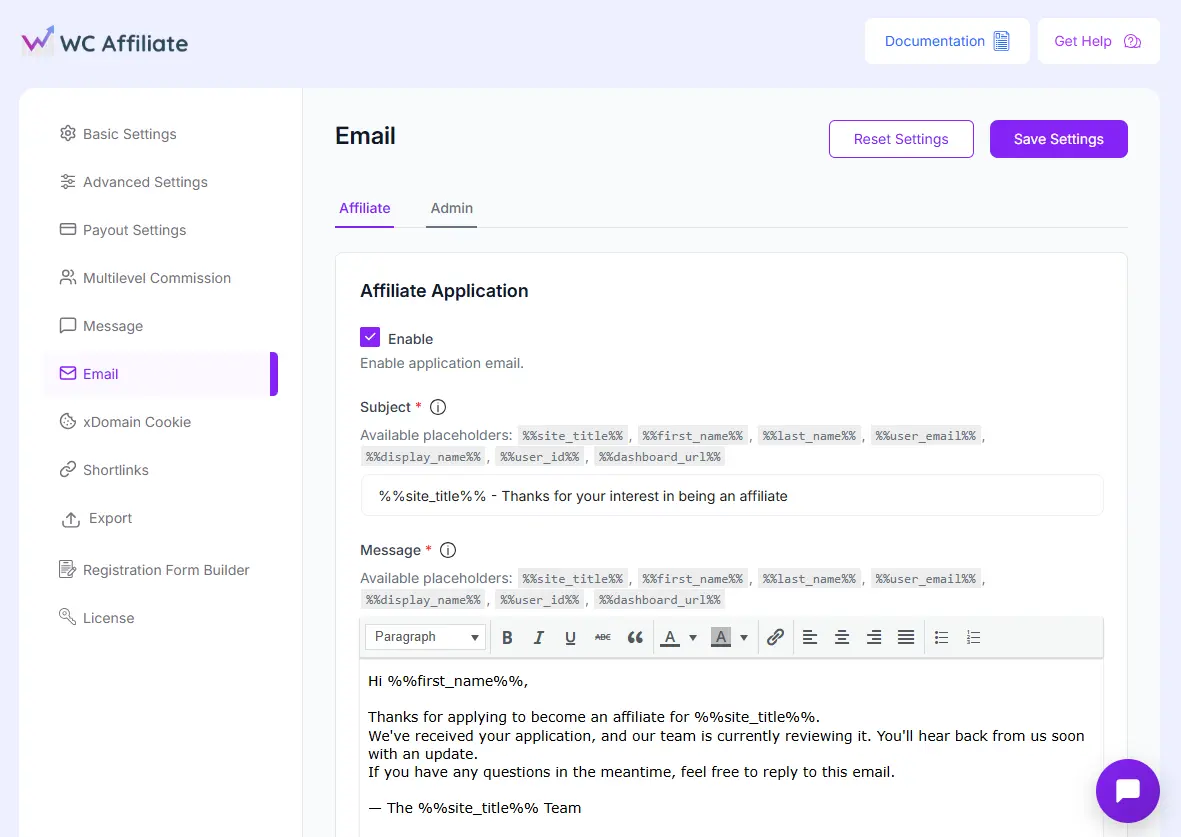
https://yourstore.com/summer-saleAffiliates can then use the landing page in their marketing campaigns instead of generating custom referral URLs. You can also set an email sequence for affiliates easily from the WC Affiliates.
Which Affiliate Tracking Method Works Best for WooCommerce?
There isn’t a single tracking method that works perfectly in every situation. Modern browsers, privacy restrictions, and multi-device shopping journeys make affiliate attribution more challenging than ever.
For most WooCommerce stores, the most reliable approach is to combine multiple tracking methods rather than relying on a single attribution source.
A strong affiliate tracking setup typically includes:
- First-party cookie tracking for standard referral attribution
- Coupon code tracking to capture conversions when cookies fail
- Server-side tracking for improved accuracy and privacy compliance
- Referral link tracking for click and conversion reporting
By using a hybrid tracking model, store owners can reduce attribution gaps, recover otherwise lost commissions, and ensure affiliates receive proper credit for the sales they generate.
If you’re running a WooCommerce affiliate program, a dedicated affiliate management plugin can centralize referral tracking, commission calculations, affiliate payouts, and performance reporting in one place. This not only improves tracking accuracy but also saves significant administrative time as your program grows.
Affiliate Tracking Best Practices
Even the best tracking system requires ongoing maintenance. Follow these practices to keep your affiliate data accurate and trustworthy:
Use First-Party Cookies Whenever Possible: First-party cookies are generally more reliable than third-party cookies and are less likely to be blocked by modern browsers.
Enable Coupon-Based Attribution: Many customers return later and purchase using a discount code instead of the original referral link. Coupon tracking helps ensure affiliates still receive credit.
Test Your Tracking Regularly: Run test purchases through affiliate links to verify that referrals, conversions, and commissions are being recorded correctly.
Monitor Attribution Gaps: Look for unusual differences between affiliate clicks, conversions, and store sales. These discrepancies can reveal tracking issues before they affect affiliate relationships.
Audit Affiliate Data Monthly: Review conversion reports, commission records, and attribution settings on a regular basis to catch errors early.
Implement Server-Side Tracking for High-Value Campaigns: Server-side tracking reduces dependence on browser-based cookies and can improve attribution accuracy in privacy-focused environments.
Clearly Define Attribution Rules: Whether you use first-click, last-click, coupon attribution, or a custom model, make your commission rules transparent so affiliates understand exactly how referrals are credited.
Final Thoughts
Affiliate tracking is what makes affiliate marketing work. Without it, there’s no reliable way to know which affiliates are driving sales, how commissions should be calculated, or which partnerships are generating the most revenue.
As customer journeys become more complex, relying on a single tracking method is often not enough. A shopper might click an affiliate link today, return from another device next week, and complete the purchase using a coupon code. If your tracking setup can’t connect those touchpoints, valuable referrals may go uncredited.
That’s why successful WooCommerce affiliate programs often combine multiple tracking methods, including referral links, cookies, coupon attribution, and landing page tracking. Together, these methods create a more complete picture of the customer journey and help reduce missed commissions.
Grow Your Affiliate Business with WC Affiliate
Get practical tips, useful guides, product updates.
Frequently Asked Questions
Server-to-server tracking is generally considered the most accurate because it does not rely on browser cookies.
Yes. However, first-party cookies are significantly more reliable than third-party cookies due to browser privacy restrictions.
Coupon tracking attributes conversions to affiliates based on unique discount codes rather than referral links.
Yes. Combining first-party cookies, coupon attribution, and server-side tracking helps improve attribution accuracy and reduce lost commissions.