
Most affiliate programs that stall do so quietly. Affiliates stop promoting not because commissions are low, but because they cannot see what is happening. No visibility into whether their links are working. No clear sense of when they will get paid. Nothing to react to.
The affiliate dashboard is the part of your program that fixes this. It is how your affiliate program communicates: with affiliates about their own performance, and with you about the health of everything. Get it right, and your program runs with significantly less friction. Get it wrong, and even a generous commission structure will not save you.
This post covers what an affiliate dashboard is, what both sides should be able to see inside it, and how WooCommerce store owners can set one up that actually does the job.
What Is an Affiliate Dashboard?

An affiliate dashboard is a centralized interface where affiliates monitor their own performance and store owners manage the entire program. Not one screen serves everyone the same data. Two separate views, built into the same system, each showing what that user actually needs.
The affiliate logs in and sees their own numbers:
- clicks,
- referrals,
- commissions, and
- the unpaid balance.
The store owner logs in and sees the full picture: every affiliate, every referral, total commissions, payout queue. Same program, different levels of access.
Affiliate Dashboard vs. Admin Dashboard: What’s the Difference?
Although both are called “dashboards,” they serve different users. The affiliate dashboard helps affiliates track and manage their performance, while the admin dashboard gives store owners complete control over the affiliate program.
| Feature | Affiliate Dashboard | Admin Dashboard |
| Primary user | Affiliates | Store owners/admins |
| Purpose | Track earnings and manage affiliate activity | Manage and monitor the entire affiliate program |
| Displays | Referrals, commissions, payouts, affiliate links | All affiliates, referrals, commissions, conversions, and payouts |
| Key actions | View performance, copy referral links, request payouts | Approve referrals, manage affiliates, process payouts, generate reports |
| Access | Own data only | Program-wide data |
| Goal | Help affiliates earn more | Help admins grow and optimize the affiliate program |
Additional read: Want to know about Affiliate Portal? Read another blog –> Learn more
How an Affiliate Dashboard Differs From an Affiliate Portal
These terms often get used as synonyms, and they are not quite the same. The dashboard is the data and reporting layer: the part that shows performance metrics, commission history, and payout status. The affiliate portal is the broader self-service environment that includes the dashboard, plus link management tools, promotional materials, account settings, and program information.
The dashboard tells affiliates how they are doing. The portal is the full environment where they go to do it. Understanding the distinction helps store owners set the right expectations when building their program.
Why the Affiliate Dashboard Is the Foundation of Your Program
1. Affiliates Act on What They Can See
Affiliate marketing is one of the top three customer acquisition channels for 54% of marketers, according to Forrester Research. That kind of performance does not come from affiliates who are guessing. It comes from partners who can see their results in real time and adjust.
An affiliate who launches a new piece of content, shares their referral link, and then has to wait days to see whether anything converted is flying blind. They stop optimizing. They reduce effort. They eventually put their energy into a program that gives them better feedback. Real-time dashboard data keeps that from happening.
2. Admin Visibility Drives Better Program Decisions
Store owners who cannot see what is happening inside their affiliate program cannot improve it. Which affiliates are bringing consistent conversions? Which referrals have been pending too long? What is the total payout exposure for this month?
Without a clear admin dashboard, these questions require manual digging through orders, payment records, and spreadsheets. With one, the answers are visible on a single screen. That shifts time from administration to actual program growth.
3. Transparency Builds the Trust That Keeps Affiliates Promoting
A study found that 52% of marketers say affiliate programs improve performance transparency. The dashboard is where that transparency is delivered.
Affiliates who trust that tracking is accurate and commissions are being logged correctly commit more consistently to promoting. Affiliates who question the numbers become a support burden, and then quietly leave.
What the Affiliate-Facing Dashboard Should Show?
An affiliate-facing dashboard should do much more than display earned commissions.
1. A Real-Time Performance Overview
The opening screen of an affiliate’s dashboard should give them the essentials at a glance: total visits, referrals, conversions, commission earned, and current unpaid balance. All of it is current, not delayed.
Each metric tells a slightly different story. Visits show reach: how many people are landing on the store through the affiliate’s links. Referrals show attribution: how many of those visits are being tracked and credited. Conversions show campaign quality: how many attributed visits resulted in a purchase. An affiliate who can read these three numbers together understands their performance without needing to contact anyone.
2. Referral Link Access and Shortlink Management
Affiliates should be able to find their referral links, create new ones for specific campaigns, and track performance per link without leaving the dashboard or reaching out to the store owner.
Shortlinks matter more than they might seem.
Long tracking URLs look suspicious to readers and often get stripped by social platforms. Branded, readable shortlinks perform better across every channel. An affiliate promoting five different campaigns should have five separate links they can monitor independently, with click counts updated in real time.
3. Commission Breakdown by Status
A single “total earnings” figure is not enough. Affiliates need to see their commissions broken into three clear categories: pending (logged but not yet approved), approved (confirmed and ready for payout), and paid (already processed).
A pending commission and a paid commission feel very different to an affiliate. Mixing them into one number creates confusion and unnecessary support requests. Separating them clearly, with timestamps on each status, answers the “where is my money?” question before it gets asked.
4. Payout History and Request Tools
Every payout should be documented: the date, the amount, the payment method, and the status. Affiliates who manage their own income tracking rely on this history for their own records.
Equally important is the ability to request a payout directly from the dashboard with one click. No email. No waiting for the store owner to notice. A payout request tool that works this cleanly removes one of the most common friction points in affiliate program management.
What the Admin Dashboard Should Show?
This is where store owners manage the affiliate program and monitor overall performance. It typically includes:
1. A Program-Wide Performance Snapshot
The admin dashboard should open to a summary: active affiliates, total visits, total referrals, total commissions, and recent payout activity. Clean KPI cards on one screen, updated without requiring a report to be run first.
Store owners are also managing a WooCommerce store. Time spent digging through affiliate data is time away from orders, inventory, and customers. The admin dashboard should answer the “how is my affiliate program doing?” question in under ten seconds.
2. Individual Affiliate Data and Management Controls
The program-level overview is useful. The affiliate-level detail is where decisions actually get made. A full affiliates table should show each partner’s status, total visits, referrals, commissions earned, and payout history, with the ability to click into any individual profile for more detail.
Commission overrides matter here, too. Adjusting commission rates per affiliate, rewarding top performers without changing the program-wide default, is the kind of control that makes a program manageable as it scales.
3. Payout Queue and Commission Approvals
Pending payouts should be organized by affiliate, amount, and preferred payment method, visible in a single table that the store owner can work through. Not scattered across emails and manual records.
The ability to approve or reject individual referrals is equally important. Returns, disputes, and order cancellations affect commission eligibility. An admin dashboard that surfaces these clearly, rather than hiding them in logs, keeps payout accuracy intact without manual reconciliation.
4. Referral and Visit Logs for Verification
Every visit and referral should be logged with a timestamp, IP address, and source. This is not just for fraud prevention, though that matters. It is also for attribution clarity. When an affiliate asks why a referral was not counted, the visit log is how the store owner gives a real answer instead of a guess.
How WC Affiliate Delivers Both Dashboards for WooCommerce
WC Affiliate is built exclusively for WooCommerce, not a plugin adapted from a generic WordPress affiliate tool. Instead, it’s designed from the ground up around how WooCommerce stores, orders, and affiliate programs actually work.
1. Affiliate-Facing Dashboard
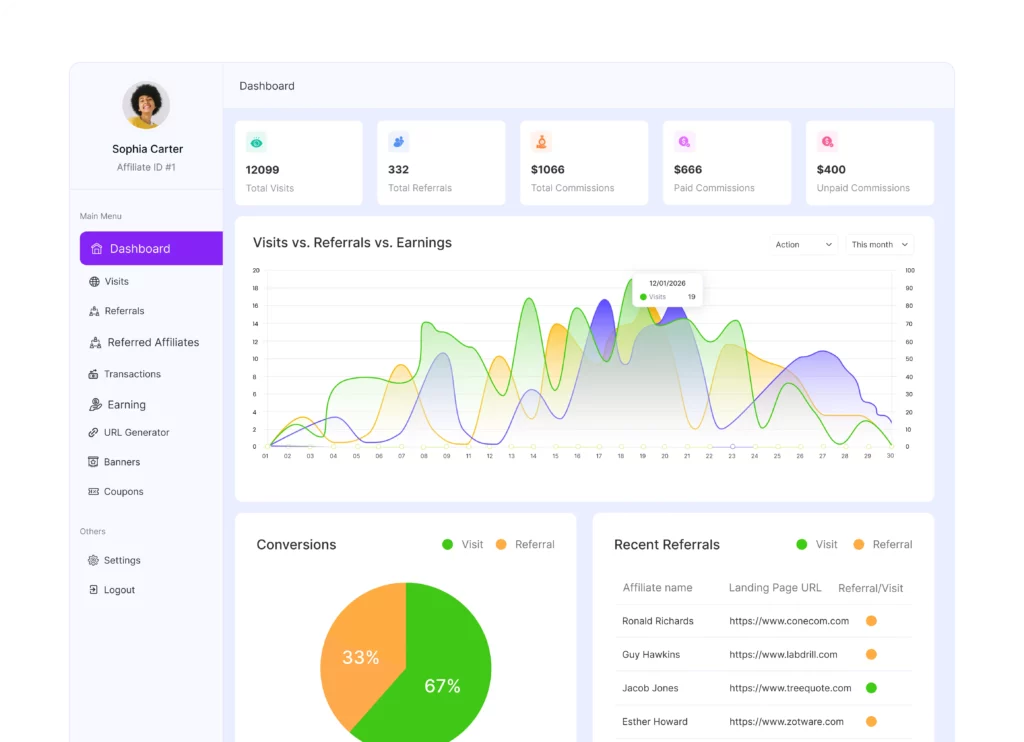
Approved affiliates land immediately on their performance overview: total visits, referrals, commissions earned, paid commissions, and unpaid balance displayed in clean summary cards with quick charts. The full referral history, transaction log, and payout request tool are all accessible from the same screen.
The shortlink generator is built directly into the affiliate dashboard. Affiliates can create branded, readable links for different campaigns, view click statistics for each link, and manage multiple links without admin involvement.
Coupon-based tracking is also available for affiliates who promote through channels where a click-through link isn’t practical. Explore the full affiliate dashboard features on the WC Affiliate site.
2. Affiliate Management Dashboard
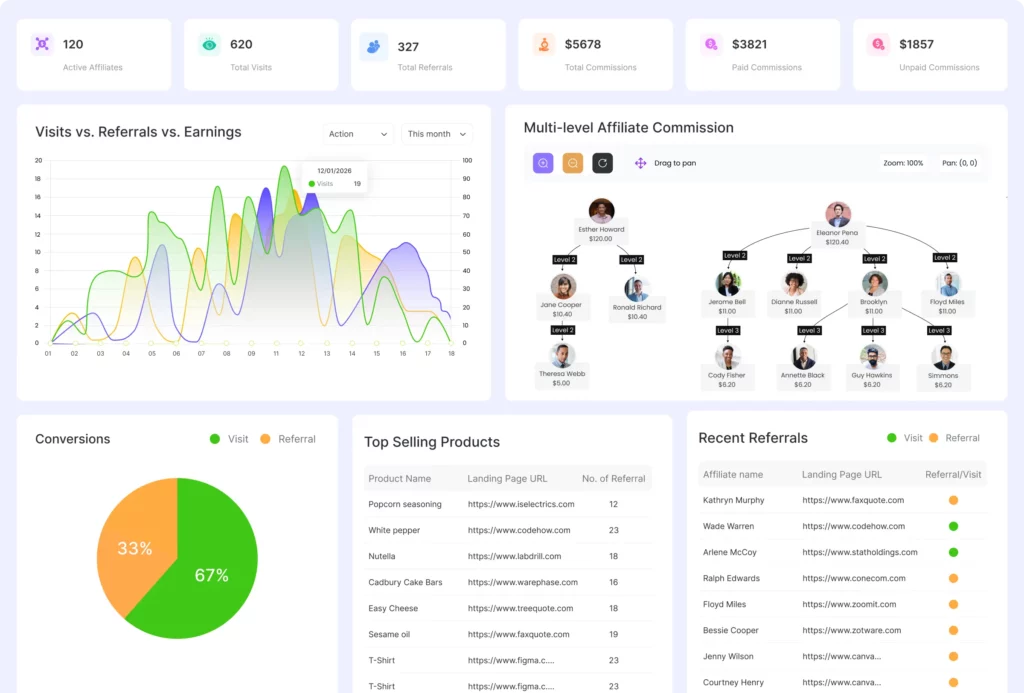
The admin side opens to a summary page with KPI cards covering active affiliates, total visits, referrals, and earnings over time. From there, separate tables handle affiliates, visits, referrals, and payables, all without switching between tools or running manual exports.
Commission approval, referral status management, and payout processing all happen from the same panel. The payables table shows pending commissions per affiliate, organized by amount and payment method, so payouts can be processed in a single session.
For stores that want to reward affiliate recruitment, multi-level commissions let you create tiered commission structures where parent affiliates earn a commission from the sales generated by the affiliates they refer. This makes it easy to grow and incentivize your affiliate network without adding extra administrative work.
See the full admin dashboard overview for the complete breakdown.
3. Why WooCommerce-Native Integration Matters for Dashboard Accuracy
Generic affiliate plugins that integrate with WooCommerce as an afterthought often carry attribution gaps. Commission calculations may not account for order status changes, refunds, or WooCommerce-specific coupon handling.
WC Affiliate pulls data directly from WooCommerce orders, so what the dashboard shows reflects what actually happened in the store, not an approximation.
For stores operating across multiple domains or subdomains, cross-domain cookie sharing helps preserve referral attribution as customers move between connected websites before completing a purchase.
This reduces lost referrals and ensures affiliates receive credit for the sales they influence, even when the customer journey spans more than one domain.
How to Get More Value from Your Affiliate Dashboard
Your affiliate dashboard isn’t just for checking numbers. The data it provides can help you identify growth opportunities, spot problems early, and make better decisions for your affiliate program. Here are four metrics and reports worth reviewing regularly.
1. Focus on Active Affiliates, Not Total Signups

A large affiliate list looks impressive, but it doesn’t necessarily mean your program is successful. A more meaningful metric is your active affiliate rate, the percentage of registered affiliates who generated at least one referral within the last 30 days.
Some affiliate managers informally cite a 20–30% active rate as a reasonable target, but there is no widely accepted industry benchmark or published research supporting that range. Instead of comparing your program to a fixed percentage, monitor your own activation rate over time and look for ways to help inactive affiliates become active.
2. Review Referral-to-Conversion Rates by Affiliate
Traffic alone doesn’t generate revenue-conversions do. If an affiliate is sending plenty of referral visits but very few sales, it usually indicates an audience mismatch, weak promotional content, or a landing page that isn’t converting well.
Comparing referral traffic with conversion rates for each affiliate helps you identify high-performing partners, provide targeted optimization advice, and improve your overall return from the program.
3. Keep Commission Status Updated
Affiliates expect timely updates on the commissions they’ve earned. If approved sales remain marked as “Pending” for too long, affiliates may question whether referrals were tracked correctly or whether they’ll receive their payouts.
Review commissions regularly, approve eligible referrals promptly, and keep statuses up to date. Clear and consistent communication builds trust and encourages affiliates to continue promoting your products.
4. Use Transaction History as Your Financial Record
Your transaction log is more than a payment history; it’s an audit trail for your affiliate program. Affiliates can verify their earnings and payout history, while store owners can reconcile commission expenses, investigate payment issues, and prepare financial reports.
Keeping a complete, timestamped record of every commission and payout makes monthly bookkeeping, reporting, and dispute resolution much easier.
Conclusion
The affiliate dashboard is how your program keeps everyone informed, and informed partners are active ones. Affiliates who can see their results, track their commissions, and request payouts without asking for help tend to promote consistently. Store owners who can see the full program picture tend to make better decisions about who to reward, what to adjust, and when to act.
WC Affiliate gives WooCommerce store owners both sides of this: an affiliate-facing dashboard built for self-service and an admin dashboard built for real oversight, all running natively inside WordPress. Free to start, and designed to scale without adding complexity.
Grow Your Affiliate Business with WC Affiliate
Get practical tips, useful guides, product updates.
Frequently Asked Questions
An affiliate dashboard shows performance data like referrals, commissions, payouts, and earnings. An affiliate portal includes the dashboard plus affiliate links, marketing assets, account settings, and other self-service tools.
Start with these three metrics:
- Active affiliate rate
- Referral-to-conversion rate
- Pending payouts
Together, they provide a quick overview of your affiliate program's health.
No. Affiliates can only access their own referrals, commissions, payouts, and performance data. Only admins can view program-wide reports.
Yes. The free version includes both the affiliate dashboard and the admin dashboard. Features like short links, coupon tracking, automatic PayPal and Stripe payouts, and the banner builder are available in Pro.