

Black Friday can bring a rush of orders to your WooCommerce store. But when you’re running an affiliate program, more sales don’t always mean more profit.
You’re already offering discounts to customers. Add affiliate commissions, coupon stacking, payment fees, and possible returns, and a successful-looking campaign can leave you with very little margin.
That doesn’t mean you should cut back on affiliate promotions. You just need to plan the numbers and rules before your partners start sharing your deals.
According to Adobe’s 2025 Cyber Monday report, affiliates and partners, including social media influencers, accounted for 21.8% of US online revenue that day. It’s a meaningful sales channel, particularly when shoppers are actively looking for recommendations and discounts.
For 2026, Black Friday falls on November 27, followed by Cyber Monday on November 30.
This Black Friday affiliate playbook covers how to prepare your WooCommerce program, set commissions, manage coupon attribution, test tracking, and handle payouts once the sale is over.
Black Friday affiliate marketing timeline for 2026
If you already have an affiliate program, there’s still time to prepare it for Black Friday. The important thing is to finish the work that affects commissions and tracking before affiliates begin promoting your offers.
Here’s a practical schedule for the weeks ahead.
| Date | What to prepare |
| By November 9 | Review product margins, finalize commission rates, and set coupon rules |
| By November 16 | Send affiliates their offers, links, coupon codes, and promotional materials |
| By November 25 | Complete tracking tests and finalize affiliate onboarding |
| November 26–30 | Monitor referrals, handle coupon issues, and communicate deal changes |
| December onward | Review sales, process returns, and approve eligible payouts |
These dates are planning targets, not fixed requirements. If you’re starting later, prioritize the margin calculations, coupon settings, and tracking tests.
What if you don’t have an affiliate program yet?
Rather than recruiting dozens of unfamiliar affiliates immediately before the sale, start with a few existing customers, creators, or business partners who already know your products.
A small group is easier to brief and support. It also gives you a chance to test the program before expanding it.
1. Calculate your margins before changing commissions
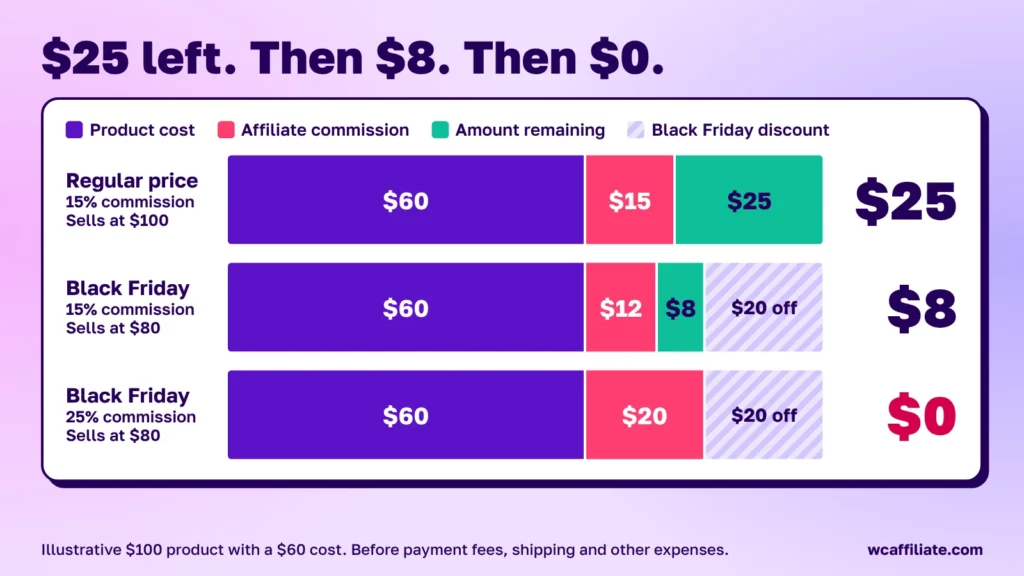
Increasing affiliate commissions might encourage more promotions during Black Friday. But a higher commission doesn’t necessarily make sense when your products are already discounted.
The discount reduces what the customer pays, while the affiliate commission takes another percentage from the sale.
Consider a WooCommerce product that normally sells for $100 and has a $60 product cost. You offer a 20% Black Friday discount, bringing the selling price down to $80.
Here’s how different commission rates affect the amount left from each order.
| Per order | Regular price, 15% | Black Friday, 15% | Black Friday, 25% |
| Selling price | $100 | $80 | $80 |
| Product cost | $60 | $60 | $60 |
| Affiliate commission | $15 | $12 | $20 |
| Amount remaining | $25 | $8 | $0 |
At a 15% commission, the discounted order leaves just $8 before other expenses. Increase the commission to 25%, and that amount falls to zero.
The store may still record an affiliate sale, but the order contributes nothing toward the expenses that haven’t been included.
That’s why commission planning should begin with the amount you can afford to pay, rather than the percentage you think affiliates would prefer.
Choose higher-margin products for additional commissions
Not every product needs the same Black Friday commission rate.
If you sell physical products, start by checking the products with higher contribution margins. Include packaging, shipping subsidies, and other variable costs in your calculations.
Digital products may offer more flexibility because there’s no physical inventory or per-order delivery cost. However, payment processing, support, licensing, and other costs still matter.
You could offer a higher commission on selected products while keeping your standard rate on low-margin items.
WooCommerce affiliate plugins with product-level or category-level commission rules can help manage these differences without changing the rate across your entire store.
Consider a sales bonus instead of increasing every commission
Another option is to reward affiliates after they reach a specific sales target.
For example, you might offer an additional $100 when an affiliate generates 20 eligible sales during the campaign.
The bonus becomes payable only when the agreed conditions are met. You should still include the possible bonus in your campaign budget.
This approach gives affiliates a reason to promote your store without permanently increasing the commission percentage on every order.
Before announcing the reward, define whether refunded orders count toward the target.
2. Select the right products for affiliates to promote
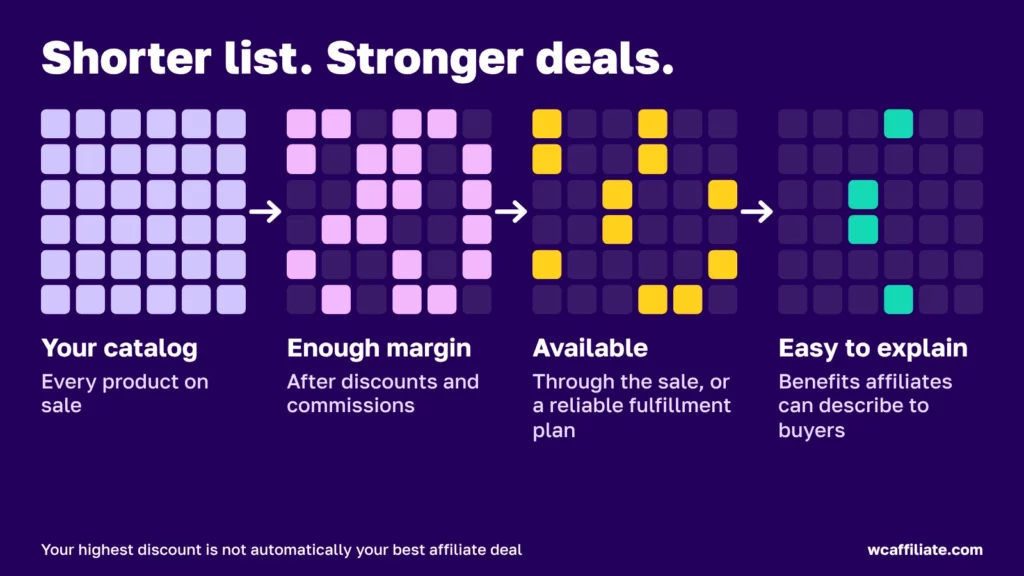
Once your commission budget is clear, decide which products affiliates should feature.
Your highest-discounted product isn’t automatically the best choice. It might have a low margin, limited inventory, or a high return rate.
Instead, choose products that meet three conditions:
- They leave enough margin after discounts and commissions.
- They’re available throughout the promotion, or have a reliable fulfillment plan.
- Their benefits are easy for affiliates to explain to potential buyers.
For physical products, check inventory and fulfillment capacity before adding an item to the affiliate deal sheet.
For digital products, make sure the purchase, license activation, and delivery process works properly under increased order volume.
A short product list is usually easier for affiliates to work with than a catalog of dozens of offers.
It also helps you focus your campaign on products where additional affiliate sales make commercial sense.
3. Set WooCommerce coupon rules before sharing deals
Coupon problems become much harder to fix once affiliates start promoting their offers.
A code that works during a quick test might fail when a customer adds a sale item, combines two coupons, or reaches a usage limit.
Before generating affiliate codes, open Marketing > Coupons in your WooCommerce dashboard and review the restrictions for each promotion.
According to the official WooCommerce coupon documentation, the following settings can affect how discounts are applied:
| Setting | What it means for your sale |
| Individual use only | Prevents the coupon from combining with other coupon codes |
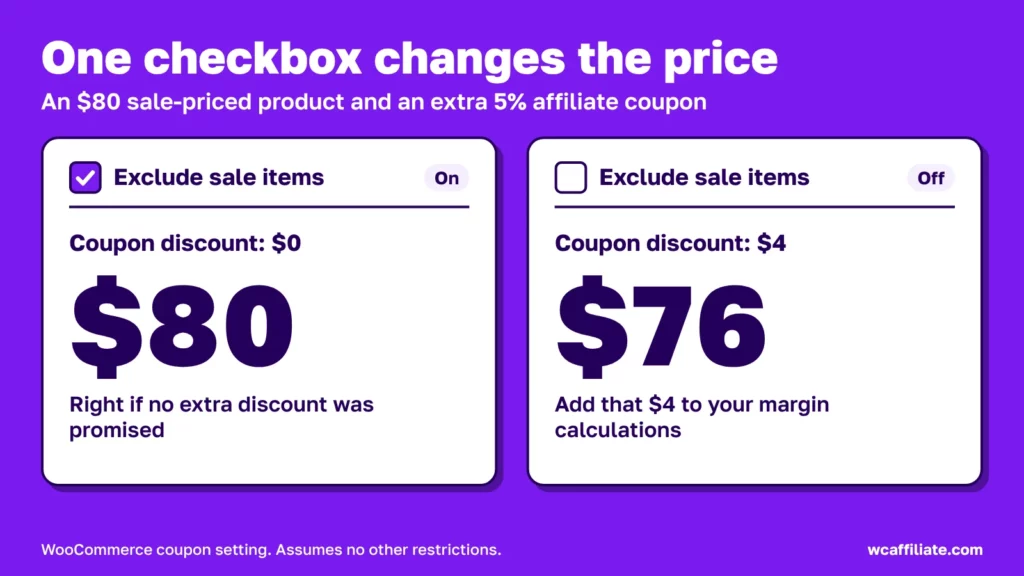
| Exclude sale items | Excludes sale-priced products from the coupon discount |
| Usage limit per coupon | Limits the total number of times the code can be used |
| Usage limit per user | Limits how often an individual customer can redeem the code |
| Coupon expiry date | Stops the code being used on its expiry date |
You should also check whether the coupon applies to the intended products or categories.
For example, suppose you’re running a 20% discount by setting products to sale prices. If the affiliate coupon has Exclude sale items enabled, the extra coupon discount won’t apply to those sale-priced products.
That may be what you intended. But if your campaign promises an additional affiliate discount, the configuration would contradict the offer.
Keep affiliate coupons separate from public promotions
Let’s say you’re advertising a public Black Friday coupon across your website and email campaigns.
An affiliate sends a customer to your store, but the customer uses the public coupon instead of the affiliate’s personal code.
Whether that affiliate receives commission depends on how your tracking system handles referral links, coupons, and attribution priority.
Some programs attribute orders through referral links even when a different coupon is used. Others can assign credit through an affiliate-specific code without requiring a tracked click.
To avoid confusion, give participating affiliates individual coupon codes, such as SARA20, and configure their attribution rules before the promotion.
If your WooCommerce affiliate plugin supports coupon-based tracking, make sure each code is connected to the correct affiliate.
Then test what happens when customers use:
- An affiliate link with no coupon
- An affiliate’s code without clicking a referral link
- An affiliate link followed by a public coupon
- One affiliate’s link combined with another affiliate’s code
These situations help you identify attribution conflicts before real orders are involved.
Decide whether affiliate coupons can stack with Black Friday discounts
An extra discount may help affiliates convert more visitors, but every additional percentage point reduces the revenue left on the order.
For instance, an extra 5% coupon applied to an $80 sale-priced product would reduce the price to $76, assuming no other restrictions.
You should include that additional $4 reduction in the same margin calculations used to set commissions.
Alternatively, you could provide a gift or free shipping on eligible orders. Those options also have costs, so compare them rather than assuming they’re cheaper.
Prepare for leaked or expired coupon codes
Even if you distribute codes privately, they may appear on coupon-sharing websites.
Set sensible expiration dates and usage limits, then explain whether affiliates are permitted to submit their codes to coupon directories.
You should also decide who can replace or disable a code during the campaign.
Without a clear process, a leaked coupon can create unnecessary discount costs or disputes over affiliate commissions.
4. Give affiliates their promotional materials early
Your affiliate partners need enough time to prepare their articles, emails, videos, and social posts.
If they receive the final offer the day before Black Friday, they may not be able to include your products in their planned promotions.
Once your products, discounts, and coupon rules are confirmed, send a single deal sheet with everything they need.
Include:
- The sale start and end dates, including time zone
- Discount details and excluded products
- Individual referral links and coupon codes
- Product images, banners, and landing-page URLs
- Commission rates and payment conditions
- Approved product claims and affiliate disclosure guidance
- A contact person for urgent questions
Keep the offer details consistent across your website, emails, and affiliate materials.
If an affiliate advertises a 30% discount while your checkout offers only 20%, shoppers are likely to lose confidence in the promotion.
Brief your most active affiliates first
Affiliates who regularly generate sales may need additional time to prepare detailed content.
Consider sending them the confirmed offer a few days before the wider announcement, especially if they’re publishing long-form reviews, newsletters, or videos.
You can also ask them to check the landing pages and discount information before publishing.
This gives you another opportunity to catch broken links, confusing offers, or outdated product details.
If the discount must remain confidential until launch, provide the promotional terms under an agreed embargo and make the publication date clear.
5. Test affiliate tracking on your live WooCommerce store
A referral link that appears to work doesn’t always record a commission correctly.
Tracking can be affected by cookie consent, redirects, caching, checkout changes, and attribution settings. Problems may also appear on mobile devices even when everything works on a desktop.
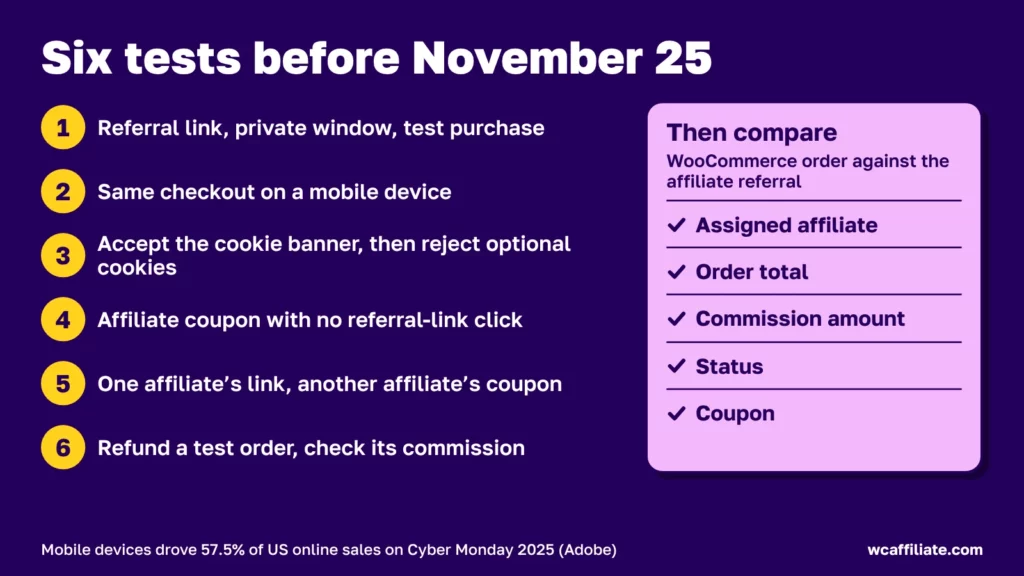
Adobe reported that mobile devices accounted for 57.5% of US online sales on Cyber Monday 2025.
That makes mobile checkout and affiliate tracking especially important to test before Black Friday.
Run these tracking tests before November 25
Use a controlled test order on your live setup, with your usual caching, CDN, consent banner, and payment configuration enabled.
- Open an affiliate referral link in a private browser window and complete a test purchase.
- Repeat the checkout on a mobile device.
- Test tracking after accepting the cookie banner, then after rejecting optional cookies.
- Purchase with an affiliate-specific coupon but no referral-link click.
- Follow one affiliate’s link and apply another affiliate’s coupon.
- Refund a test order and verify how its commission is handled.
For every test, compare the WooCommerce order against the referral recorded in your affiliate system.
Check the assigned affiliate, order total, commission amount, status, and coupon.
A completed checkout isn’t enough to confirm that attribution worked correctly.
Check cookie duration and attribution priority
Your affiliate program also needs clear rules for customers who don’t purchase immediately.
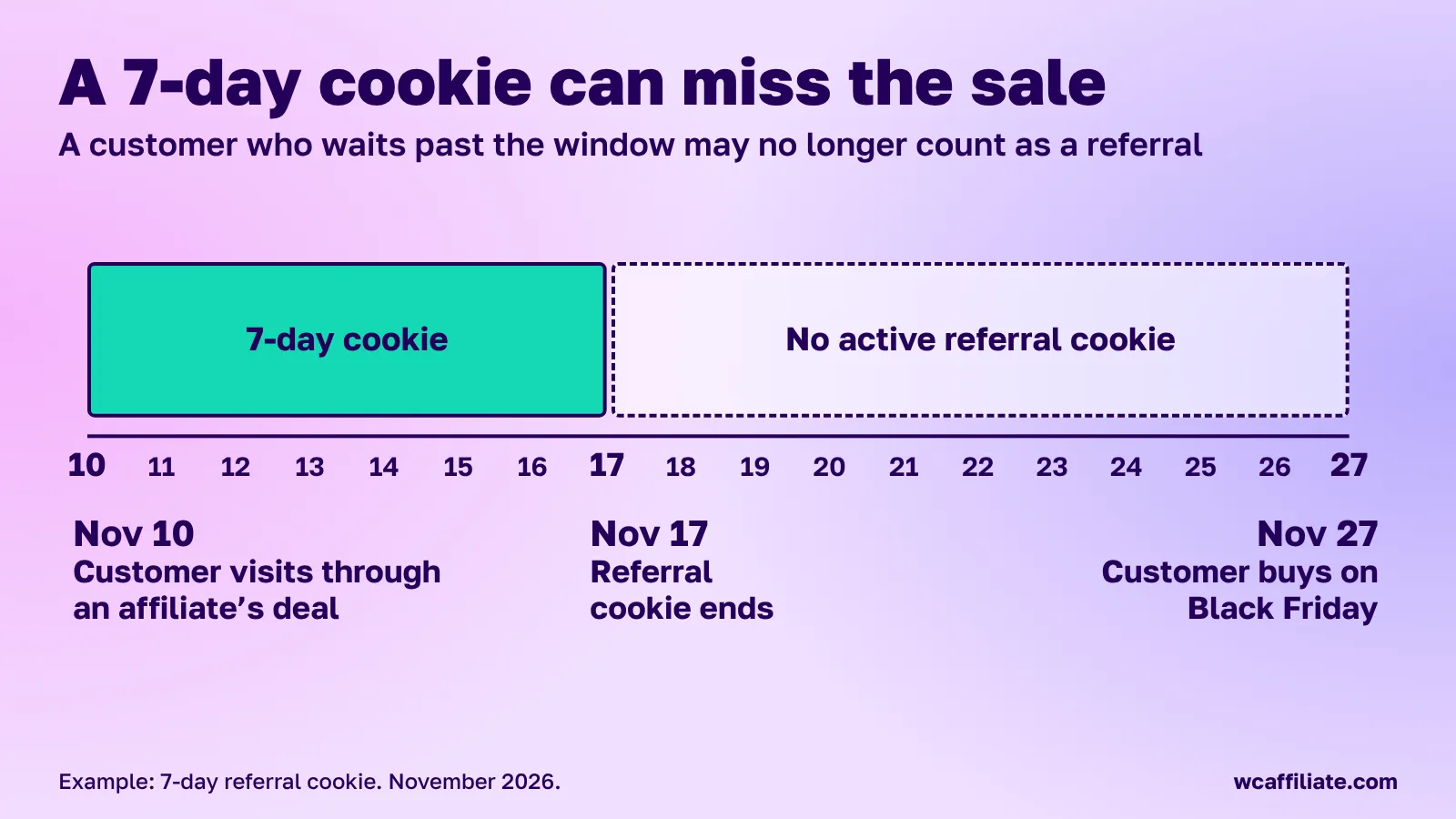
Suppose an affiliate shares your deal on November 10, but a customer waits until Black Friday to buy.
If your program uses a seven-day referral cookie, that earlier visit may no longer qualify for attribution.
Review your referral tracking window and decide whether it gives affiliates enough time to promote your offers.
Also confirm how your plugin handles referrals from multiple affiliates.
A first-click model generally favors the affiliate who introduced the customer. A last-click model favors the most recent qualifying referral.
Neither approach is automatically right for every store. What matters is choosing a rule, checking how your plugin applies it, and communicating it to affiliates.
Check redirects, caching, and consent settings
If your store uses a CDN, redirect plugin, or custom landing pages, confirm that referral parameters aren’t being removed before tracking occurs.
Test the exact links affiliates will share, including shortened URLs where applicable.
Cookie-consent behavior deserves special attention. If a visitor rejects optional tracking, the result depends on your implementation and applicable privacy requirements.
Do not assume your system can continue identifying that visitor through another tracking method without checking the legal and technical implications.
Once the tests pass, avoid unnecessary changes to checkout-related plugins, referral settings, and theme code during the sale. Critical security and stability fixes should still be handled.
6. Keep affiliates informed throughout Cyber Week
Black Friday may attract the most attention, but your affiliate campaign shouldn’t stop there.
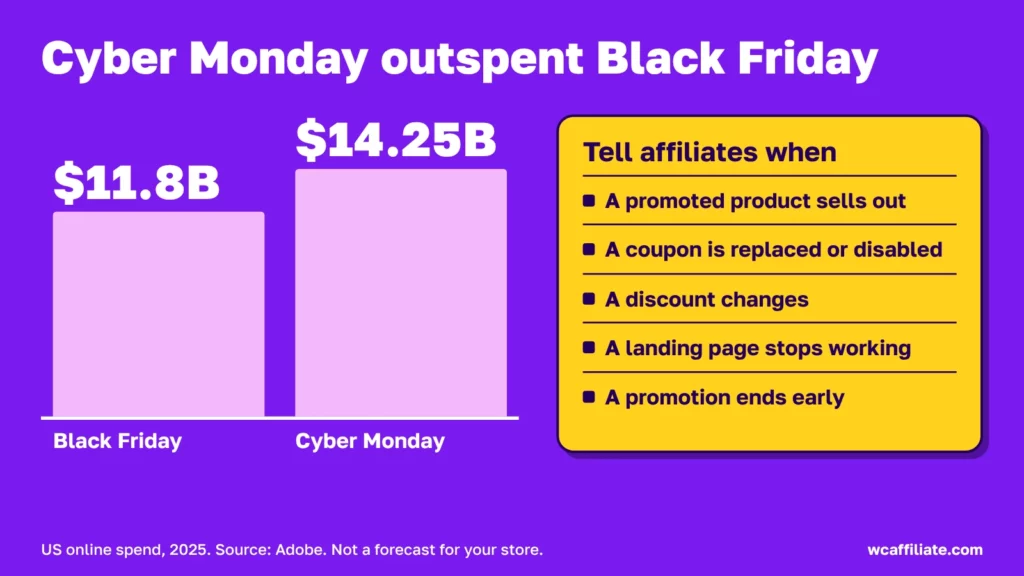
In 2025, US consumers spent $11.8 billion online on Black Friday and $14.25 billion on Cyber Monday, according to Adobe’s holiday shopping data.
Those numbers are not a forecast for your own WooCommerce store, but they show why it’s worth planning promotions across the full shopping period.
During the campaign, monitor referral orders and keep communication with affiliates simple.
Tell them whenever:
- A promoted product sells out
- A coupon code is replaced or disabled
- A discount changes
- A landing page stops working
- A promotion is ending earlier than expected
You don’t need a long daily newsletter. A short update with the relevant changes is usually enough.
For example, if an item sells out on Saturday, notify affiliates promptly and suggest another eligible product.
Otherwise, they may continue sending customers to a page where the advertised offer is no longer available.
7. Monitor suspicious affiliate activity without penalizing genuine sales
Higher order volume can make unusual referral activity harder to notice.
Some affiliates may generate legitimate spikes because their content performs particularly well. Others may try to claim commissions on purchases they didn’t meaningfully refer.
Rather than treating every unusual order as fraud, use a review process.
Pay attention to:
- Repeated purchases associated with the same affiliate and customer
- Unusually high coupon redemption from one buyer
- Sudden referral spikes without a clear traffic source
- Orders linked to prohibited self-referrals
- Paid advertisements targeting your brand terms when your affiliate agreement disallows them
These are reasons to investigate, not automatic grounds for rejecting commissions.
Check the order history, referral source, affiliate agreement, and available evidence before making a decision.
You should also make sure your fraud checks comply with applicable privacy rules.
If an order needs manual review, keep its commission pending until the issue is resolved.
This is easier to manage when your affiliate terms explain what counts as an invalid referral and when commissions may be withheld.
8. Set affiliate payout rules around refunds
Black Friday can bring strong sales, but some orders will be refunded or returned after the promotion ends.
The National Retail Federation’s 2025 returns report estimated that 19.3% of US online sales would be returned during 2025.
That is an industry estimate, not a prediction of your store’s return rate. Still, it explains why paying commissions immediately after checkout can create problems.
If you pay an affiliate and the customer later returns the product, you may have to recover or adjust the commission.
Decide when commissions become eligible for payment
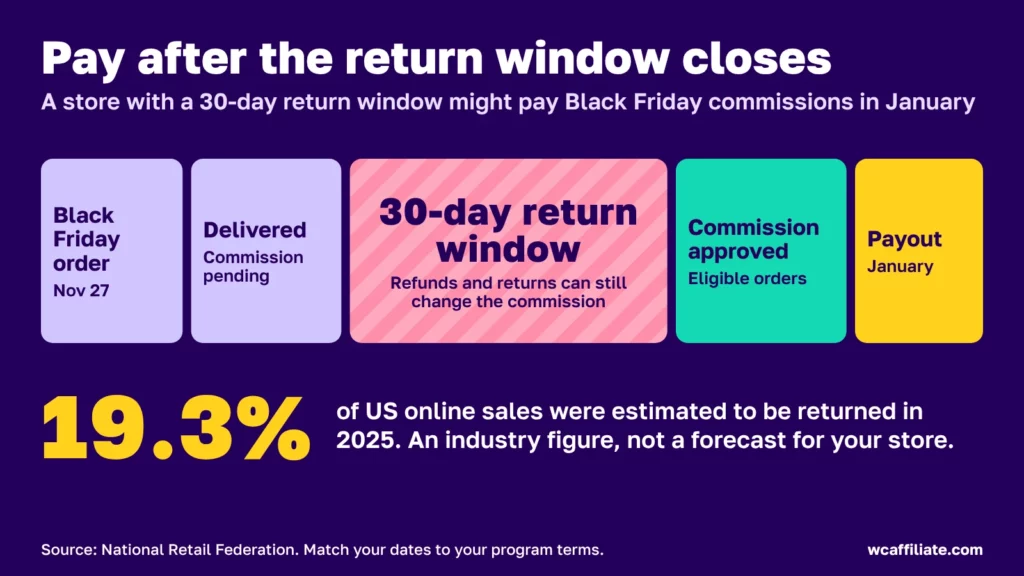
For physical products, consider approving commissions after delivery and the applicable return or cancellation period.
For digital products, use a reasonable pending period based on your refund policy and the way your affiliate program operates.
A store offering a 30-day return window might schedule its Black Friday commission payment for January, after the relevant orders have passed their return period.
The exact payout date should match your program terms rather than being chosen solely for convenience.
Before Black Friday, tell affiliates:
- When commissions are approved and paid
- What happens if an order is fully refunded
- How commissions are adjusted after a partial refund
A partial refund is worth spelling out because the affiliate may still be entitled to commission on the amount the store keeps, depending on your rules.
Once the sale is over, reconcile eligible orders and reserve enough money to cover outstanding commission payments.
That way, January payouts don’t become a surprise expense.
9. Make affiliate disclosures part of the campaign
Affiliate promotions should make it clear when a recommendation involves a financial relationship.
For US audiences, the Federal Trade Commission expects paid relationships and affiliate commissions to be disclosed clearly and conspicuously.
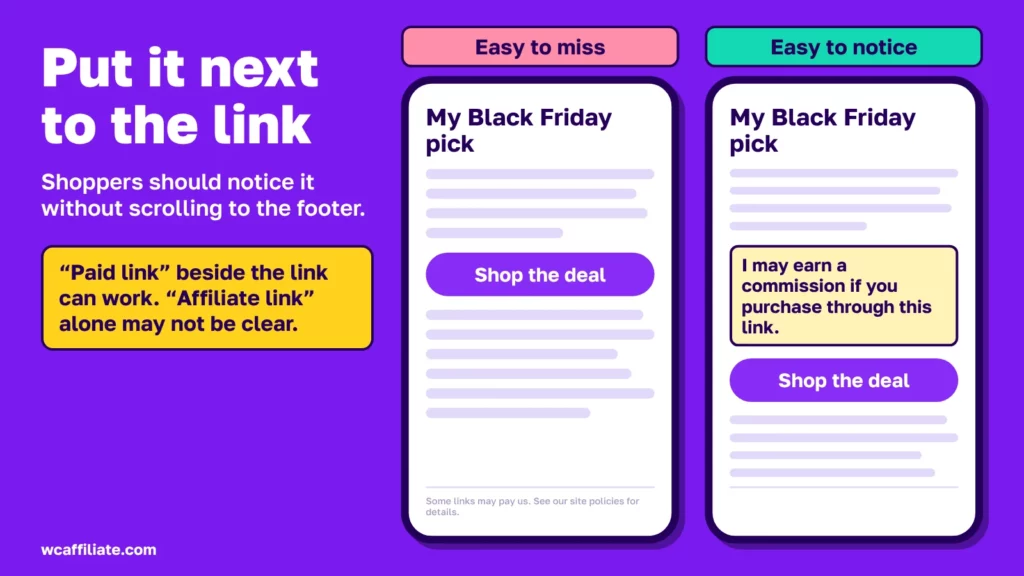
The FTC’s endorsement guidance explains that a disclosure should be easy for consumers to notice and understand, preferably close to the relevant recommendation or link.
For example, an affiliate could write:
“I may earn a commission if you purchase through this link.”
The FTC also considers “Paid link” immediately beside an affiliate link an adequate disclosure in appropriate circumstances.
However, simply labeling something an “affiliate link” may not clearly explain to every reader that the publisher earns a commission.
Include disclosure guidance in your affiliate materials
When sharing your Black Friday deal sheet, provide a short disclosure example that affiliates can adapt to their content.
Then review a sample of their published promotions.
Check that disclosures are visible on mobile, not buried in the footer, and not hidden behind unrelated text.
Rules can vary by market, platform, and content format. If your affiliates target shoppers in several countries, review the requirements for those markets rather than assuming US guidance covers everything.
10. Measure affiliate profitability after Black Friday
After Cyber Monday, your affiliate dashboard may show a large increase in referred orders and commissionable revenue.
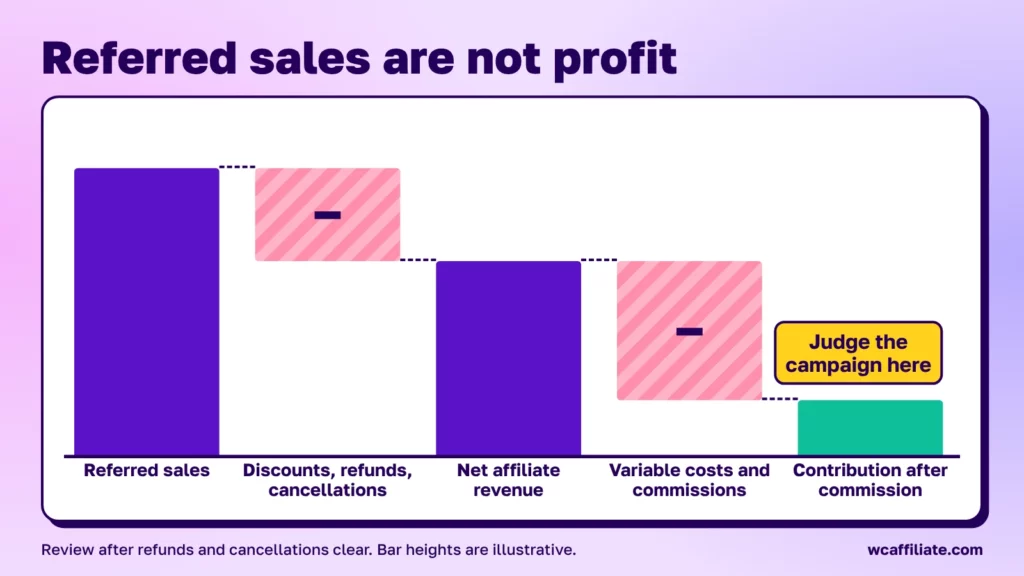
Those figures are useful, but they don’t tell you whether the campaign was profitable.
To understand what your affiliates actually contributed, review the results after refunds and cancellations have been processed.
Focus on these measures:
| Metric | Why it matters |
| Net affiliate revenue | Shows sales after discounts, refunds, and cancellations |
| Contribution after commission | Shows how much remains after applicable variable costs and affiliate payments |
| New customer percentage | Helps identify affiliates introducing new buyers |
| Refund rate | Highlights differences in order quality |
| Conversion rate | Shows how effectively referral traffic turns into purchases |
| Repeat purchase rate | Helps assess the longer-term value of referred customers |
Look beyond the number of referred orders
An affiliate who generates 100 discounted orders isn’t necessarily more valuable than one who generates 40.
The smaller affiliate may be bringing in new customers with better margins and fewer refunds.
Compare revenue and commission costs alongside customer acquisition and order quality before deciding who performed best.
Also check whether referred buyers were already customers.
If most affiliate conversions come from existing shoppers, investigate how much additional business the affiliate actually generated.
That doesn’t automatically mean those commissions were wasted. Existing customers can still respond to a creator’s recommendation or discover products they otherwise wouldn’t have purchased.
It does mean that attribution and incremental sales are different measurements.
Use the results to plan your next campaign
Once the numbers are settled, identify which affiliates generated profitable sales and which products performed best.
Share relevant performance feedback with your strongest partners and discuss what could work better next time.
You may discover that one product needs a lower commission, a particular coupon attracts low-value orders, or a certain affiliate audience brings in more repeat customers.
Those findings are more useful than simply copying the same Black Friday commission rates into your next promotion.
Black Friday affiliate checklist for WooCommerce stores
Before the sale begins, make sure you’ve completed the following:
- Calculated margins after discounts and commissions
- Selected products with enough margin and available stock
- Confirmed affiliate commission rates and bonuses
- Checked coupon restrictions and usage limits
- Connected personal coupons to the intended affiliates
- Tested referral links, coupons, and mobile checkout
- Reviewed cookie duration and attribution priority
- Shared promotional materials and disclosure guidance
- Documented refund and payout rules
- Assigned someone to monitor referrals during the campaign
You don’t need a complicated affiliate program to make Black Friday work. But you do need clear rules and reliable tracking before customers start ordering.
Final thoughts
A successful Black Friday affiliate campaign should generate sales that are worth keeping.
Start by checking what you can afford to pay in commissions. Then make sure your coupon rules, referral tracking, and payout terms support those decisions.
Once affiliates have accurate offers and working links, they can concentrate on reaching customers instead of sorting out technical problems during the busiest days of the sale.
After the promotion, compare the actual profit, refunds, and new customers each affiliate brought in. Those results will tell you where to invest more in your next campaign.
Frequently Asked Questions
Not necessarily. If you're starting shortly before Black Friday, invite a small group of trusted customers or partners. Keep the commission rules simple and test tracking before they begin promoting. A larger recruitment campaign can wait until your program has been tested.
Only when your margins support the increase. Calculate the amount left after discounts, product costs, affiliate commissions, and other variable expenses. Higher commissions may be suitable for selected products, while sales bonuses can provide another incentive.
Yes, provided your coupon restrictions allow it. In WooCommerce, enabling “Exclude sale items” prevents the coupon discount from applying to sale-priced products. Test the combined offer before sending codes to affiliates.
That depends on your acquisition goals and commission budget. Coupon sites may reach customers who are already planning to buy. Define whether coupon-directory promotion is allowed and assess the resulting sales before offering the same commission rates as content-focused affiliates.
