


Admin Payables Overview
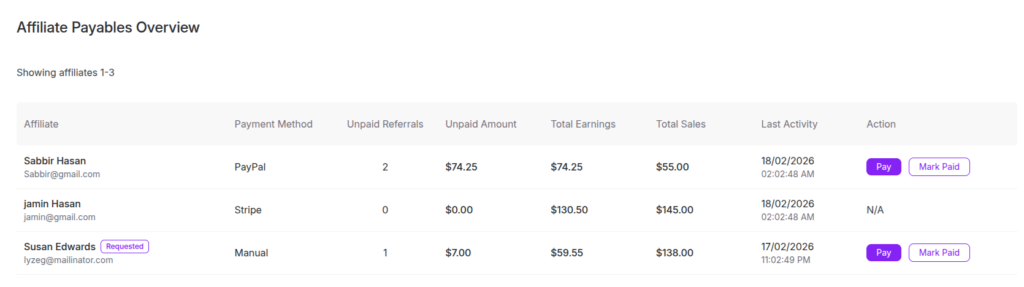
The Payables Overview section allows the admin to view and manage all unpaid affiliate commissions from one central place. This page helps you to track how much is owed to affiliates and process their payments easily.
On the Payables page, you will see a table with several columns such as Affiliate, Payment Method, Unpaid Referrals, Unpaid Amount, Total Earnings, Total Sales etc.
When you click the Pay button, a payout popup appears. This window shows the affiliate’s details including Affiliate ID, email, payment method, bank details (if added), total earnings and the current payable amount. It allows you to review everything before completing the payment.
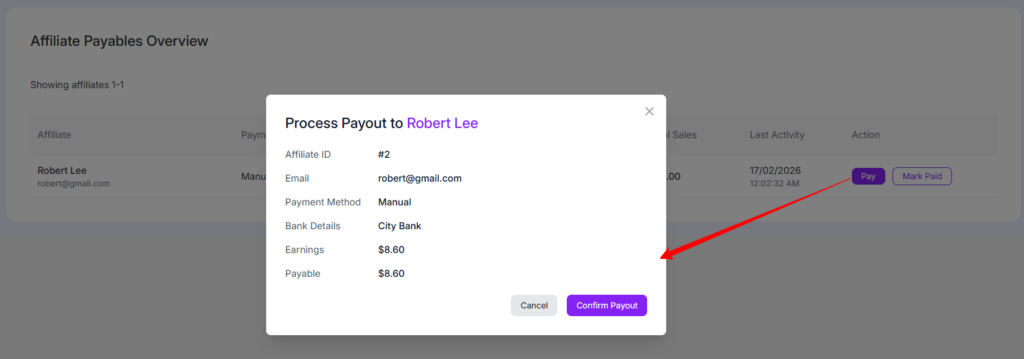
If the payment method is Manual, you need to send the money outside the system such as bank transfer. After sending the payment, click Confirm Payout to mark the referrals as paid and clear the unpaid balance. If you are not ready, you can click Cancel to close the popup.
When you click Mark Paid, a popup appears showing the affiliate’s details such as Affiliate ID, email, payment method, earnings and payable amount. This window is used when you have already sent the payment manually for example, via bank transfer, Paypal, Stripe.
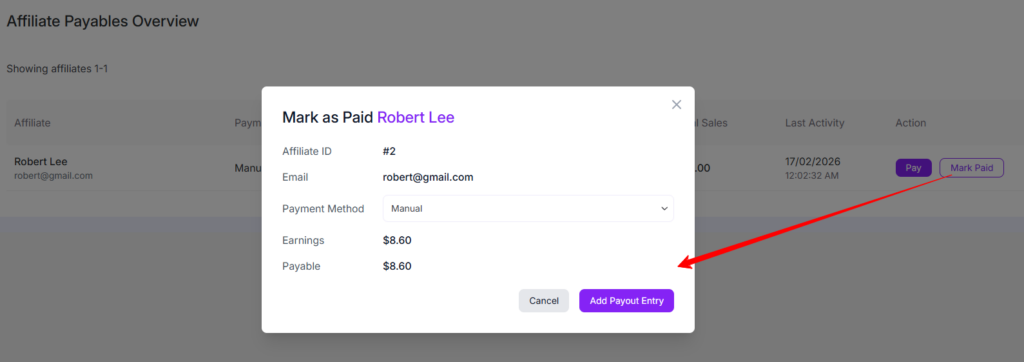
After confirming the details, click Add Payout Entry to mark the commission as paid. This will clear the unpaid balance and move the record to the Transactions section. If you do not want to proceed, click Cancel to close the popup.
Was this doc helpful?