


Earnings
The Payout page allows you to manage and withdraw your affiliate earnings. From here, you can review your available balance, track payout history, and submit new payout requests. All payout requests are subject to admin review and approval.
As an affiliate, you can:
- View your total earnings
- Check paid and unpaid balances
- Submit payout requests
- Monitor payout status
Requesting a Payout: To request a payout, ensure your available (unpaid) balance meets the minimum withdrawal threshold set by the store. Once submitted, your request will be reviewed by the store admin.
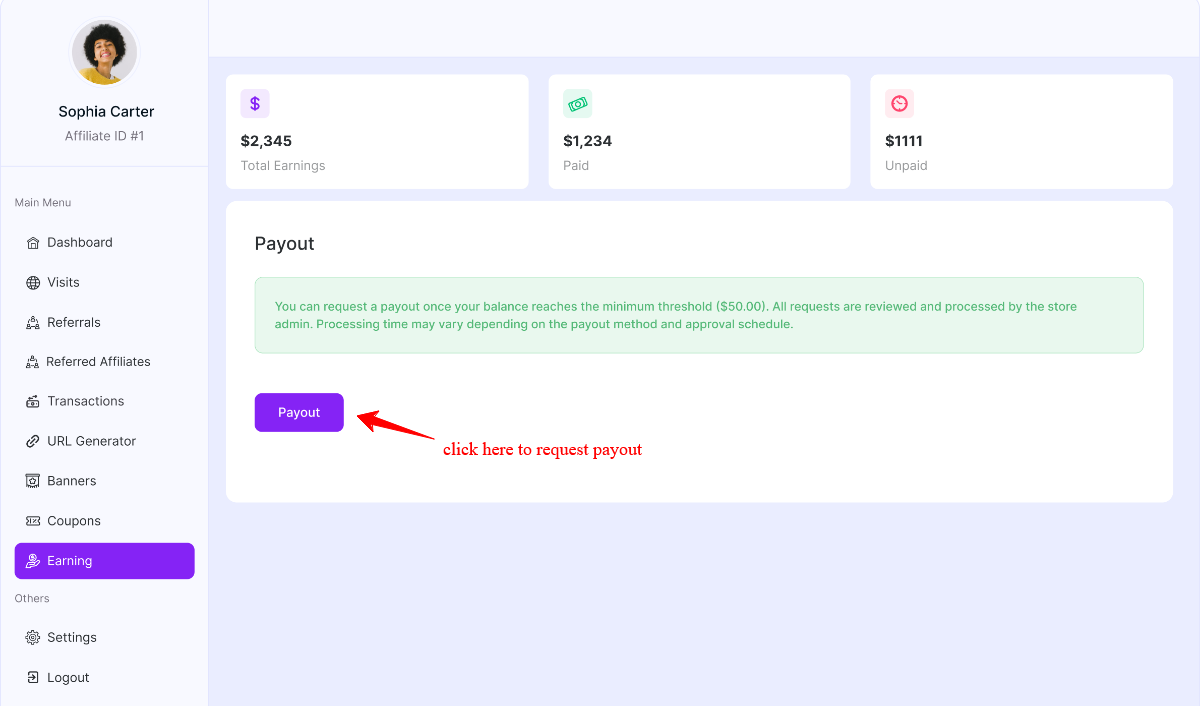
Payout Summary Breakdown
Total Earnings: Displays the total commission you have earned from all approved referrals. This includes both paid and unpaid amounts.
Paid: Shows the total amount that has already been successfully processed and transferred to you.
Unpaid: Represents the available balance that is eligible (or pending eligibility) for payout.
To complete the payout process fully functional, at first Admin or Store owner needs to enable the payment method from admin payout setting and the affiliate can set their payment method from the Affiliate dashboard→ Settings
Was this doc helpful?