


Transactions Overview
The Transactions page provides a complete history of all payout transactions associated with your affiliate account. This section helps you track processed payments, monitor payout timelines, and maintain clear financial records. Each row represents a single payout transaction, including request details, processing time, and current status.
Search & Filter: Use the search field at the top of the page to quickly locate a specific transaction by Transaction ID.
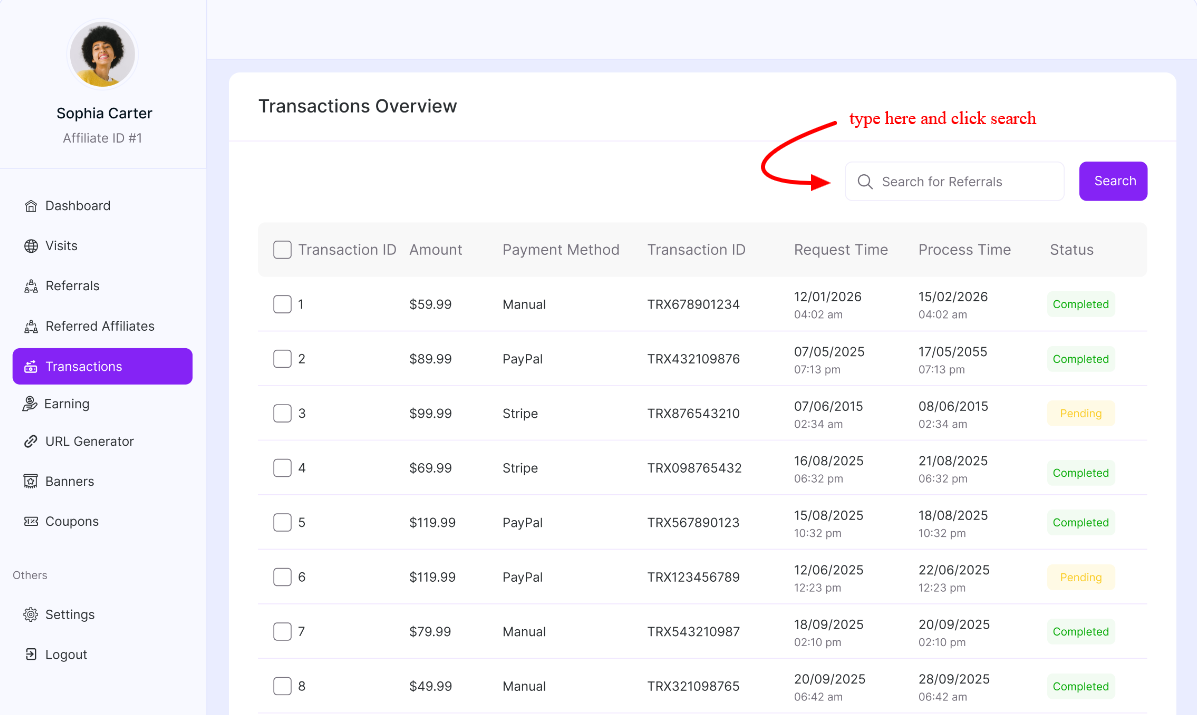
Transactions Table Breakdown
Transaction ID: Displays the unique ID assigned to the payout transaction. This helps you reference and track specific payments.
Amount: Shows the total amount processed for the payout request.
Payment Method: Indicates the method used to process the payout (e.g., manual, bank transfer, Stripe, PayPal, etc.).
Reference ID / Payment ID: Displays the external or system-generated reference number related to the payout. This can be used for cross-verification.
Request Time: Shows the exact date and time when the payout request was submitted.
Process Time: Displays the date and time when the payout was approved and processed.
Status: Indicates the current state of the transaction. Common statuses include:
- Pending – The payout request is awaiting approval.
- Processing – The payout is being prepared or transferred.
- Completed – The payout has been successfully processed.
- Rejected – The payout request was declined.
This transaction page ensures full transparency over your payout activities and helps you keep accurate records of all affiliate earnings withdrawals.
Was this doc helpful?