83% of shoppers say coupons influence their purchasing decisions. That’s one reason coupon code tracking has become an essential part of modern affiliate marketing.
Unlike traditional referral links that rely on browser cookies, coupon code tracking attributes sales based on the coupon customers use at checkout. This makes it a more reliable tracking method when cookies are blocked, deleted, or users switch devices.
For WooCommerce store owners, coupon code tracking does more than improve attribution. It helps ensure affiliates receive accurate commissions, reduces missed referrals, and gives customers an easy way to support their favorite creators.
In this guide, you’ll learn how coupon code tracking works, when to use it instead of referral links, and how to set it up in WooCommerce using WC Affiliate.
What Is Coupon Code Tracking?

Each affiliate gets a unique discount code, something like JANE15 or MIKE20. When a customer enters that code at checkout, the system automatically credits the sale to the affiliate who owns it. The commission logs. The affiliate gets paid. No referral link, no cookie, no redirect required.
The attribution lives in the code itself, not the browser session. That’s the key difference between coupon code tracking and traditional link-based affiliate tracking.
Why It’s More Reliable Than Link-Based Tracking?
Referral links work by dropping a cookie when someone clicks. That cookie expires. It gets cleared. It gets blocked by Safari, Firefox, and a growing number of browser extensions. The link did its job, the visitor arrived, but by the time they bought, the trail was cold.
Coupon code tracking doesn’t have this problem. The code goes in at checkout. That moment is the point of attribution, not the click, not the session start, not the cookie set three days ago.
According to DemandSage’s coupon research, 62% of U.S. shoppers actively look for promo codes before completing a purchase. The code isn’t just a tracking mechanism. It’s also what gets the customer over the finish line.
Coupon Code Tracking vs. Referral Link Tracking: When to Use Which
These two tracking methods solve different problems. Here’s an honest look at where each one holds up, and where it doesn’t.
| Scenario | Referral Link Tracking | Coupon Code Tracking |
|---|---|---|
| Customer uses an ad blocker | Often fails | Works fine |
| Customer switches devices | Tracking lost | Still works |
| Customer clears cookies | Tracking lost | Still works |
| Influencer or podcast promotion | Hard to share long URLs | Easy to mention aloud |
| Offline events, print, flyers | Not practical | Works perfectly |
| Blog reviews and banner ads | Excellent fit | Less natural |
| Customer gets a discount | No built-in incentive | Discount built in at checkout |
| Multi-day consideration cycle | Depends on cookie duration | Code works whenever they buy |
The Real Answer: Run Both at Once
There’s no reason to choose. The store owners running high-performing affiliate programs give their affiliates both a referral link for content and digital placements, and a coupon code for everything else.
Referral links belong in blog posts, banner ads, email campaigns, and any digital channel where a clickable URL makes sense. Coupon codes take over in the places links can’t go: podcasts, YouTube sponsorships, Instagram Stories, TikTok videos, and in-person events.
According to Fintel Connect data cited in Remoby’s 2026 affiliate marketing benchmarks, 41% of affiliate purchases happen via coupon affiliates. That’s not a niche tactic. That’s nearly half the affiliate sales channel. WC Affiliate supports both tracking methods from one dashboard, so there’s no need to manage two separate systems.
Why Cookie Tracking Is Losing Ground in 2026 (And Why It Matters for WooCommerce Stores)
(i) Privacy Shift
Safari and Firefox have been blocking third-party cookies for years. Chrome keeps revising its own deprecation timeline, and even if full deprecation gets delayed again, the direction is clear, third-party cookie reliability has already eroded significantly. It’s not a future problem. It’s a current one.
For affiliate programs that still rely entirely on cookie-based referral links, this means a portion of every program’s revenue is going untracked silently. The affiliate sends a buyer. The cookie gets blocked. No commission logs. The affiliate notices their numbers look off. They start promoting less. That’s the compounding cost of not having a coupon tracking layer in place.
(ii) Influencer Marketing Reality
Influencer marketing has fundamentally changed how affiliate attribution needs to work.
A YouTuber reviewing your WooCommerce store can’t embed a referral link into a spoken sentence.
A podcaster can’t ask their audience to manually type a 60-character URL with tracking parameters. But they can say “use code SARAH20 at checkout” mid-episode and have it register perfectly when the customer buys three days later.
Sprout Social research found that 55% of consumers are more likely to seek out influencer content when discount or promo codes are involved.
That’s not just an attribution advantage; it’s a conversion multiplier. Influencer-linked coupon campaigns now account for 22% of all social commerce sales, according to Impulze AI data cited in DemandSage’s 2025 coupon report. The brands not account for this in 2026 are building affiliate programs for yesterday’s channel mix.
(iii) Offline and Multi-Device Problem
Not every sale starts with a click. A customer hears about a product at a conference. A friend mentions a store. A flyer catches their eye. None of those touchpoints leaves a cookie trail.
Coupon codes work in all of them.
If your affiliate speaks at a WordPress event or runs a local campaign, the code goes on the slide deck or flyer. The customer types it in when they buy, whenever that turns out to be. Clean attribution, no link required.
How Coupon Code Tracking Works in a WooCommerce Affiliate Program
This is simpler than most store owners expect. Here’s how it runs end-to-end:
- Create the coupon in WooCommerce: set the discount type, amount, expiry date, and any usage restrictions as you normally would.
- Assign it to an affiliate in WC Affiliate: the coupon is linked to a specific affiliate directly from the WC Affiliate dashboard.
- The affiliate shares the code: on their YouTube channel, in their newsletter, at an event, or on Instagram Stories. One code, unlimited channels.
- The customer applies the code at checkout: the discount applies, the sale is logged, and the commission is attributed to the correct affiliate automatically. No manual tracking needed.
Read our latest guide on how to recruit your first 10 affiliates in 30 days
What Gets Tracked
Every time a code gets used, WC Affiliate logs the full picture: commission amount, commission rate, order total, payment method, date, and which affiliate earned it. Affiliates can see their own performance in real time from their dashboard.
This visibility matters for affiliate retention. When affiliates can see their own numbers clearly, they trust the program. That trust is what keeps them promoting consistently.
How to Set Up Coupon Code Tracking in WooCommerce Using WC Affiliate
WC Affiliate supports both coupon-code tracking and link-based affiliate tracking. For now, let’s walk through how to set up coupon-code tracking.
Step 1: Enable Coupon-Based Referral Tracking
Start by confirming coupons are active in WooCommerce. Go to WooCommerce → Settings → General and make sure the coupon option is enabled.
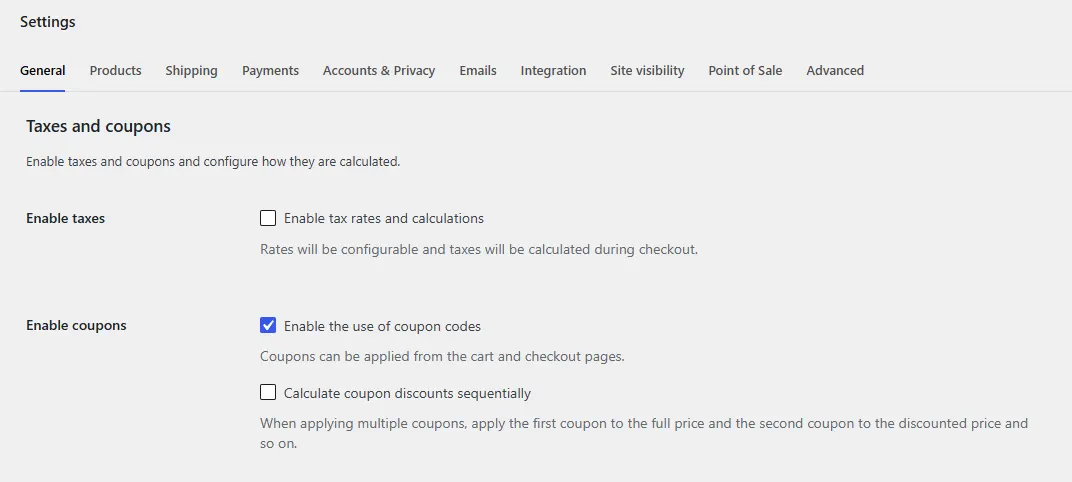
Then open WC Affiliate settings and enable coupon-based referral tracking. This connects WooCommerce’s native coupon system to WC Affiliate’s attribution engine.
Step 2: Create the Coupon in WooCommerce
Go to Marketing → Coupons and create the coupon as you normally would. Set the discount type, percentage off or fixed cart, along with the discount amount and any usage limits or expiry dates.
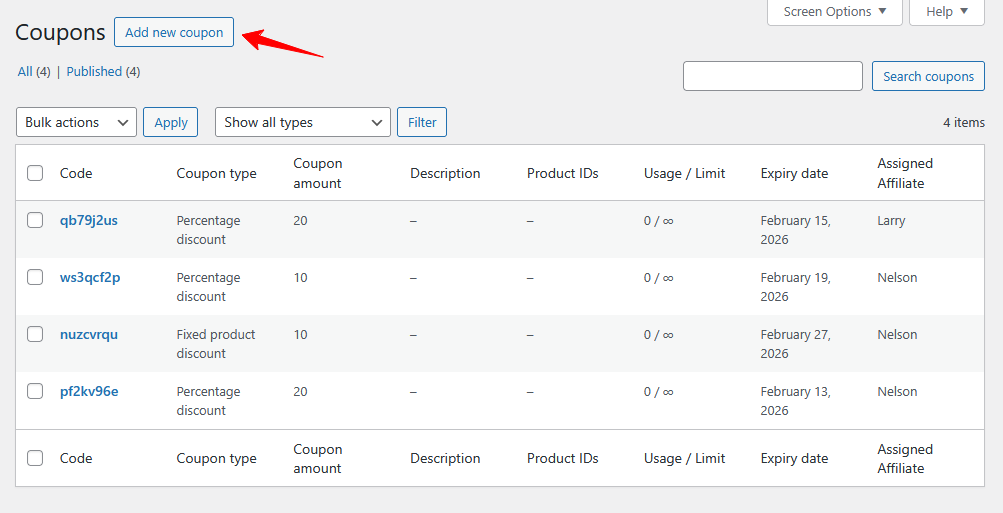
One note on naming: resist the temptation to use generic codes like SAVE10 or DISC15. The naming strategy section below explains why this matters more than most people expect.
Step 3: Assign the Coupon to an Affiliate in WC Affiliate
Once the coupon is created, head to WC Affiliate and assign it to the relevant affiliate. Search by name, email, or username. Save the assignment.
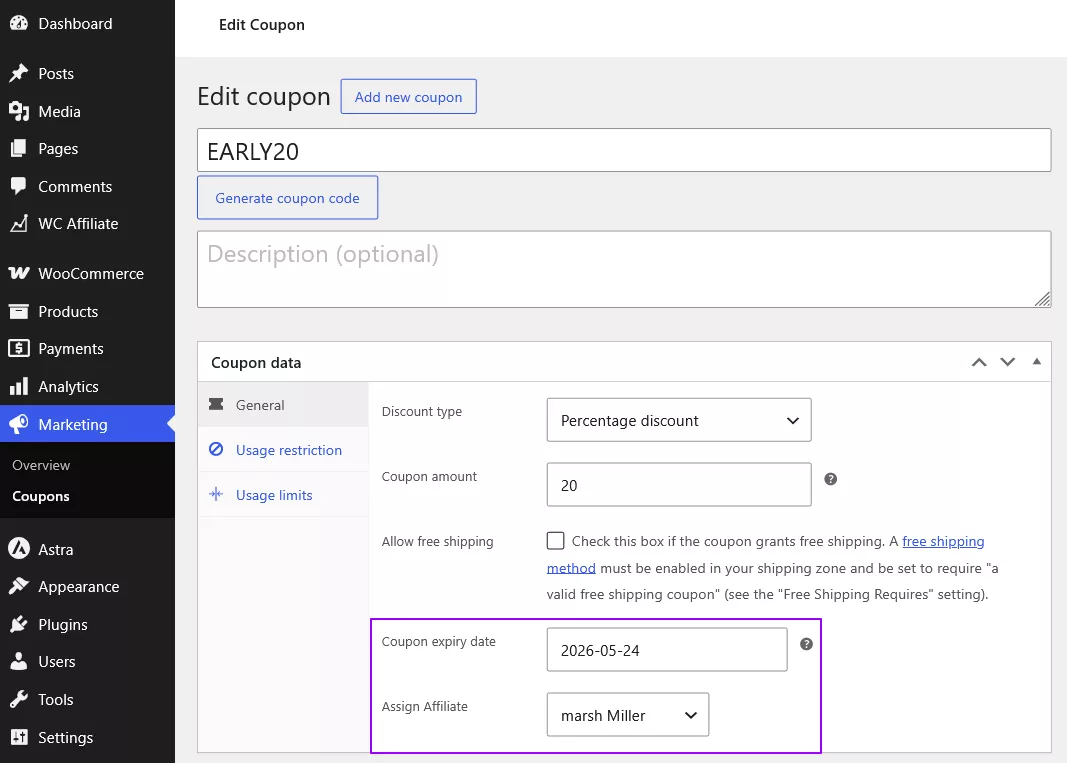
The coupon will appear immediately in the affiliate’s WC Affiliate dashboard. They can start sharing it right away, with no extra setup on their end.
One coupon = one affiliate. If multiple affiliates need unique codes, create separate coupons for each. This keeps attribution clean and avoids any ambiguity about who drove which sale.
Step 4: Test Before You Send It Out
This step gets skipped constantly. Don’t skip it.
Place a test order using the coupon. Confirm the discount applies correctly. Confirm the commission is attributed to the right affiliate in the WC Affiliate dashboard. A broken coupon means a lost sale and a frustrated affiliate; five minutes of testing prevents both.
For more detailed setup documentation, see the WC Affiliate docs. If you haven’t set up your affiliate program yet, here is a launching guide for running a WooCommerce affiliate program.
Name Your Affiliate Coupon Codes the Right Way
Most guides cover how to create a coupon. Almost none cover how to name it well. It matters more than you’d think.
Branded Codes Convert Better
SARAH20 outperforms XJK27Q every time, not because the discount is different, but because SARAH20 feels personal. It signals that Sarah specifically arranged this deal for her audience. That’s a trust signal, and trust converts.
Random codes feel like auto-generated spam. Branded codes feel like an exclusive arrangement. Customers remember them, use them, and sometimes share them. The code itself becomes part of how the affiliate communicates their relationship with the brand.
Naming Formats That Work
A few formats that hold up across different affiliate types and campaign contexts:
- Name + discount: SARAH20, MIKE10, JAKE15
- Campaign-specific: BFJAKE25 for Black Friday, SUMMERMIKE for seasonal pushes
- Product-specific: JANEHOODIES, MIKESHOES for targeted product promotions
Keep codes short, uppercase, and free of special characters. The target is something an affiliate can say aloud and a customer can type without frustration. If it takes more than two seconds to say, it’s probably too long.
When to Give an Affiliate Multiple Codes
One affiliate can have multiple coupons assigned to them in WC Affiliate.
This is useful when you want a general promotion code for everyday use alongside a higher-discount code for a product launch, or when you’re running a seasonal campaign and want per-campaign performance data. Each coupon tracks independently, so you can see which code or campaign is driving the most sales without any guesswork.
Common Coupon Tracking Mistakes WooCommerce Store Owners Make
(i) Letting the Discount Eat Your Margin
Most programs that run sustainably stick to the 10–25% range. That’s enough to motivate a purchase without making the product look devalued or eroding profitability. A 50% off code might spike short-term conversions, but it attracts the wrong buyer profile and compounds margin problems fast.
If you’re uncertain where to start, 15% off is a reasonable baseline for most WooCommerce product categories. Adjust from there based on your margins and what your top affiliates are actually seeing convert.
(ii) Skipping Expiry Dates
An open-ended coupon with no expiry can run indefinitely. For evergreen affiliate promotions, that might be intentional. For campaign-specific codes tied to a launch or season, it’s a quiet liability. Set expiry dates on those codes. WC Affiliate logs every transaction with timestamps, making it easy to audit and deactivate codes that have run their course.
(iii) Mixing Affiliate Codes with Sitewide Promotions
This creates attribution problems. If an affiliate’s personal code and a sitewide BLACKFRIDAY code both apply to the same order, the tracking gets complicated, or completely misattributed. Keep affiliate coupons separate from general promotional codes. One purpose per coupon.
(iv) Forgetting to Test
According to MarketingProfs, 30% of affiliate marketing losses in 2024 were attributed to fraud and system errors. Not all of those are malicious; many are simple configuration mistakes that go undetected until an affiliate reports a discrepancy. Test every coupon before distributing it. Five minutes of testing protects both your revenue and your affiliate relationships.
Conclusion
Coupon code tracking isn’t a workaround for broken links. It’s a separate attribution layer that covers the sales channels; referral links were never designed to handle influencer content, podcasts, offline events, multi-device journeys, and cookie-blocked sessions.
The shift is already underway. Cookie reliability is declining. Influencer marketing is code-driven by default. Shoppers expect a discount before they buy. Programs that account for all of this are capturing revenue that cookie-only programs are losing silently.
WC Affiliate makes the setup simple and easy. Create a coupon in WooCommerce, assign it to an affiliate, test it, and it’s live. No SaaS subscription, no third-party integration, no developer needed. Start with one affiliate, one branded code, and see what the data shows you from there.
Frequently Asked Questions
Yes, and most serious affiliate programs do exactly this. Use plugins like WC Affiliate, which support both of them simultaneously. The referral link handles digital content and clickable placements; the coupon code covers influencer mentions, offline channels, and situations where a link isn't practical. Running both gives you maximum attribution coverage across all the channels your affiliates actually use.
WC Affiliate attributes the commission to the coupon owner when a code is applied at checkout. The code takes precedence at the point of sale if you want to configure different attribution logic for specific scenarios, which can be adjusted in WC Affiliate's referral settings.
Yes. You can assign multiple coupons to a single affiliate in WC Affiliate - a general promotion code, a seasonal campaign code, and a product-specific code. Each tracks independently, giving you per-code performance data without needing to create separate affiliate accounts or manage anything in a spreadsheet.
Core coupon tracking is available in the free version of WC Affiliate on WordPress.org. You get the foundation: assign coupons to affiliates, track commissions, and view performance from a central dashboard. WC Affiliate Pro adds auto payouts via PayPal, Stripe, Wise, and Payoneer, along with advanced reporting, multi-level commission support, and additional affiliate features.