
WooCommerce doesn’t protect your affiliate program. That’s not a criticism of the platform. It’s just how it works. WooCommerce handles orders, products, and payments. What happens inside your affiliate program is a different matter: who’s gaming it, which commissions are legitimate, and if someone is quietly collecting payouts they never earned. That’s entirely on you.
That gap is exactly where affiliate fraud in WooCommerce takes hold.
This guide covers the most common fraud patterns affecting WooCommerce affiliate programs, how to catch them in your admin panel, and the specific settings that stop most abuse before it starts.
Why WooCommerce Affiliate Programs Are a Common Target for Fraud
Affiliate fraud isn’t just a general affiliate marketing issue. WooCommerce stores face unique challenges that make them especially vulnerable.
Research shows that fake referrals and commission manipulation affect a significant number of online merchants. For WooCommerce businesses, the risk is even higher because affiliate management is often handled through third-party plugins with limited fraud prevention enabled by default.
Unlike large ecommerce platforms with dedicated compliance teams and advanced monitoring systems, most WooCommerce stores rely on small teams or solo operators. As a result, fraudulent activities can go unnoticed for weeks or even months, leading to unnecessary commission payouts and reduced profitability.
Two factors make WooCommerce affiliate programs particularly attractive to fraudsters:
1. WooCommerce Doesn’t Include Native Affiliate Fraud Protection
WooCommerce is designed to manage products, orders, and payments. It wasn’t built to detect affiliate fraud.
By default, WooCommerce can tell you what was purchased, who purchased it, and how much was paid. However, it cannot determine whether an affiliate legitimately referred the sale or whether the affiliate generated the commission through abusive tactics.
That responsibility falls entirely on the affiliate plugin you use and how you configure it.
One common mistake store owners make is overlooking self-referral protection. Many affiliate plugins offer settings to prevent affiliates from earning commissions on their own purchases, but these safeguards are often disabled by default. If they’re not configured properly during setup, affiliates may be able to buy through their own referral links and collect commissions without raising any immediate red flags.
2. Running a Self-Hosted Program Means You’re Responsible for Monitoring Fraud
When you run an affiliate program on WooCommerce, you’re also responsible for policing it.
Large companies have dedicated teams and automated systems that continuously monitor affiliate activity for suspicious behaviour. Most WooCommerce store owners don’t have those resources.
Instead, they’re focused on inventory, marketing, customer support, and day-to-day operations. Affiliate monitoring often becomes a lower priority, especially when an affiliate has already built a history of strong performance.
Unfortunately, that’s exactly when many fraudsters become more aggressive. Once trust is established and oversight decreases, fraudulent activity becomes easier to hide.
WooCommerce won’t automatically warn you about suspicious commission patterns. Unless you’re regularly reviewing affiliate data and referral activity, fraud can continue quietly in the background, costing your business money long before it becomes obvious.
The 5 Most Common Types of Affiliate Fraud in WooCommerce
The fraud types themselves aren’t unique to WooCommerce. But how they play out inside a WooCommerce store, and which plugin settings make you vulnerable, is worth understanding specifically.
1. Self-Referrals
This is the most widespread affiliate fraud type in WooCommerce stores, and the easiest to execute.
An affiliate uses their own referral link to place an order at your store. They get the product, sometimes at a discount, and collect a commission on top of it. You’ve effectively subsidised their own purchase.
Some affiliates go further. They loop in friends and family, rotating multiple customer accounts that all convert through their link. The orders look completely legitimate. The commission payouts are not.
According to StoreApps, the self-referral toggle is the most commonly overlooked setting in WooCommerce affiliate setups – not because the option doesn’t exist, but because it’s off by default and easy to skip during installation.
2. Cookie Stuffing
Cookie stuffing is quieter and harder to catch without looking at the right data.
An affiliate injects tracking cookies into users’ browsers without them ever clicking an affiliate link. They might use a hidden iFrame on their website, a script that fires on page load, or redirect code embedded in a piece of unrelated content. The user never knows it happened.
Later, when that user shops at your store of their own accord, the cookie fires and the affiliate claims the commission. Cookie stuffing affects an estimated 5% to 10% of all affiliate marketing transactions. A December 2024 investigation found that PayPal’s Honey browser extension was allegedly replacing legitimate affiliate cookies with its own at checkout. It’s one of the clearest large-scale examples of how this tactic operates in practice.
3. Coupon Code Leaking
This one is common and consistently underreported because the orders themselves look completely normal.
You assign an exclusive coupon to an affiliate. They post it publicly on a deal aggregator, a Reddit thread, or a Facebook group. Anyone who finds it and uses it. Every purchase made with that code generates a commission, regardless of if the affiliate had any involvement in bringing that customer to your store.
You end up paying for customers you’d have acquired through your own marketing. The affiliate did nothing beyond a single public post.
4. Fake Orders and Purchase-Refund Cycles
An affiliate places orders to trigger commissions, then refunds or cancels them after the commission is recorded.
For WooCommerce stores using cash-on-delivery, this is particularly damaging. The order gets rejected at delivery, but if your commission holding period is too short or doesn’t exist, the commission may have already been processed. Even on standard card orders, affiliates can run purchase-refund cycles within your return window: buy through their link, collect the commission, and refund before the deadline expires. You reverse the sale. They keep the money.
5. Brand Bidding
Brand bidding doesn’t look like fraud at first glance. It is.
An affiliate bids on your branded keywords in Google Ads. When someone searches for your store by name, they see the affiliate’s paid listing first, click through, and purchase. The affiliate earns a commission. But that customer was already looking specifically for you. They would have found your store through organic search and converted without any affiliate involvement. You paid a commission on traffic you already owned.
Warning Signs to Watch in Your WooCommerce Admin Panel
Not every anomaly is fraud. But when multiple signals stack up on the same affiliate over the same period, investigation is warranted.
| Warning Sign | What It Likely Means |
| Conversion rate above 20–30% | Cookie stuffing or self-referrals |
| Conversion rate below 1% with high clicks | Bot traffic or click fraud |
| Multiple orders from the same IP address | Self-referral ring |
| High refund rate from one affiliate | Purchase-refund cycle |
| Sudden commission spike from a new affiliate | Coupon leaking or brand bidding |
| Blank or missing referral URLs | Attribution manipulation |
According to 24metrics’ affiliate fraud detection guide, any affiliate sitting above a 30% conversion rate deserves an immediate review. Legitimate paid traffic rarely exceeds 8–12%, and organic content traffic tends to convert lower still.
How to Detect Affiliate Fraud in Your WooCommerce Dashboard
Where do you actually start? Most of what you need is already inside your affiliate plugin’s reporting. The question is knowing which numbers to pull and what they’re telling you.
Check Conversion Rates Per Affiliate
Pull a breakdown showing clicks versus confirmed referrals for every affiliate in your program. A healthy range tends to fall between 2% and 15%, depending on your niche and where the affiliate’s traffic originates.
An affiliate sitting at 80%? Nearly impossible without self-referrals or cookie stuffing. An affiliate sending thousands of clicks with under 1% converting? Likely inflated traffic with no genuine buyers behind it. Review this monthly. Quarterly is too slow.
Compare IP Addresses on Orders
Quality affiliate plugins log IP addresses against each referral. Pull the referral log for any affiliate who’s already triggered another flag and look for repeated IPs across multiple orders.
Several orders attributed to the same affiliate, all sharing one IP address, placed within a short time window, that’s a direct self-referral signal. Most self-referral fraud at the WooCommerce store level isn’t sophisticated enough to use VPNs consistently, so IP patterns tend to show up clearly when you look for them.
Track Refund Rates by Affiliate
This is the metric most WooCommerce store owners miss entirely.
Standard affiliate reporting surfaces total sales and commissions per partner. Refund rates by affiliate require a separate data pull, but it’s worth building into your monthly review. If one affiliate drives 12% of your sales and 45% of your refunds, that imbalance needs investigating before the next payout, not after.
Audit Referring Domains
Your plugin’s visitor log should show the referral URL on each click. Check where your highest-earning affiliates are actually sending traffic from.
Blank referral URLs, inconsistent sources, or domains that don’t exist are all problems worth investigating. A legitimate affiliate has a real website, email list, or social presence you can verify in a few minutes. If the referral data doesn’t point to any real, raise it with the affiliate directly before releasing pending commissions.
How to Prevent Affiliate Fraud in WooCommerce
Prevention is significantly cheaper than investigation and recovery. These six steps close the gaps that fraudsters use most often in WooCommerce programs. We will try WC Affiliate, a WooCommerce Affiliate plugin, for these steps mostly.
Step 1: Disable Self-Referrals – Do This First
This is the single highest-impact change you can make to a WooCommerce affiliate program.
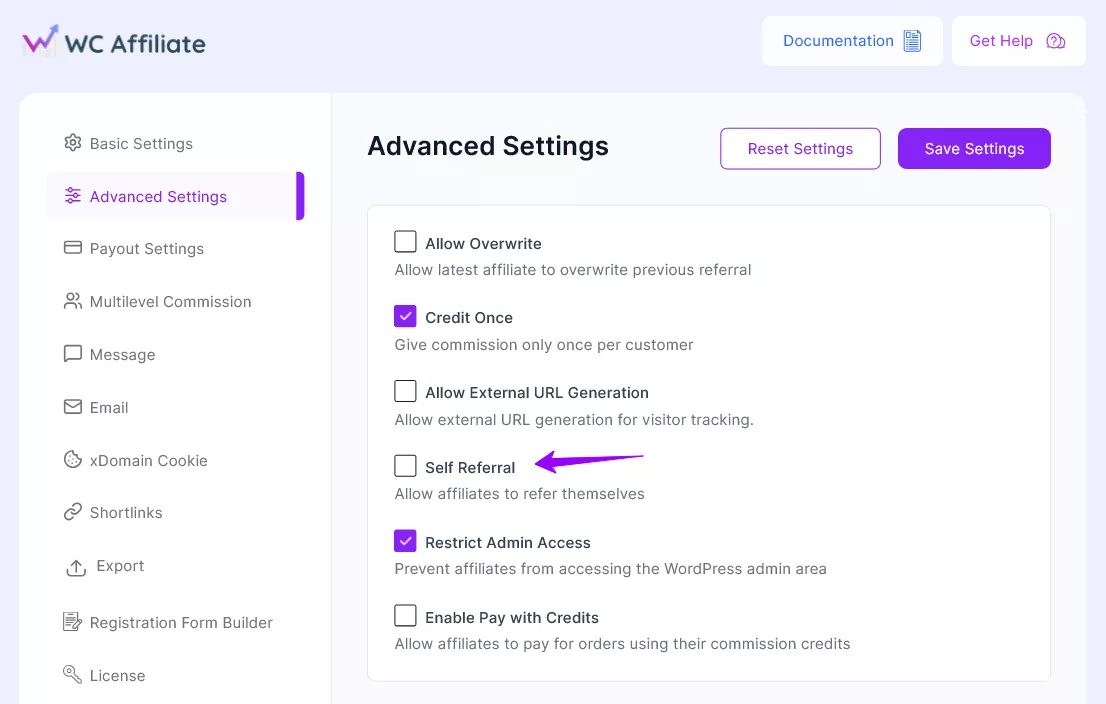
In WC Affiliate’s settings, there’s a toggle to block affiliates from earning commissions on their own purchases. It applies to both referral links and coupon codes. Turn it off before your first affiliate goes live, not after you’ve discovered the problem. This is the most frequently skipped setting in WooCommerce affiliate setups, often unchecked until a store owner encounters self-referral fraud firsthand.
Step 2: Require Manual Affiliate Application Approval
Stop auto-approving applications and take a few minutes to review each one first. With WC Affiliate, you can review your affiliates from the Affiliates page.
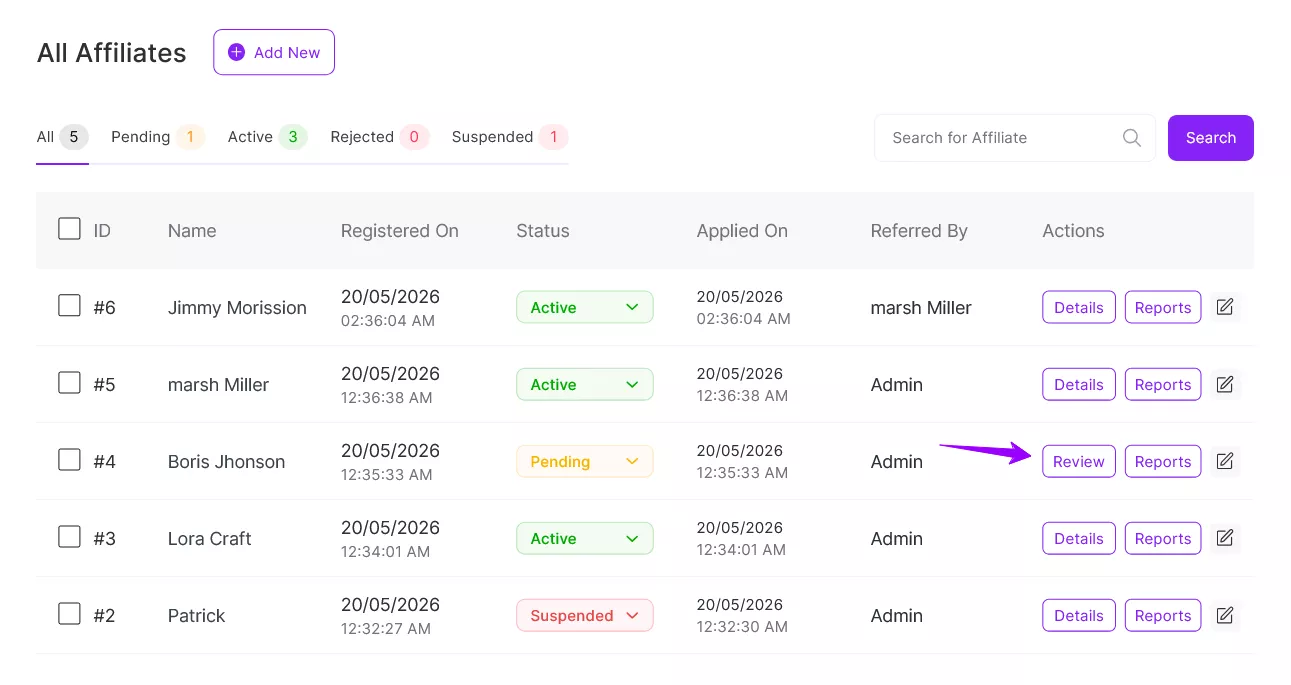
The vetting process doesn’t need to be involved: does this applicant have a real website, social presence, or email list? Does their audience match what you sell? Is their email from a real domain, not a throwaway? A basic check per application is enough to filter out most fraud attempts before they enter your program.
Rejecting a share of applicants is worth it. Fraud typically enters through volume: automated signups, throwaway email accounts, fake referral sources. Manual review breaks that pattern at the door.
Step 3: Set a Commission Holding Period
Hold commissions for 15–30 days before they’re eligible for payout.
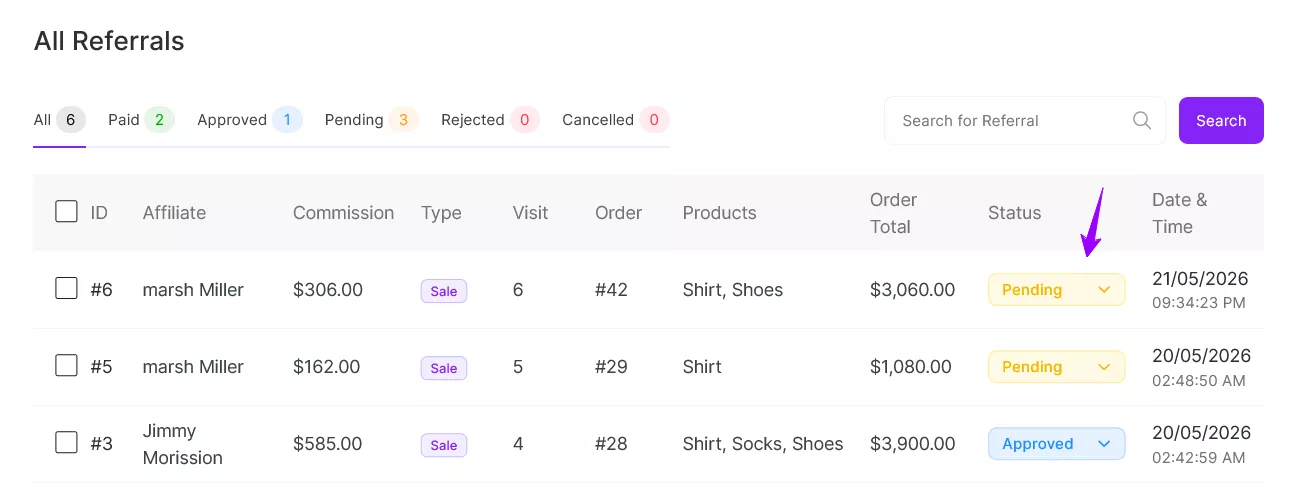
This single policy change closes the purchase-refund cycle almost entirely. By the time a commission becomes payable, your refund window has already closed. If an order is reversed, the commission reverses it before any payout happens. It’s also a signal to bad actors that your program is actively managed – most abuse at the WooCommerce store level gravitates toward easier targets.
Step 4: Use IP Logging to Spot Self-Referral Rings
WC Affiliate includes IP logging tied to each visit, making it significantly easier to identify situations where one person is operating multiple fake customer accounts through a single affiliate.
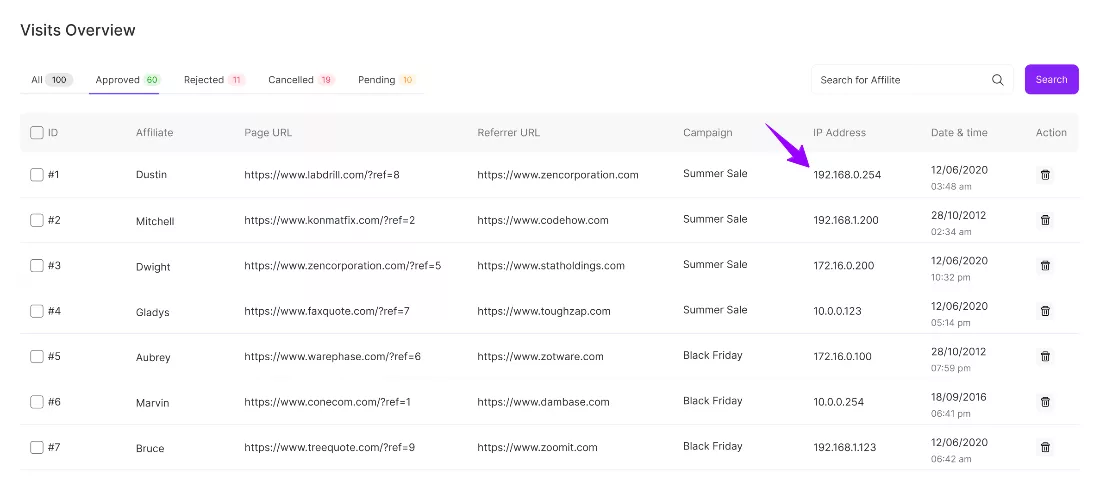
Flag any pattern where multiple orders or signups share the same IP address within a tight window. That rarely happens organically. When it does, investigate before approving any pending commissions associated with that affiliate.
Step 5: Shorten Your Cookie Duration
A 90-day cookie window gives fraudsters months of exposure. A cookie stuffed into a browser in week one can generate a commission in week eleven, long after any genuine referral intent would have expired. In WC Affiliate, you can easily customise your affiliate cookies independently.
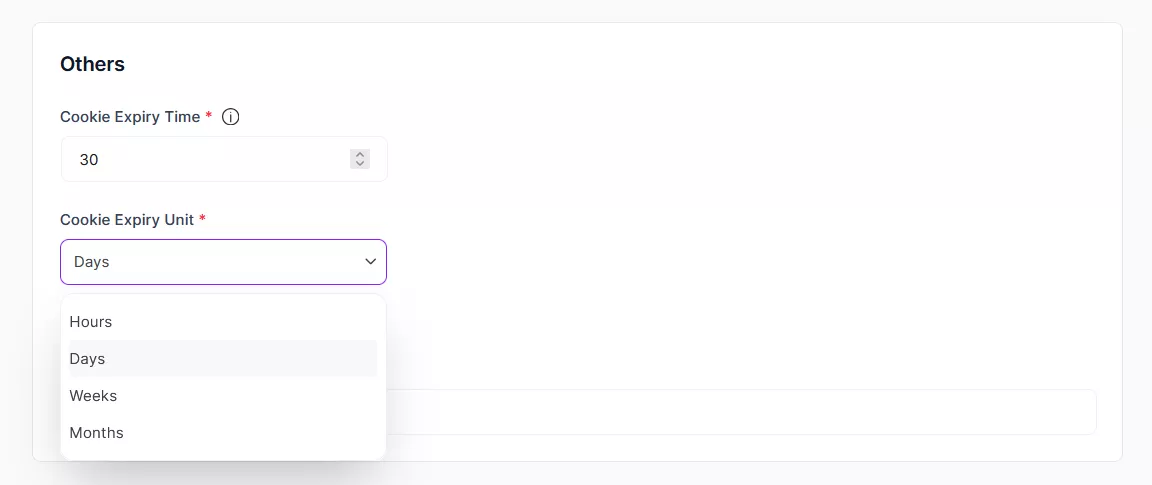
Shortening to 15–30 days closes that window meaningfully. Genuine referrals still get tracked: people who click a real affiliate’s recommendation and buy within a reasonable timeframe. The long-tail fraud window shrinks.
Step 6: Lock Down Coupon Codes in Your Affiliate Agreement
If you issue exclusive coupon codes, your agreement needs to explicitly prohibit posting them on public deal sites, Reddit, or open Facebook groups. Make the consequences clear. Assign unique codes per affiliate rather than using shared site-wide discounts.
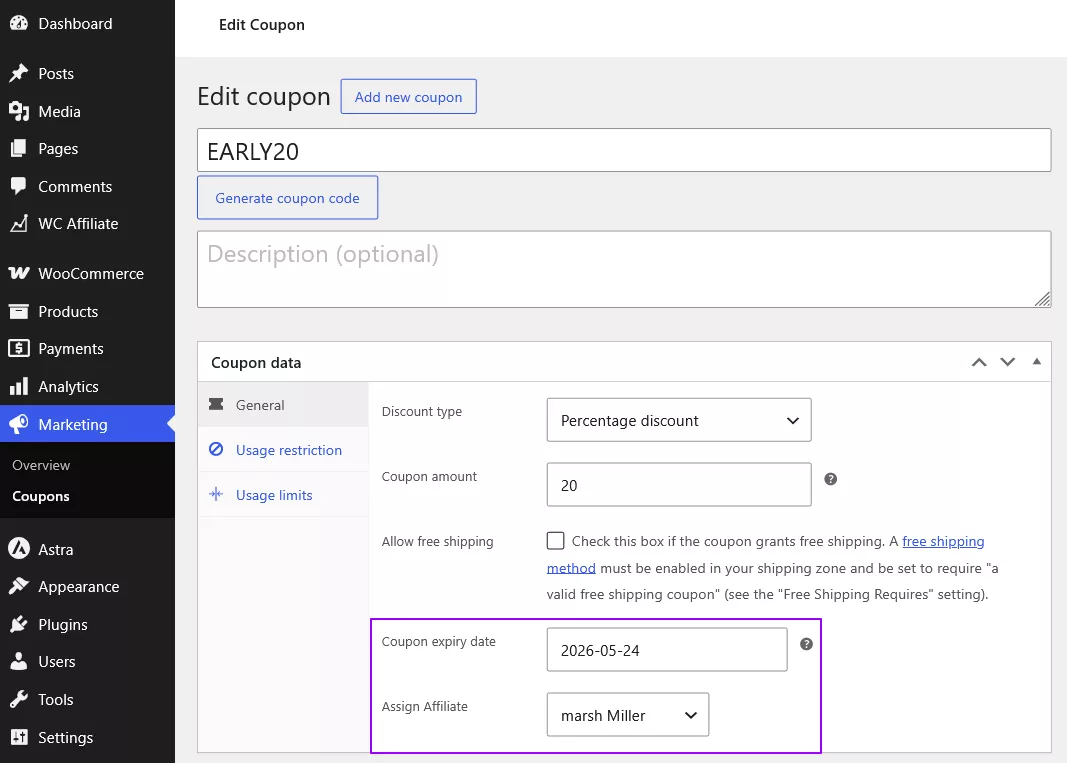
Make a quarterly search part of your routine: look up your active coupon codes on Google and major aggregator sites. If a code surfaces on RetailMeNot or a similar platform, you’ve found your leak, and you can act on it before the next payout cycle.
Final Words
Affiliate fraud in WooCommerce rarely arrives all at once. It shows up as a few unexplained refunds, a conversion rate that looks suspiciously high, and a new affiliate outperforming everyone else in their first week. By the time it’s obvious, it’s already been costly.
The fix isn’t complicated, and most of it happens at setup. Disable self-referrals before your first affiliate goes live. Require manual approval. Set a 15–30 day commission hold. Check per-affiliate conversion rates and refund patterns monthly. These aren’t advanced fraud prevention techniques. They’re basic hygiene that most WooCommerce programs skip.
WC Affiliate gives you the controls to put all of this in place: self-referral blocking in the free version, IP tracking in Pro, and commission management tools that make holding periods easy to enforce. If you’re building your WooCommerce affiliate program from scratch, or tightening up a program that’s already running, that’s where to start.
Grow Your Affiliate Business with WC Affiliate
Get practical tips, useful guides, product updates.
Frequently Asked Questions
Some prevention is possible on free plugin tiers. Disabling self-referrals, requiring manual approval, and setting commission holding periods are available in the free version of WC Affiliate and most comparable tools. IP logging and deeper referral pattern analysis generally require a Pro plan. For a small program with a handful of affiliates, free-tier controls may cover the highest-risk gaps. As your affiliate count grows, the lack of IP-level data becomes a real blind spot. You lose visibility into one of the clearest fraud signals available.
Self-referrals. The reason is straightforward: most WooCommerce affiliate plugins allow affiliates to earn commissions on their own purchases unless the store owner explicitly turns off this feature. Since it's often off by default and easy to overlook during setup, self-referral fraud can run undetected for months. It's also the simplest fix in this entire guide. One setting, enabled at launch, closes the gap entirely.
Not immediately. One anomalous data point might be a household member purchasing through a shared link, or a small, tightly targeted niche audience that converts at an unusually high rate for legitimate reasons. Look at the full picture over at least 30 days. Fraud almost always shows multiple signals stacking together, an elevated conversion rate, repeated IPs plus a high refund rate. A single flag warrants closer monitoring and possibly a direct conversation. A consistent pattern warrants termination and commission reversal.
WC Affiliate currently includes a self-referral blocking toggle in the free version, the most effective single control for preventing commission abuse, along with IP logging available in the Pro plan. A broader fraud prevention layer is actively in development, designed to flag suspicious referral sequences and duplicate click inflation before commissions are released. Pairing WC Affiliate's current controls with the manual monitoring steps in this guide covers the patterns most likely to affect a WooCommerce store right now.