


The Affiliate Management section allows admins to view, manage, and control all affiliates from a single dashboard. From here, you can track affiliate registrations, approval status, referrals, and performance reports.
Accessing Affiliates
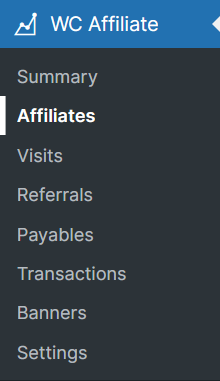
Navigate to WordPress Dashboard → WC Affiliate → Affiliates. This will open the All Affiliates page, where every registered affiliate is listed.
Affiliate Status Overview
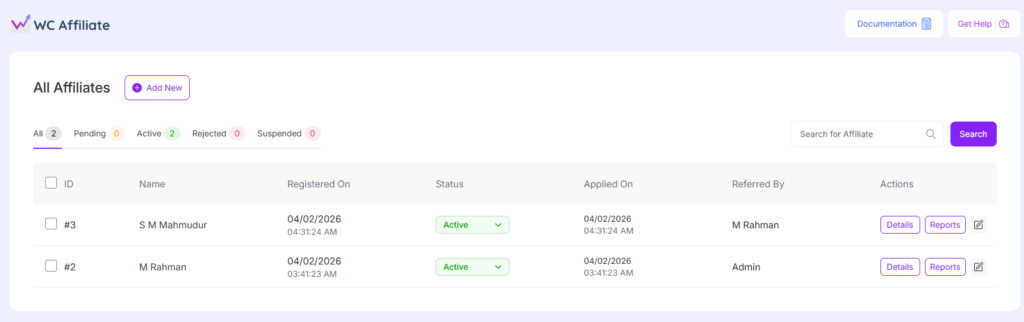
At the top of the page, affiliates are grouped by status for quick filtering:
- All – Displays all affiliates
- Pending – Affiliates waiting for admin approval
- Active – Approved affiliates who can generate referrals
- Rejected – Applications that were declined
- Suspended – Temporarily disabled affiliates
Each status tab shows the total number of affiliates under that category.
Affiliate List Columns
Each affiliate entry displays the following information:
- ID – Unique affiliate ID
- Name – Affiliate’s registered name
- Registered On – Date and time the affiliate account was created
- Status – Current affiliate status (Active, Pending, etc.)
- Applied On – Date and time the affiliate application was submitted
- Referred By – Referrer who invited the affiliate (Admin or another affiliate)
- Actions – Available management options
Affiliate Status Management
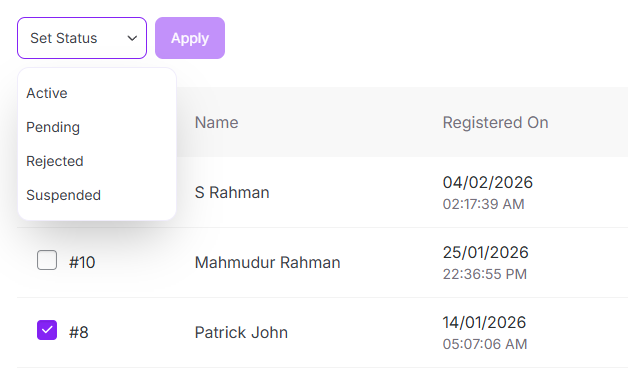
Admins can change an affiliate’s status directly from the Status dropdown:
- Pending → Awaiting approval
- Active → Approved and eligible for commissions
- Rejected → Application declined
- Suspended → Temporarily disabled
Status changes take effect immediately and control whether the affiliate can earn referrals.
Actions Available
Each affiliate row includes action buttons:
- Details – View full affiliate profile, account details, and settings
- Reports – Access affiliate performance reports, referrals, and earnings
- Review – (Pending affiliates only) Approve or reject applications.
- Edit Icon – Quick edit affiliate information
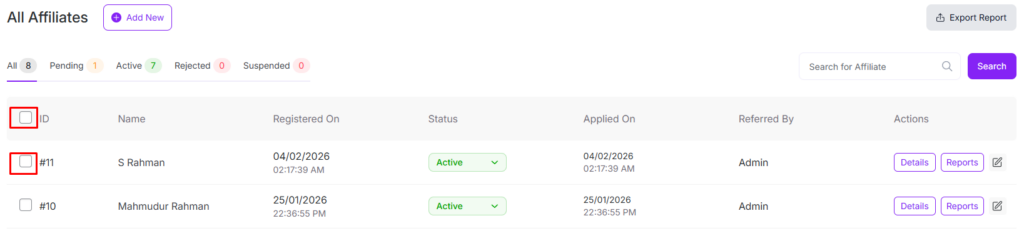
Bulk Action
Admins can change multiple affiliates’ status or a single affiliate by clicking the checkbox:
Add New Affiliate
Click the Add New button at the top of the page to manually create a new affiliate account. This is useful for inviting partners directly without requiring a registration form.
Search Affiliates
Use the Search for Affiliate field to quickly find affiliates by name or ID.
Was this doc helpful?