


Home » Admin Dashboard » Affiliate Details
The Affiliate Details page provides a complete overview of an individual affiliate’s profile and current status. Admin can use this page to review affiliate information, verify referral sources and monitor account activity.
Accessing Affiliate Details
Navigate to WC Affiliate → Affiliates → Click on Details. This will open the Affiliate Details page.
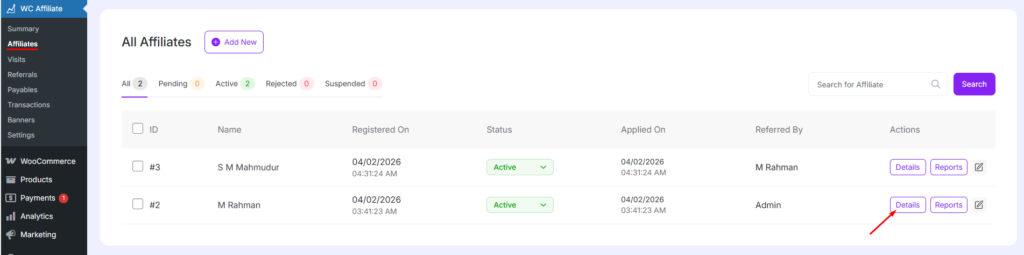
Affiliate Information Fields
Name: Displays the full name of the affiliate registered in the system.
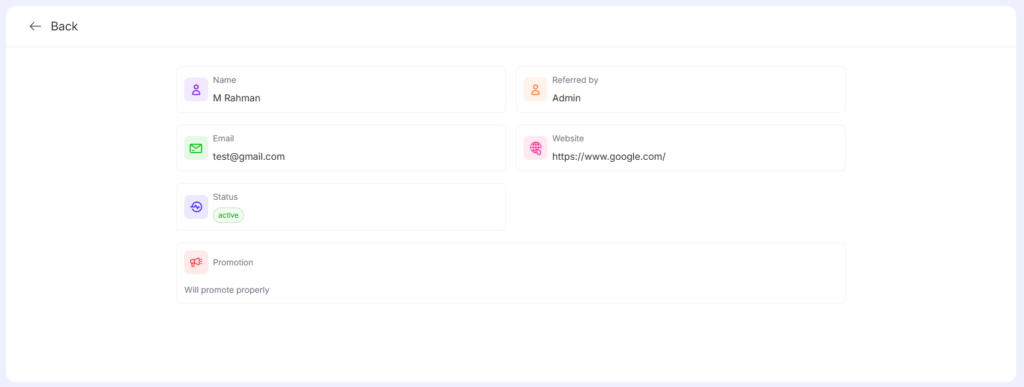
Referred By: Shows who referred this affiliate.
- Admin means the affiliate was added manually by an administrator.
- If another affiliate referred them, that affiliate’s name will appear here.
Email: The registered email address of the affiliate.
This email is used for:
- Account identification
- Notifications
- Affiliate-related communications
Website: Displays the affiliate’s website URL if provided during registration.
- If no website was added, this field will show empty.
- Useful for reviewing how affiliates promote your products.
Status: Indicates the current account status of the affiliate.
Possible statuses include:
- Active – Affiliate is approved and can earn commissions
- Pending – Awaiting admin approval
- Rejected – Affiliate is not allowed to participate
Was this doc helpful?