


The Visits Overview page gives you a detailed, real-time log of every tracked visit generated by your affiliates. This section helps you monitor traffic quality, identify converting visits, and detect unusual activity.
Note: You have to sign in to your affiliate account to see the overview of your visit activity.
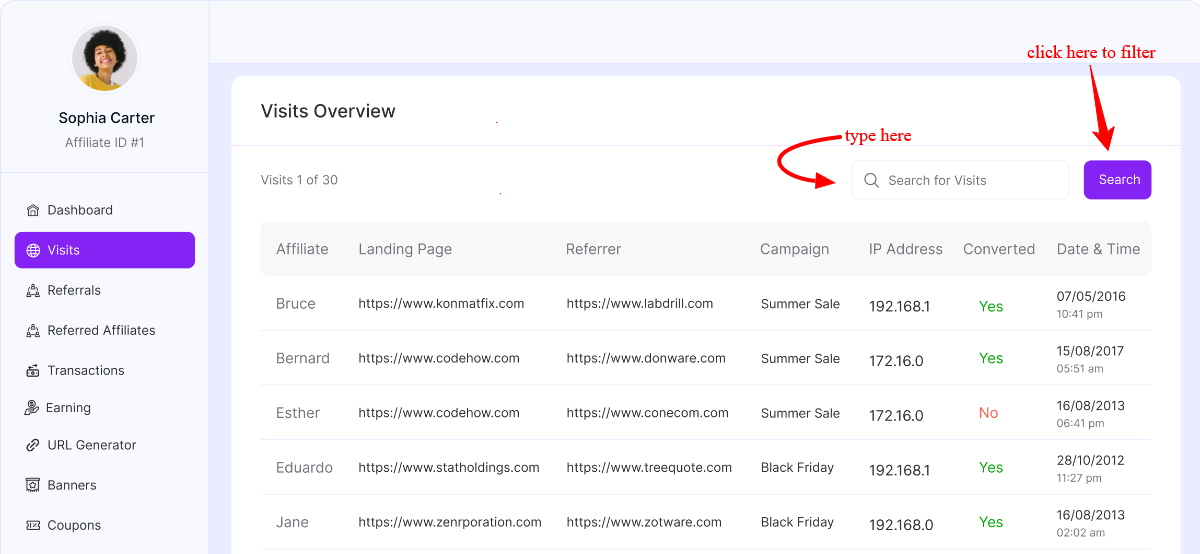
Search & Filtering: At the top of the page, you’ll find a search field that allows you to locate specific visits quickly. You can search by:
- Affiliate name
- Landing page URL
- Referrer URL
- Campaign name
This is especially useful when investigating a specific campaign or reviewing traffic from a particular affiliate.
Visits Table Breakdown
Each row in the table represents a single tracked visit. The columns provide detailed information about that visit:
Affiliate: Displays the affiliate responsible for generating the visit. This helps you track individual affiliate performance at the click level.
Landing Page: Shows the exact URL of the page the visitor landed on after clicking the affiliate link. Use this to identify which product or content pages receive traffic and which landing pages are attracting the most engagement.
Referrer: Indicates the source from which the visitor came. Like direct traffic, external websites, blog posts, and social media platforms. This helps you understand where affiliates are promoting your store.
Campaign: Displays the campaign name associated with the visit (if campaign tracking is used). This allows you to compare campaign performance, measure traffic from specific promotions, and identify which campaigns lead to conversions
IP Address: Shows the visitor’s IP address. This is useful for detecting suspicious or repeated traffic, identifying potential click fraud, and reviewing duplicate visit patterns
Converted: Indicates whether the visit resulted in a successful referral (conversion).
- Yes → The visit led to a tracked referral.
- No → The visit did not result in a referral.
This column helps you quickly evaluate traffic quality at the individual visit level.
Date & Time: Displays the exact timestamp of the visit. You can use this to track peak traffic hours, monitor campaign launch timing, and investigate unusual spikes in activity
Was this doc helpful?