


The Referrals Overview page provides a complete record of all affiliate-generated referrals. As an affiliate, you can monitor your sales, review commission amounts, and manage payment statuses with full transparency. Each row represents a single referral tied to a completed or pending order.
You can access this section from the Affiliate dashboard → Referrals
Search & Filtering: At the top of the page, you’ll find a search field that helps you quickly locate specific referrals. You can search by:
- Order ID
- Product name
- Referral type
- Commission amount
This is especially helpful when reviewing a specific transaction or verifying a payout.
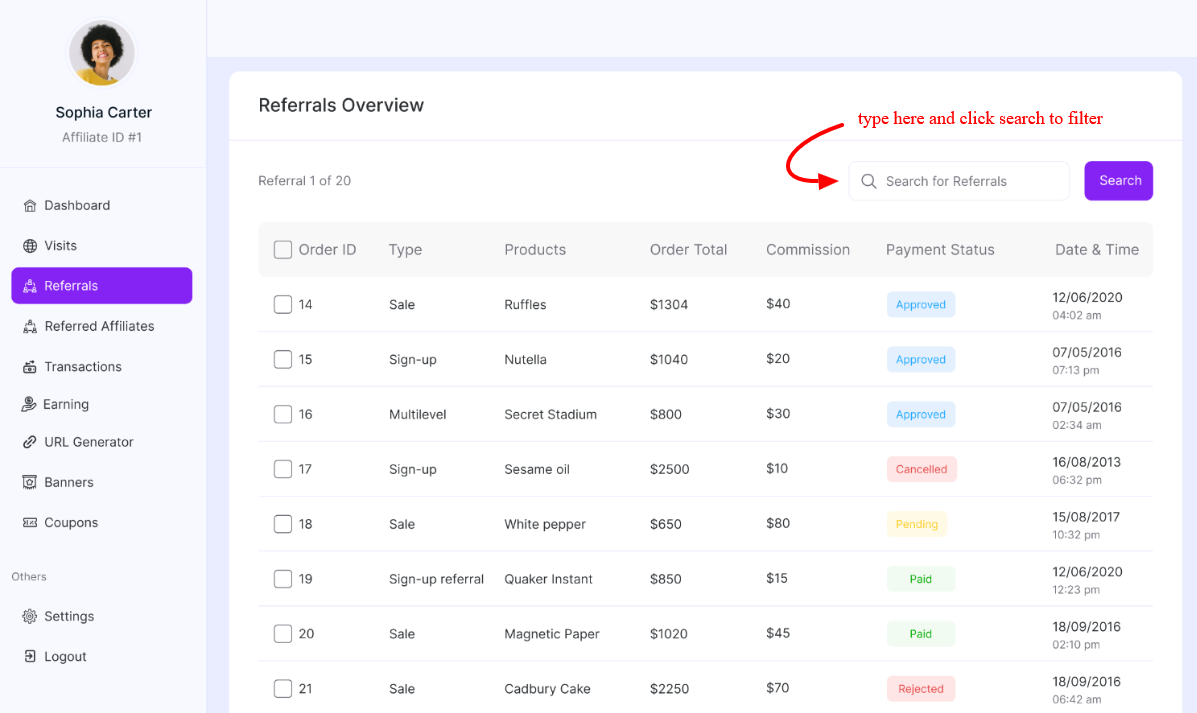
Referrals Table Breakdown
Order ID: Displays the WooCommerce order number associated with the referral. This allows you to cross-check referral data directly with the corresponding store order.
Type: Indicates the type of referral. The Common types may include Sale, sign-up referral, and multi-level (if enabled). This helps differentiate between revenue-generating referrals and other conversion types.
Products: Shows the product(s) included in the order. This enables you to identify which products you are successfully promoting and evaluate performance at the product level.
Order Total: Displays the full order value generated by the referral. This reflects the customer’s total purchase amount before commission calculation.
Commission: Shows the exact commission earned from the order. The commission is calculated based on your configured commission rules (global, affiliate-specific, or product-based).
This column helps you verify:
- Accurate commission calculation
- Revenue contribution per affiliate
- High-value referrals
Payment Status: Indicates the commission’s current status. This allows you to manage payouts and maintain clear financial records. Common statuses include:
- Approved → Eligible for payout
- Pending → Awaiting approval or order confirmation
- Rejected → Not eligible for commission
- Paid → Commission has been successfully paid
Date & Time: Displays the exact timestamp when the referral was recorded. This helps you monitor sales activity in real time, track campaign timing, and analyze peak conversion periods
Was this doc helpful?