


The Referred Affiliates section allows affiliates to track the users they have successfully referred to join your affiliate program. This feature is especially useful if you offer multi-level or referral-based affiliate incentives. Each entry in this table represents an affiliate who signed up through another affiliate’s referral link. Below is a detailed breakdown of the information displayed.
Note: To check your referred affiliates, sign into your affiliate account and navigate to the Referred Affiliates tab.
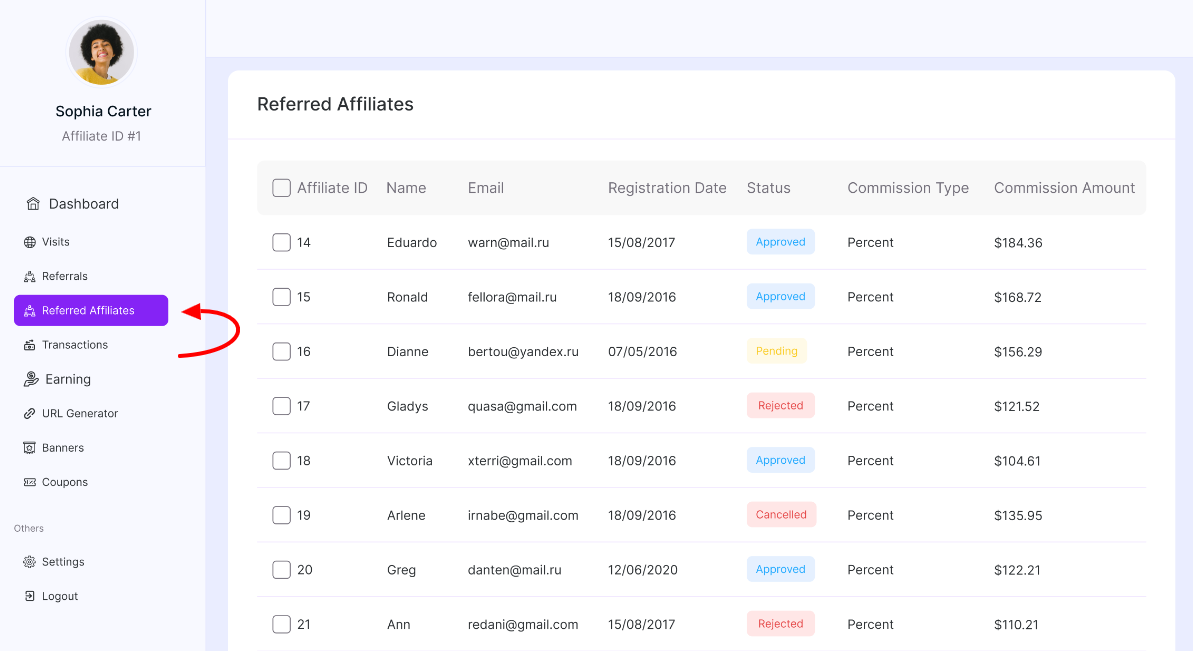
Table Overview
Affiliate ID: Displays the unique ID assigned to the referred affiliate. This helps you quickly identify and manage specific affiliates within your system.
Name: Shows the full name of the referred affiliate. This allows the referring affiliate to see exactly who joined through their referral link.
Email: Displays the registered email address of the referred affiliate. Useful for identification and verification purposes.
Registration Date: Indicates the date the affiliate completed their registration. This helps track growth trends and measure recruitment performance over time.
Status: Shows the approval status of the referred affiliate. Common statuses include:
- Pending → Awaiting admin approval
- Approved → Eligible to start promoting
- Rejected → Registration not approved
- Cancelled → Access revoked or application withdrawn
This gives visibility into whether the referred affiliate is active in the program.
Commission Type: Displays the commission structure assigned to the referred affiliate. For example, Percent and Fixed. This reflects how commissions are calculated for that affiliate.
Commission Amount: Shows the commission rate or amount assigned to the referred affiliate. For percentage-based commissions, this indicates the percentage value. And for fixed commissions, it represents the fixed payout amount per referral.
Was this doc helpful?