


The Banners section in the Affiliate Dashboard provides ready-to-use promotional creatives that affiliates can embed directly on their websites, blogs, or landing pages. These banners are pre-designed by the store owner and automatically include the affiliate’s unique tracking information.
To access banners, you have to go to Affiliate Dashboard → Banners
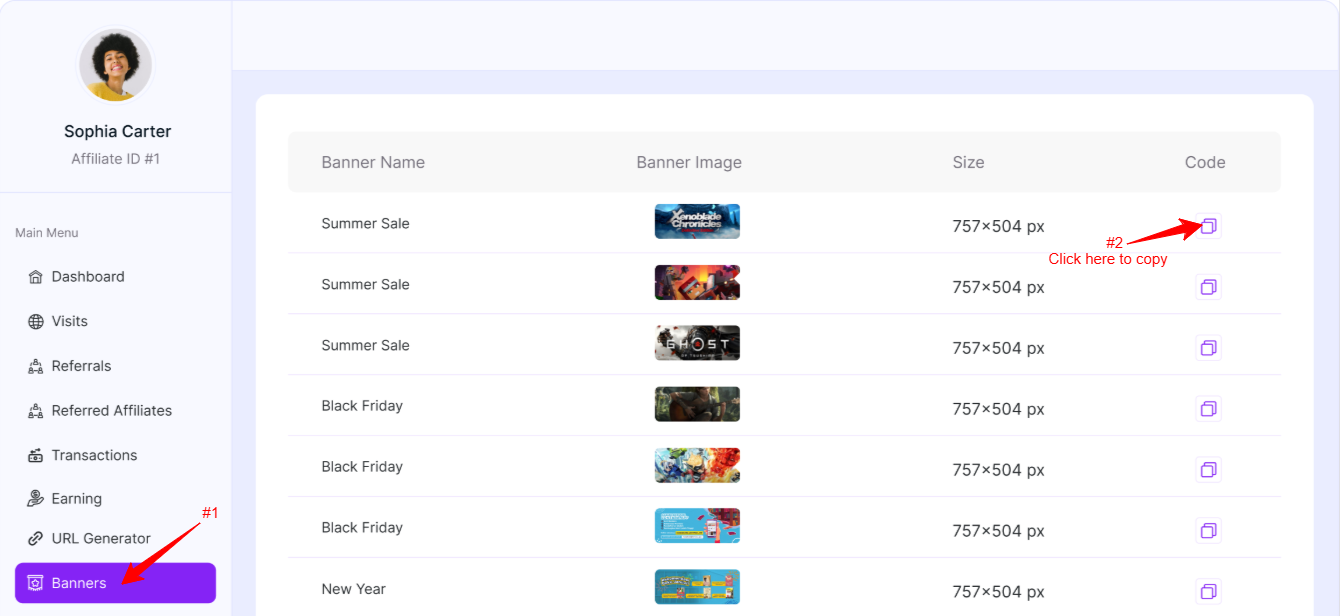
Table Overview
Each row represents a promotional banner available for the affiliate.
Banner Name: Displays the campaign or promotion name associated with the banner (for example, seasonal promotions or special sales events). This helps affiliates quickly identify which banner fits their current campaign.
Banner Image: Shows a preview of the banner creative. Affiliates can visually confirm the design style, offer messaging, and campaign relevance. This ensures the banner aligns with their audience and content.
Size: Indicates the exact banner dimensions in pixels (e.g., 757×504 px). Knowing the size helps affiliates:
- Place banners correctly within their website layout
- Choose the right placement area (sidebar, header, blog content, etc.)
- Avoid design or responsiveness issues
Code: Provides the embed code for the banner. With one click, affiliates can copy the banner code, paste it into their website HTML, widget area, or page builder
The banners displayed in the Affiliate Dashboard are created and managed by the store owner or admin from Admin Dashboard. Once a banner is created and published by the admin, it automatically becomes visible to all affiliates inside their Affiliate Dashboard under the Banners section.
To learn how to create and manage banners from the admin side, please go to the Admin Banner Creation page.
Was this doc helpful?