


The Settings page allows you to manage your personal information, payout preferences, and account security. From this page, you can:
- Update your personal information
- Change your password
- Select your preferred payout method
- Provide payment details
- Upload or update your profile image
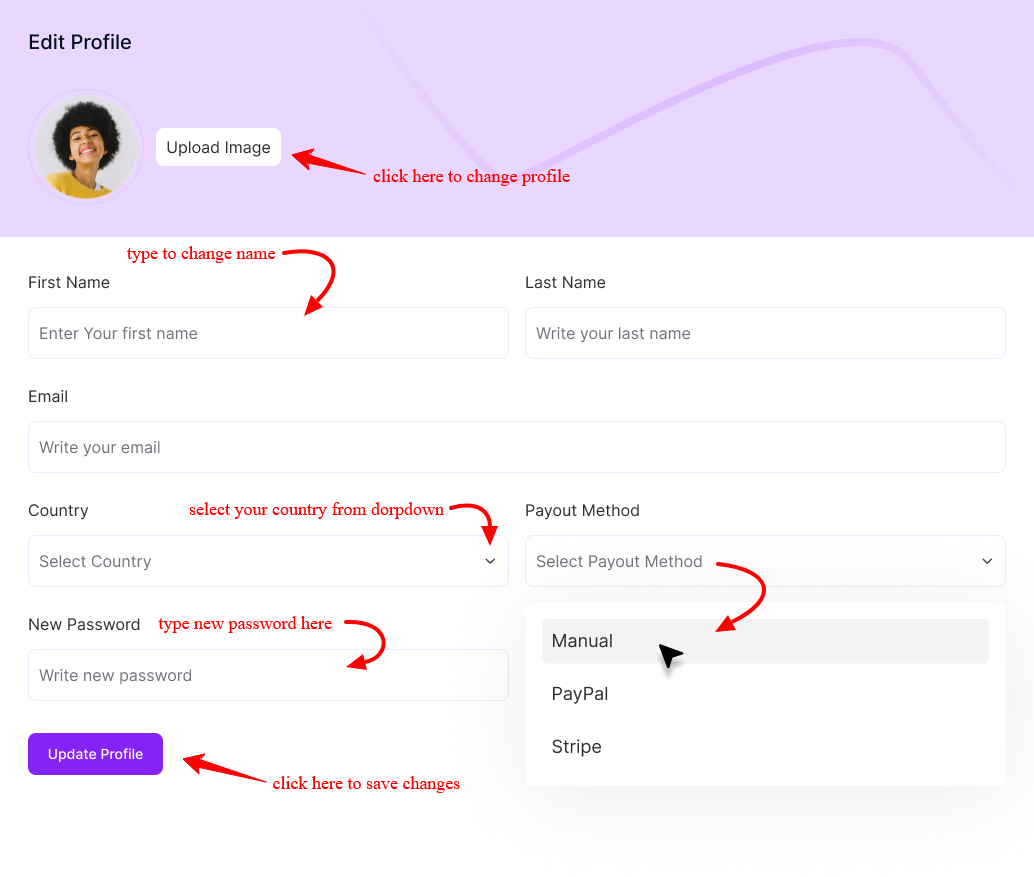
Profile Information Breakdown
Profile Image: Upload a profile picture to personalize your affiliate account.
First Name & Last Name: Update your name as it should appear in your affiliate profile.
Email: Enter a valid email address to receive notifications, payout updates, and important account communications.
Country: Select your country of residence. This may affect payout methods and compliance requirements.
Security Settings
New Password: Enter a new password if you wish to update your account credentials. Choose a strong password to keep your account secure.
Payout Settings
Payout Method: Select your preferred payout method. Available options may include:
- Manual – Processed directly by the store admin
- PayPal – Sent to your PayPal account
- Stripe – Processed via Stripe-supported transfers
Bank Information: Provide your payment details based on the selected payout method. For bank transfers, include information such as:
- Account holder name
- Bank name
- Account number
- Routing/IBAN/SWIFT code (if applicable)
Ensure all payment details are accurate to avoid delays in payout processing.
Updating Your Profile
After making changes, click Update Profile to save your settings. Your updated information will be applied immediately once saved. Keeping your affiliate settings accurate helps ensure smooth payouts and uninterrupted account access.
Was this doc helpful?