


Overview
The Advanced Settings section in WC Affiliate allows you to control how affiliate tracking behaves at a technical level. From referral key customization to cookie control and fraud-prevention options, this panel gives you deeper flexibility over how visits and referrals are recorded.
You can access this section from WP Admin → WC Affiliate → Settings → Advanced Settings
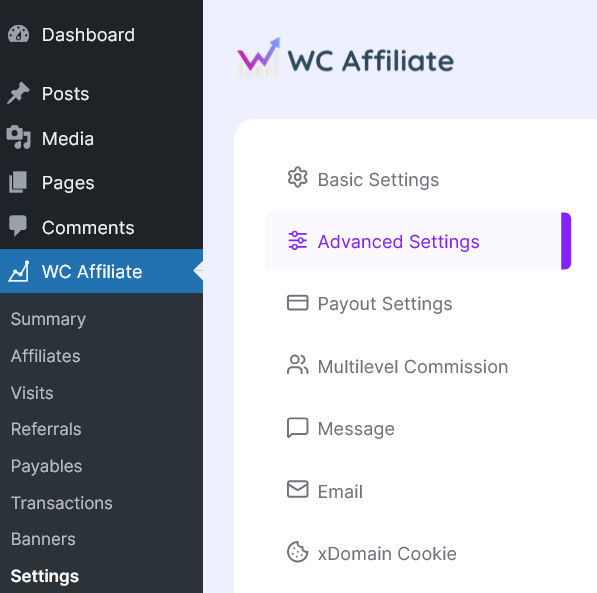
Below is a complete overview of every option available inside this panel.
Referral Settings
This section defines how affiliate tracking works through URL parameters and cookies.
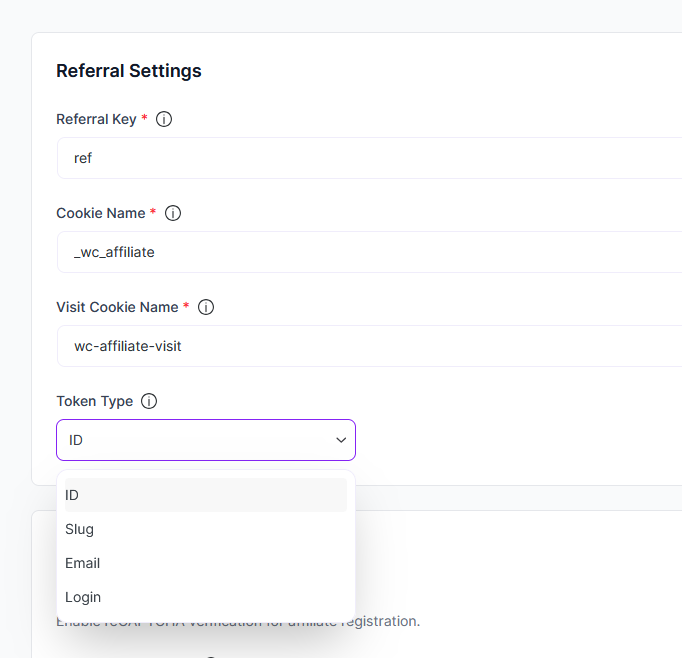
Referral Key: The Referral Key determines the URL parameter used for affiliate tracking. Example: If your referral key is set to ref, affiliate links will look like:
https://yourstore.com/?ref=affiliate_idYou may customize this value if you prefer a different parameter name.
Note: Changing this setting may affect existing affiliate links.
Cookie Name: This defines the name of the primary tracking cookie stored in the visitor’s browser. The cookie stores affiliate identification data so referrals can be attributed correctly within the cookie validity period. You should only modify this if:
- You need custom naming for compatibility reasons
- You are resolving conflicts with other plugins
Visit Cookie Name: This cookie tracks the recorded visit separately from referral conversion. It helps:
- Count unique visits
- Prevent duplicate visit tracking
- Improve reporting accuracy
Like the main cookie name, this should only be changed if you have a specific technical requirement.
Token Type: The Token Type determines how affiliate identifiers are generated and passed in referral URLs. Available options may include:
- ID-based tokens
- Other unique identifiers (depending on system configuration)
Changing the token type affects how affiliate links are structured and interpreted.
My Account
This section controls account-level protections and referral behavior rules.
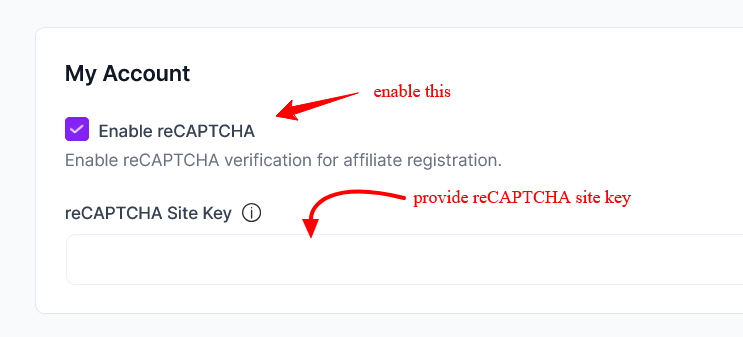
Enable reCAPTCHA: Enable this option to add Google reCAPTCHA verification to the affiliate registration form. This helps:
- Prevent spam registrations
- Block automated bot submissions
- Maintain affiliate program integrity
Once enabled, you must provide a valid:
- reCAPTCHA Site Key
For a complete overview, you can see this tutorial on how to set recaptcha.
reCAPTCHA Site Key: Enter your Google reCAPTCHA site key here to activate the verification system. Make sure your domain is properly configured in your Google reCAPTCHA account.
Other Settings Overview
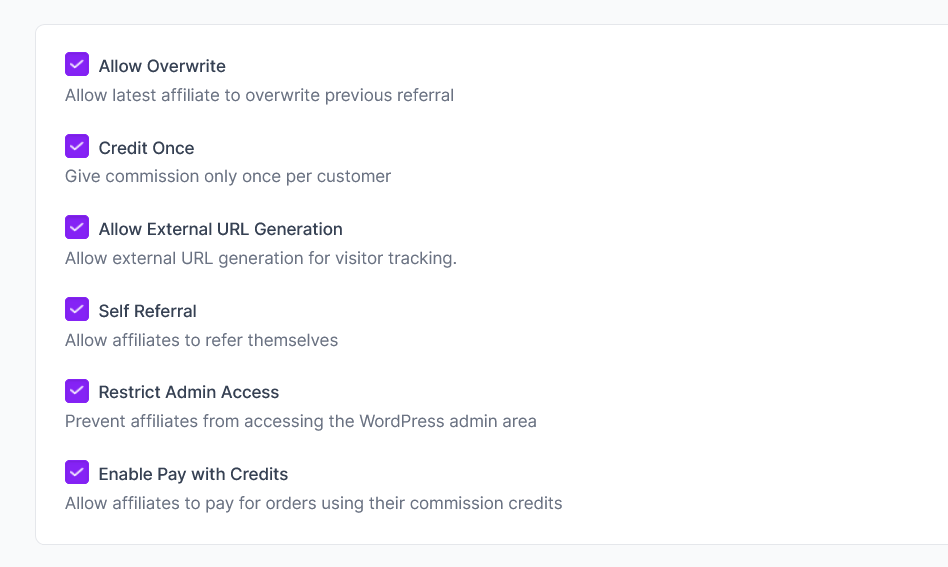
Allow Overwrite: When enabled, the most recent affiliate link clicked by a visitor will overwrite the previous affiliate cookie. When disabled, the first affiliate referral will be preserved. This determines whether your system uses:
- Last-click attribution
- First-click attribution
Credit Once: Enable this option to allow commission to be granted only once per customer. This is useful if you want to:
- Prevent repeated commissions from the same buyer
- Reward affiliates only for first-time customer acquisition
Allow External URL Generation: Enable this to allow affiliates to generate tracking URLs for external pages. This is useful when:
- Running campaigns outside your main domain
- Tracking traffic from landing pages or microsites
Self Referral:
Enable this option to allow affiliates to earn commission on their own purchases. Disable it if you want to prevent affiliates from referring themselves.
Restrict Admin Access: When enabled, affiliates cannot access the WordPress admin dashboard. This is recommended to:
- Improve security
- Prevent unauthorized backend access
- Keep affiliates limited to their frontend dashboard
Enable Pay with Credits: Allow affiliates to use their earned commission balance as store credit. When enabled, affiliates can:
- Redeem commission credits
- Apply them toward product purchases
This can increase retention and encourage affiliates to become customers.
WC Tab Settings
The Tab Settings section allows you to control how the affiliate dashboard appears within the My Account page of WooCommerce. This feature is available only after activating a valid license
1. Enable Tab
This option lets you display the affiliate dashboard as a separate tab inside the WooCommerce My Account page.
- Enabled: The affiliate tab will be visible to users in their account dashboard.
- Disabled: The affiliate tab will not be shown.
Enable this option if you want affiliates to easily access their dashboard from their account page.
2. Tab Slug
The Tab Slug defines the URL endpoint for the affiliate tab.
- Default:
affiliate - Example URL:
https://yourwebsite.com/affiliate
Important Notes:
- The slug should be unique and URL-friendly (no spaces).
- After changing the slug make sure to update permalinks:
- Go to Settings → Permalinks
- Click Save Changes
3. Tab Label
The Tab Label is the visible name of the tab shown in the My Account menu.
- You can customize it based on your preference, such as:
- “My Affiliate Panel”
- “Affiliate Dashboard”
- “Download”
Final Step
After making changes in Advanced Settings:
- Click Save Settings
- Test your referral links
- Verify cookie behavior
- Confirm registration flow (if reCAPTCHA is enabled)
Advanced Settings are powerful. You should change them carefully, especially tracking-related options, as they directly affect how referrals are recorded. If you are unsure about modifying tracking parameters or cookies, consider testing changes in a staging environment before applying them to your live site.
Was this doc helpful?