


The Short Links feature allows affiliates to generate clean, branded, and easy-to-share links instead of long affiliate URLs. This improves link appearance, increases trust, and boosts click-through rates.
To access Short Link settings: WordPress Dashboard → WC Affiliate → Settings → Shortlinks
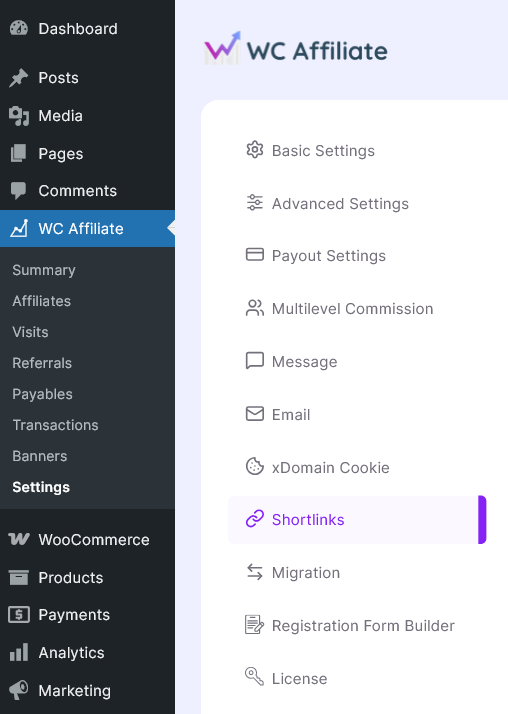
Shortlinks Settings
In this section, you will find all the necessary settings related to the shortlink.
Note: This is a pro feature of WC Affiliate. If you want to enable this, purchase WC Affiliate Pro and follow the next procedure.
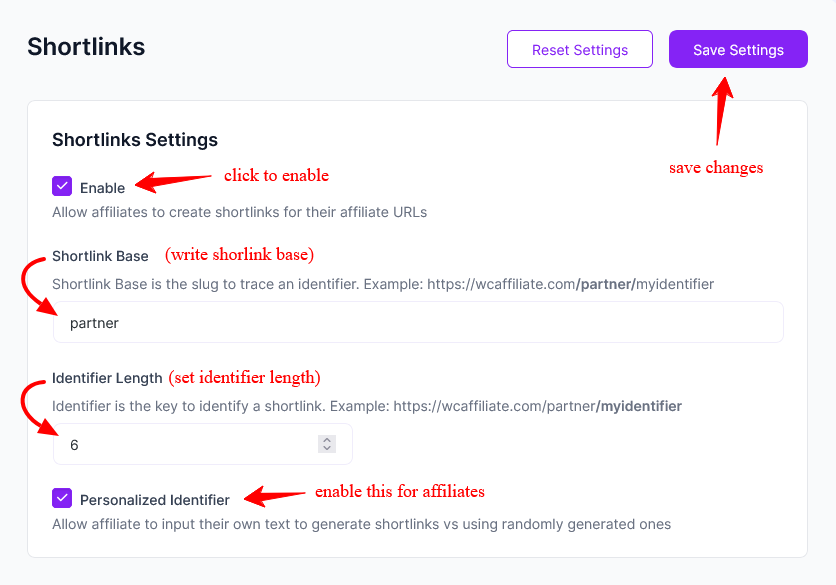
Enable: When enabled, affiliates can create short links for their affiliate URLs from their dashboard.
- If disabled, the short link feature will not be available to affiliates.
- Tracking continues to work normally for standard referral links.
Short link Base: This defines the URL slug used for all short links. If you set the Shortlink Base to partner, your short links will look like:
https://yourwebsite.com/partner/identifier
Use a short, branded slug like go, partner, refer, promo, etc. Avoid using slugs that conflict with existing WordPress pages.
Identifier Length: This setting controls the length of the randomly generated short link identifier. For example If the identifier is set to 6, the link will look like:
https://yourwebsite.com/partner/a8f3k2
Important Notes:
- Longer identifiers increase uniqueness and security.
- Shorter identifiers are cleaner but slightly more predictable.
- Recommended length: 6–8 characters
Personalized Identifier: When enabled, affiliates can create custom short link identifiers instead of using randomly generated ones. Check the example below:
https://yourwebsite.com/partner/johnpromo
Instead of:
https://yourwebsite.com/partner/x7k2p9
Important: Identifiers must be unique. Always avoid allowing sensitive or restricted keywords and consider moderating custom identifiers if necessary.
Reset & Save Settings
- Save Settings – Applies all changes immediately.
- Reset Settings – Restores the default short link configuration.
How Shortlinks Work
- Affiliate generates a short link.
- Visitor clicks the short link.
- WC Affiliate redirects the visitor to the original affiliate URL.
- The referral is tracked as usual.
- Commission is credited upon successful purchase.
There is no change to your existing commission rules or tracking logic. If you need additional help, refer to the main WC Affiliate documentation, contact support, or post in the community for faster responses.
Was this doc helpful?