
You recruit a promising affiliate, approve their application, and expect them to start promoting. But weeks later, they still haven’t shared a referral link, generated a click, or made a sale.
This is where affiliate onboarding matters. It helps new affiliates understand your program, find their referral links, learn how commissions and tracking work, and know exactly what to do next.
For WooCommerce stores, WC Affiliate can bring registration, approvals, tracking, commissions, promotional tools, and payouts into one workflow.
Let’s walk through a practical affiliate onboarding process that takes a new partner from signup to their first promotion and, ideally, their first sale.
What Is Affiliate Onboarding?

Affiliate onboarding is the process of helping a newly approved affiliate understand your program and start promoting your products correctly.
It usually covers dashboard access, referral links, commission rates, tracking, payout rules, promotional resources, program policies, and the affiliate’s first action.
It sits between affiliate approval and affiliate activation.
| Stage | What happens |
| Affiliate recruitment | You find suitable potential partners |
| Affiliate signup | They apply to join your program |
| Affiliate approval | You decide whether to accept them |
| Affiliate onboarding | You give them what they need to start |
| Affiliate activation | They begin generating clicks, referrals, or sales |
The distinction matters because an approved affiliate is not necessarily an active affiliate. You can have plenty of registered affiliates while only a small percentage actually send traffic or sales.
A good onboarding process closes that gap.
Affiliate Registration vs Affiliate Onboarding
Affiliate registration and affiliate onboarding are connected, but they solve different problems.
Affiliate registration gets someone into the program. The affiliate fills out an application, provides their details, agrees to your terms, and submits the application for approval.
Affiliate onboarding helps them use the program. Once approved, they need to know where to log in, how to create referral links, what they will earn, when they get paid, and what they should promote first.
| Affiliate registration | Affiliate onboarding |
| Collects affiliate information | Helps the affiliate start promoting |
| Happens before approval | Usually begins after approval |
| Includes the application form | Includes dashboard access and guidance |
| Confirms program terms | Explains how the program works |
| Gets someone into the program | Helps them become an active partner |
If you are still building the registration side, start with our guide on how to create an affiliate sign-up page in WooCommerce.
The common mistake is treating registration as the finish line. An application tells you someone wants to join. It does not mean they know how to become a productive affiliate.
Why Affiliate Onboarding Matters
Every new affiliate arrives with the same six questions:
- How much will I earn?
- Where is my referral link?
- How long does the tracking cookie last?
- When will I get paid?
- Which product should I promote?
- What am I not allowed to do?
When those answers are hard to find, three things cost you money:
- Lost revenue. Affiliates lose momentum before they publish anything, so the recruitment effort produces no sales.
- Support load. Your team answers the same dashboard, commission, and payout questions one affiliate at a time.
- Compliance risk. Affiliates who don’t know your rules make misleading claims, misuse coupons, or skip disclosures, which leads to disputes and reversed commissions.
Onboarding does not need to teach everything on day one. It needs to get the affiliate through one complete promotion and show them what happens after someone clicks.
7-Step Affiliate Onboarding Process With WC Affiliate
A good affiliate onboarding process should be ready before the first partner is approved. That means setting up the dashboard, commission rules, tracking, and payouts first. Once the system is ready, you can approve affiliates, send the right onboarding email, and guide them toward their first promotion.
If you have not configured the program yet, see our WooCommerce affiliate program setup guide first.
Here is a practical step-by-step onboarding flow with WC Affiliate.
1. Set Up the Affiliate Dashboard
Start by creating the place where affiliates will manage their account.
Go to: WordPress Dashboard → WC Affiliate → Setup Wizard
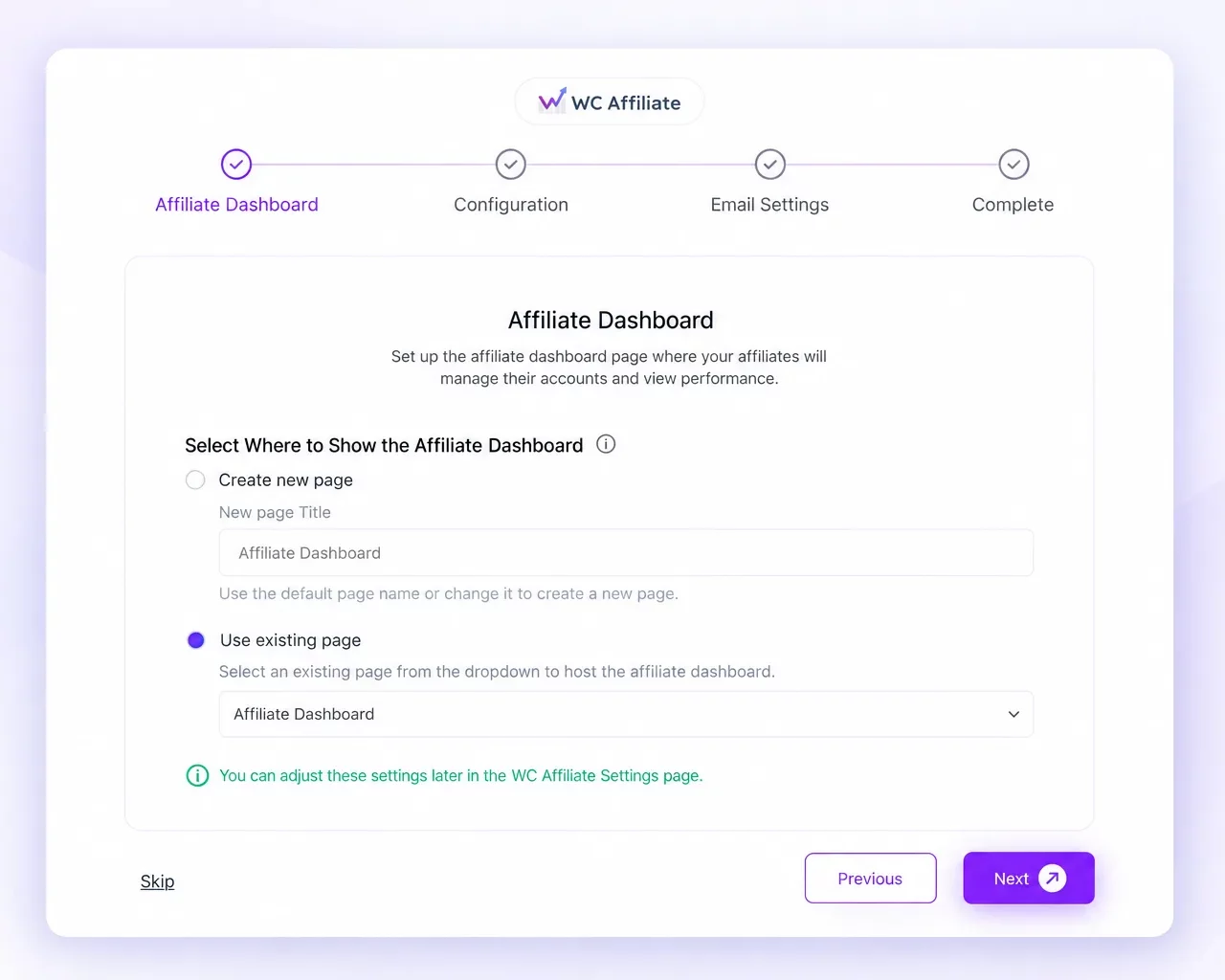
During the Affiliate Dashboard step, you can create a new dashboard page or select an existing WordPress page.
This dashboard becomes the main workspace for approved affiliates. They can use it to check visits, referrals, commissions, paid and unpaid earnings, referral links, and other account activity.
Before moving forward, create a test affiliate account and go through the dashboard yourself. Generate a referral link, open it from another browser session, and make sure the visit appears correctly.
For a deeper look at attribution and referral tracking, see our WooCommerce affiliate tracking guide.
Once the dashboard is ready, the next step is deciding how affiliates will earn and get paid.
2. Configure Commission, Tracking, and Payout Rules
Before approving anyone, make sure the money side of the program is clear.
Set Your Commission
During the WC Affiliate Setup Wizard, you can configure:
- Commission base
- Percentage or fixed commission
- Default commission amount
- Cookie expiry
You can update these settings later from:
WC Affiliate → Settings → Basic Settings
For example:
Commission type: Percentage
Commission amount: 20%
Cookie duration: 30 days
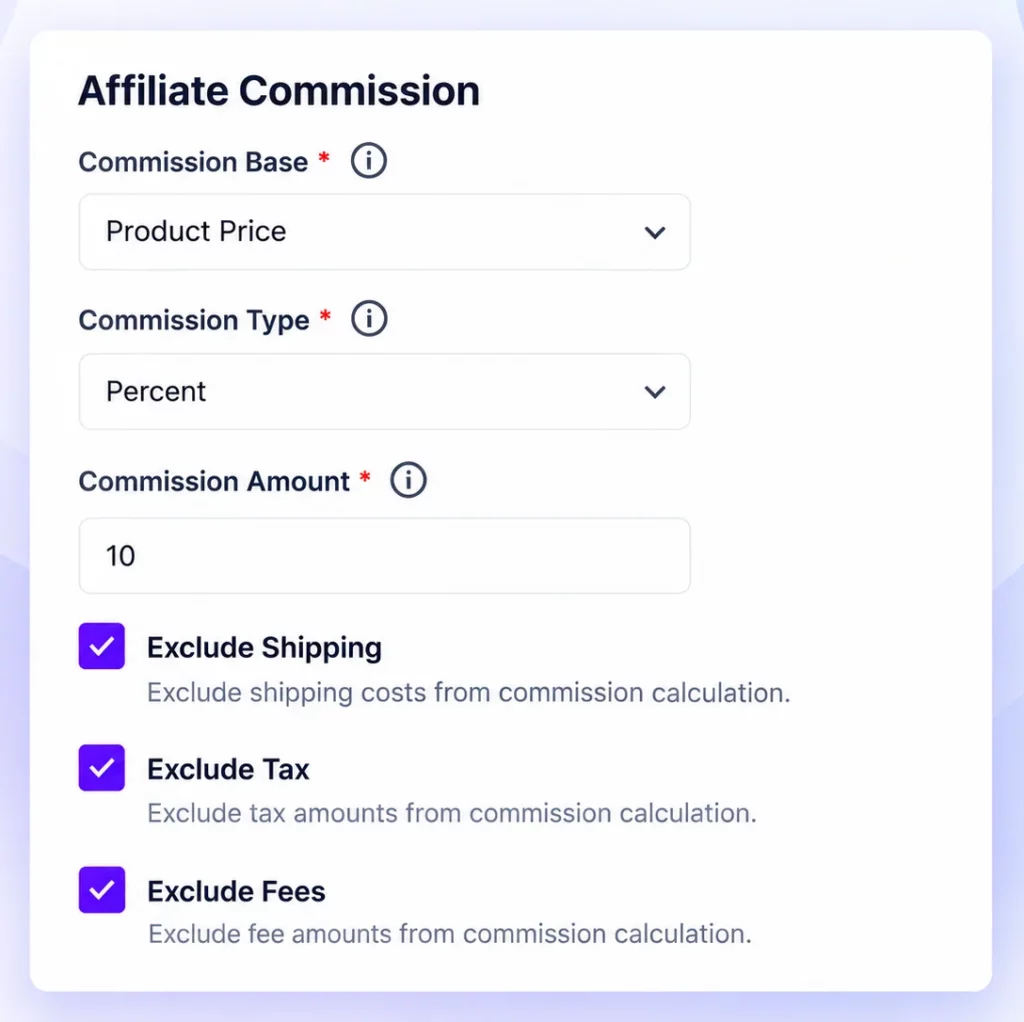
You should also decide whether shipping, taxes, or fees count toward the commission calculation.
As your program grows, you may want to use different rates for selected affiliates or products. Our guide to custom affiliate commission rates explains when that makes sense.
Configure Referral Tracking
WC Affiliate uses referral links and cookies to connect visits with conversions.
Advanced tracking options are available under: WC Affiliate → Settings → Advanced Settings
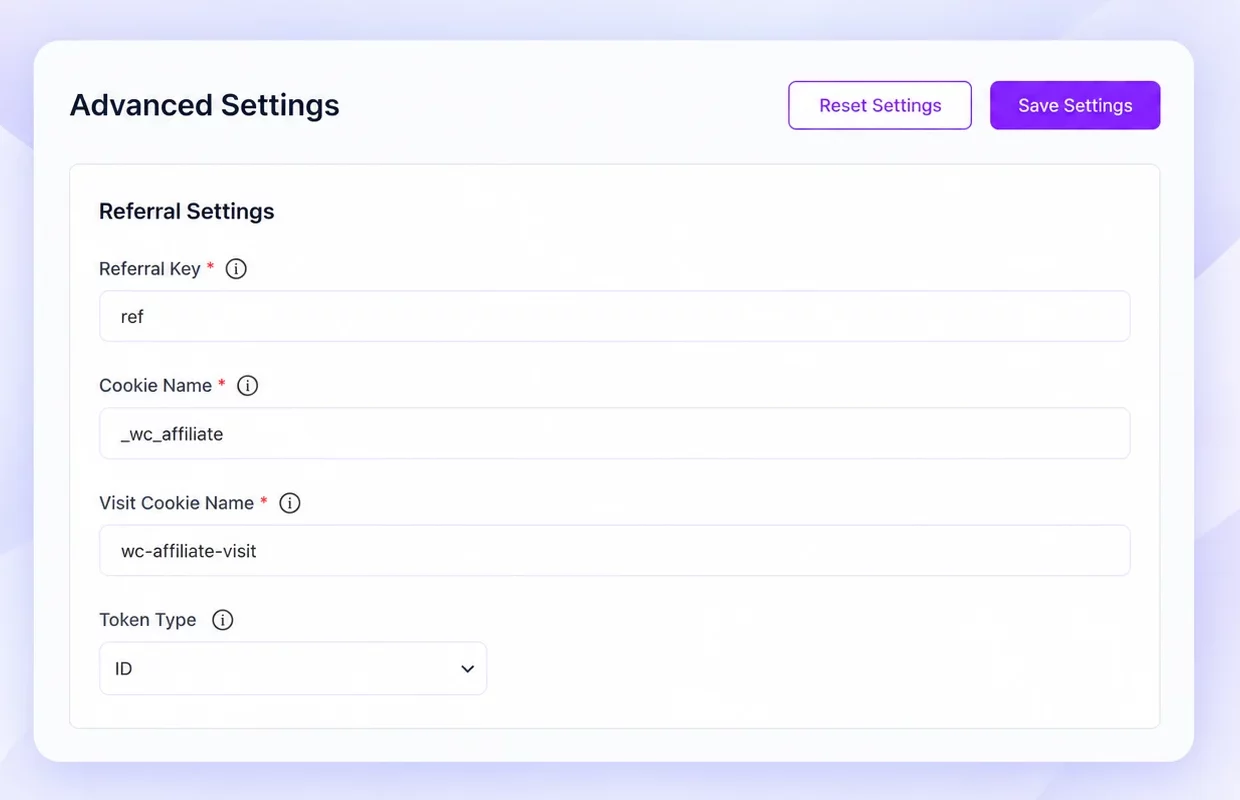
At this stage, decide how long the referral cookie should last, how affiliates will generate links, and how referrals should be attributed.
Configure Payouts
Next, go to: WordPress Dashboard → WC Affiliate → Settings → Payout Settings
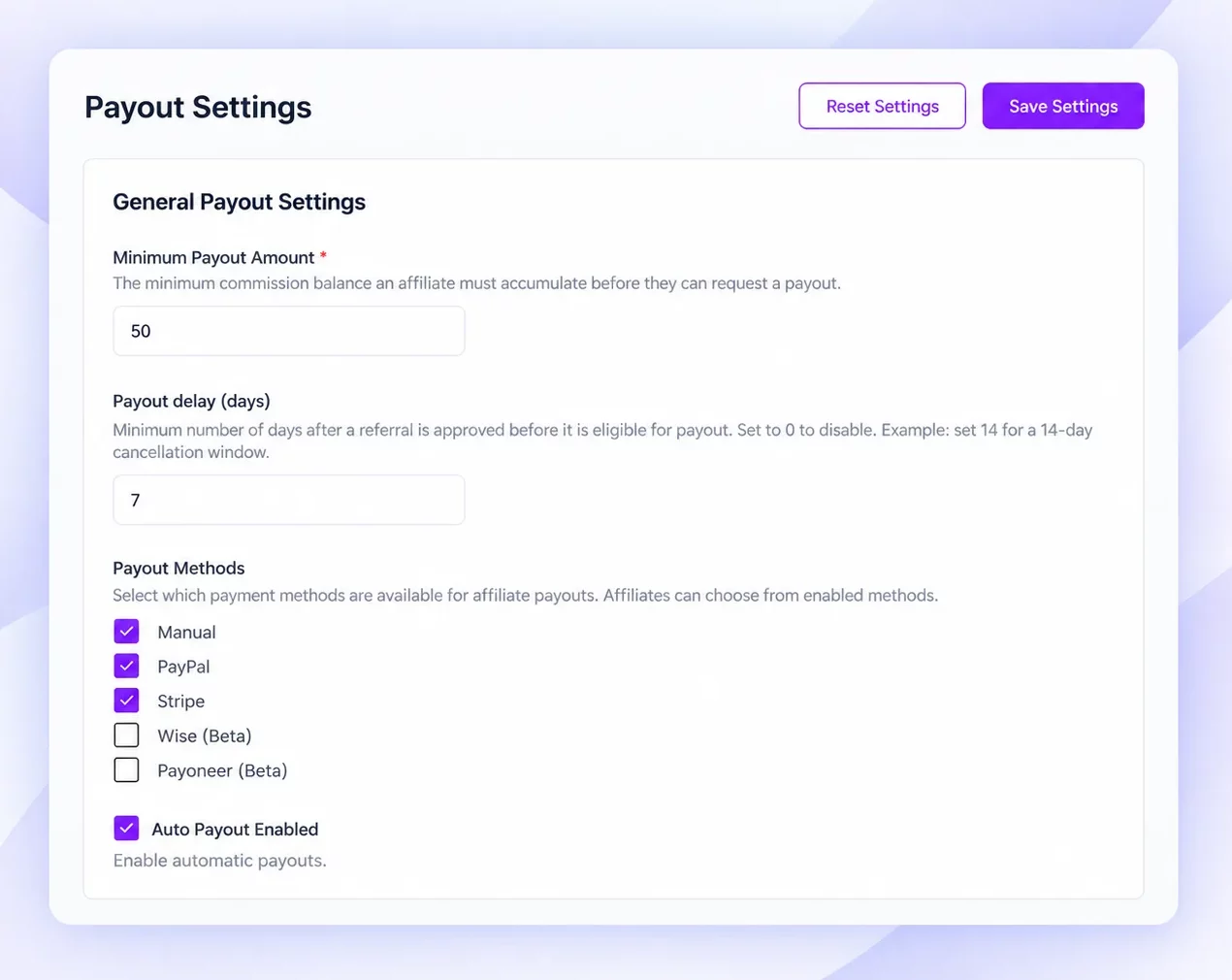
Set the minimum payout requirement and the payment methods you want to offer.
By the time this step is complete, you should be able to answer three basic affiliate questions clearly:
How much do I earn?
How is my referral tracked?
When and how do I get paid?
With the program fully configured, you are ready to start approving affiliates.
3. Review and Approve the Right Affiliates
Now you can decide who should actually join the program.
If you want applications to be approved automatically, enable Auto Approval from:
WordPress Dashboard → WC Affiliate → Settings → Basic Settings
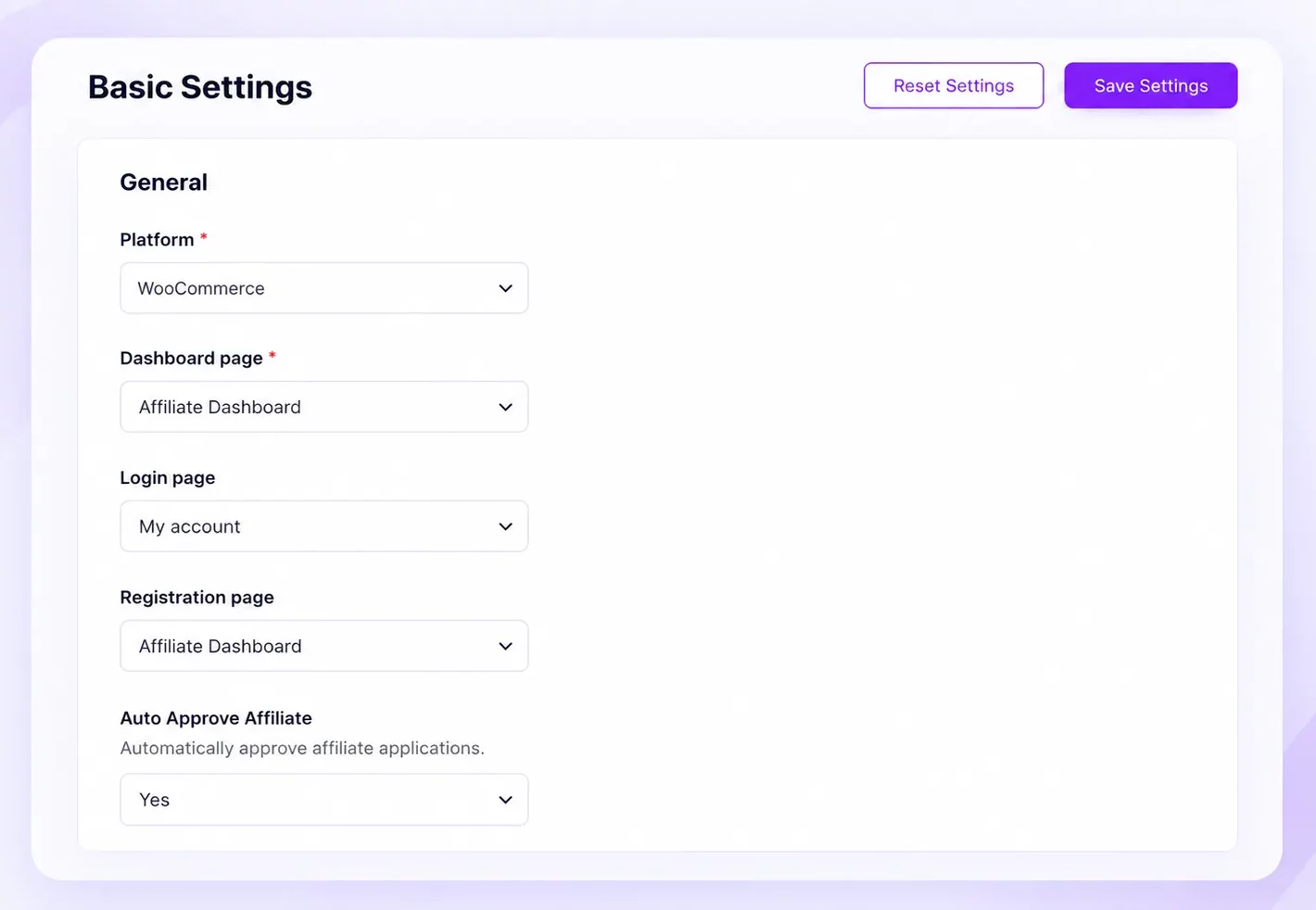
If you prefer to review each application first, go to:
WC Affiliate → Affiliates → All Affiliates
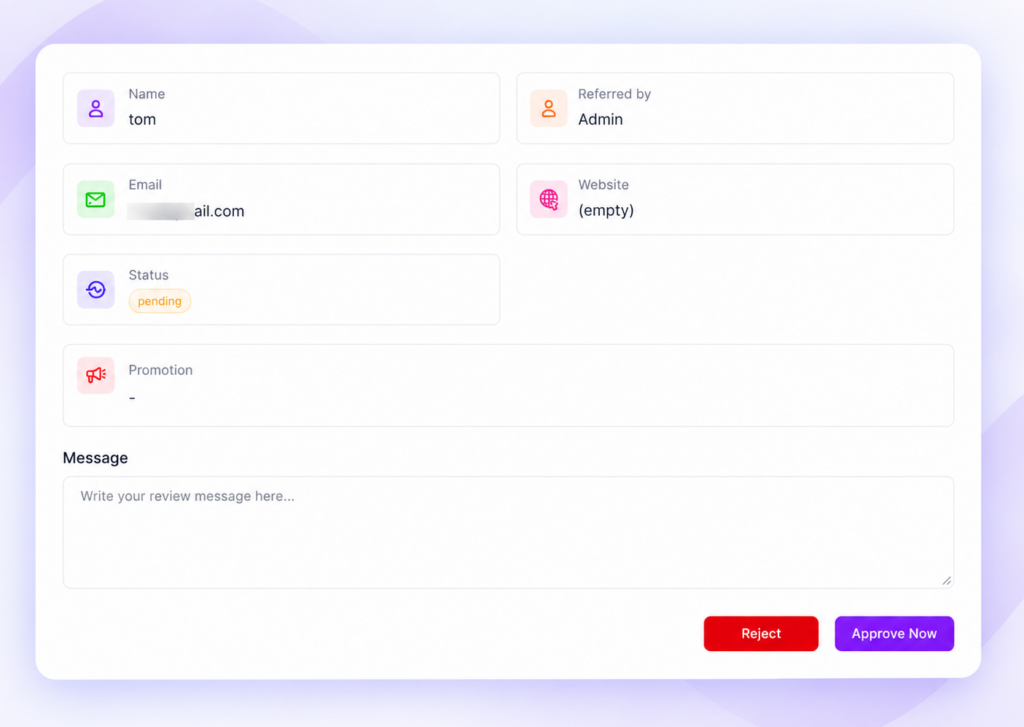
Review the applicant’s audience, promotional channel, content quality, and overall fit before approving or rejecting them.
For a new affiliate program, manual approval usually gives you more control. It helps you understand who is applying and which types of partners are most relevant to your store.
Once you approve an affiliate, they should immediately receive clear guidance on what happens next.
4. Send the Affiliate Welcome and Approval Email
The first message after approval should remove uncertainty.
Your welcome email should confirm that the affiliate’s account is active and point them toward the dashboard.
Include the essentials:
- Dashboard or login link
- Commission rate
- Cookie duration
- Payment schedule
- Referral link location
- Important program rules
- Support contact
- One clear first action
WC Affiliate can automate notifications for application confirmation, approval, rejection, commissions, and payouts. You can manage these from:
WC Affiliate → Settings → Email
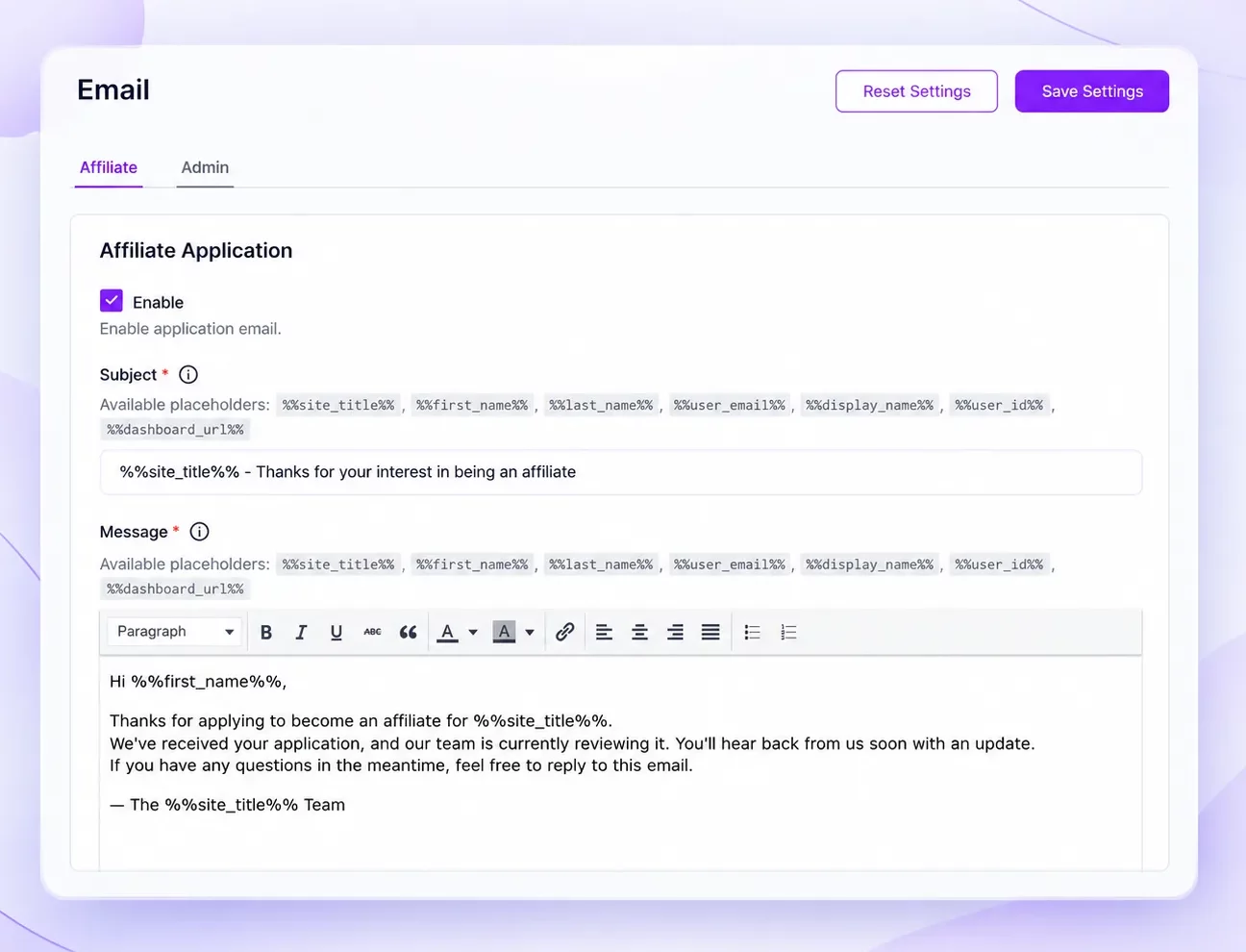
Keep the message focused. Instead of trying to explain everything at once, give the affiliate one simple task:
Log in to your affiliate dashboard, generate your first referral link, and test it.
Once they know where to go and what to do, you can give them the material they need to create their first promotion.
5. Give Affiliates Their First Promotional Resources
Do not overwhelm a new affiliate with every campaign asset you have.
Start with what they need to create one useful promotion.
| Essential at onboarding | Useful later |
| Product description | Seasonal campaign assets |
| Product images | Additional banner sizes |
| Affiliate link | Advanced swipe copy |
| Target customer | Case studies |
| Main benefits | Campaign calendars |
| Promotion rules | Launch kits |
| Example messaging | Creative variations |
WC Affiliate can keep promotional resources close to the affiliate workflow, but the most useful information is usually product positioning.
Tell affiliates who the product is for, what problem it solves, and why someone should choose it.
That gives them enough direction to create content in their own voice instead of simply copying your marketing.
Before they publish, though, make sure they also understand the rules.
6. Set Promotion Rules and Coupon Tracking
Your affiliate terms should make the important boundaries clear before someone starts promoting.
Depending on your program, these may cover:
- Paid advertising
- Trademark bidding
- Coupon websites
- Self-referrals
- Email marketing
- Misleading claims
- Affiliate disclosures
The FTC’s Endorsement Guides explain that material relationships between brands and endorsers should be disclosed clearly and conspicuously.
Keep the practical message simple: affiliates should make it clear when they may earn a commission from a recommendation.
Set Up Coupon Tracking When Needed
Referral links are not always the best option. A YouTuber, influencer, or podcast host may prefer a memorable coupon such as: “Use SARAH20 for 20% off.”
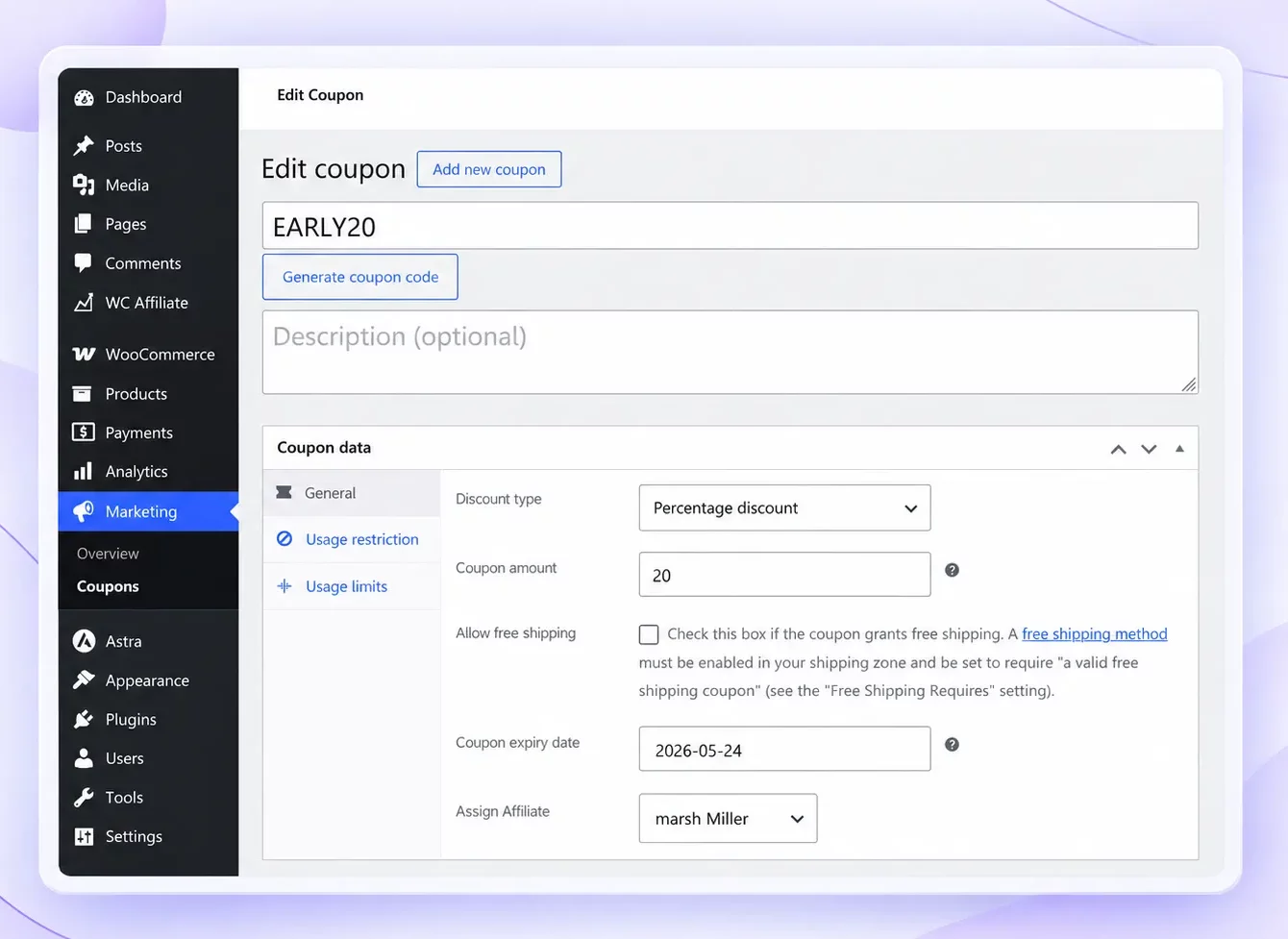
With WC Affiliate Pro, you can assign a WooCommerce coupon to a specific affiliate so qualifying sales can still be attributed to that partner.
Coupon tracking is especially useful for video, podcast, social, community, and offline promotion.
At this point, the affiliate knows how the program works, what they can promote, and which rules they need to follow. The final step is getting them to take action.
7. Help Them Complete Their First Promotion
Do not consider onboarding complete just because the affiliate has dashboard access. The process should end when they successfully publish and track their first promotion.
Give them a first task they can finish in one sitting:
- Log in to the affiliate dashboard and pick one product.
- Generate a referral URL and test it in a private browser window.
- Write a short, honest recommendation for one channel.
- Add the affiliate disclosure and publish it.
- Go back to the dashboard and confirm the visit was recorded.
Those five steps cover the whole workflow: create a link, promote it, get a click, see the visit, and earn a commission on a qualifying sale.
An affiliate who has completed that cycle once knows how your program works and is far more likely to promote again.
Affiliate Onboarding Checklist
A repeatable checklist keeps onboarding consistent without making it overwhelming.
Before approval
- Review the affiliate’s audience and promotional channel
- Check content quality and program fit
Immediately after approval
- Send the welcome email with dashboard access
- Confirm commissions, tracking, and payout terms
- Share the key rules and one first action
Before the first promotion
- Provide product information and essential assets
- Explain the target customer and main benefits
- Confirm disclosure requirements
- Show how to test their link or coupon
After the first promotion
- Confirm that tracking works
- Ask whether they hit any friction
After the first sale
- Check that the referral and commission were recorded correctly
- Introduce additional products, campaigns, or higher-value opportunities
5 Common Affiliate Onboarding Mistakes
A good affiliate program can still lose promising partners if onboarding feels confusing.
1. Sending One Welcome Email and Disappearing: The welcome email should start onboarding, not end it. If an approved affiliate remains inactive, send a short follow-up.
2. Overloading Affiliates With Information: Give them what they need for their first promotion. Advanced resources can come later.
3. Hiding Commission and Payout Terms: Affiliates should understand how much they earn, when they get paid, and what affects their commissions.
4. Never Testing Affiliate Tracking: Test your own referral flow before affiliates start promoting. A tracking problem damages trust quickly.
5. Treating Every Affiliate the Same: Keep the core onboarding process consistent, but adapt resources to the partner. A YouTuber, blogger, and email marketer will not necessarily need the same assets.
How to Measure Affiliate Onboarding Success
Do not judge onboarding by how many applications you approve. Measure what affiliates do afterward.
| Metric | What it shows |
| Activation rate | How many affiliates start promoting |
| Time to first click | How quickly they take action |
| Time to first referral | How quickly they generate results |
| First-sale rate | How many produce a sale |
| 30-day active rate | Whether they stay active |
These metrics show where affiliates are getting stuck. For example, a high approval rate but low activation rate may point to an onboarding problem rather than a recruitment problem.
Our guide to affiliate marketing metrics covers the broader numbers worth tracking as your program grows.
Final Thoughts
Affiliate onboarding closes the gap between “You’re approved” and “I’ve started promoting.”
Set up the program first. Then approve the right people, send a welcome email with one action, give them only the resources they need, set the rules, walk them through a first promotion, and follow up until the first sale.
Measure activation rate each month and you will know whether it is working.
Stop approving affiliates who never promote. WC Affiliate handles approvals, welcome emails, referral links, coupon tracking, commissions, and payouts for WooCommerce in one plugin.
Frequently Asked Questions
Set up the affiliate dashboard, commission rules, tracking, and payouts first. Then approve the right affiliates, send a clear welcome email, provide promotional resources, share program rules, and guide them through their first promotion.
Affiliate registration is the process of applying to join an affiliate program. Affiliate onboarding happens after approval and helps the affiliate understand how to promote, track referrals, earn commissions, and get paid.
An affiliate welcome email should include the dashboard link, commission rate, cookie duration, payout details, referral-link instructions, key program rules, support contact, and one clear next step.
Aim to get a new affiliate to their first promotion within 7 days of approval. If they have not generated a referral link by then, send a short follow-up.
